Saturday, 11 March 2023

Apex Roadmap: User Mode with Permission Sets

As has been the case since the first TrailheaDX in 2016, the stars didn't align so that I could attend in person. Luckily a lot of the content is already up on Salesforce+, including a very interesting session on the Apex roadmap from Daniel Ballinger and Chris Peterson. One feature that is currently in development really stood out for me - User Mode with Permission Sets. 

User Mode

User Mode went GA in the Spring 23 release of Salesforce, and is a real benefit for those of us with app exchange packages containing Apex code. For those who haven't attempted this and the associated security review, here's a brief summary of what you are up against with the previous tooling:

  • You need to respect the CRUD and FLS permissions set by the subscriber org (the Salesforce instance into which the package has been installed) administrator. This is of course quite right, otherwise your package could just help itself to confidential information that it has no business accessing.
  • There isn't much support in the platform for this, so you need to either create your own methods to check this for each object and field, or use one of the myriad third party offerings.
I've always been in agreement with this governance being enforced in the security review, and also of the strong opinion that if this is a requirement it should be baked into the platform, rather than pushed back on everyone that is developing a package with code. There must be tens of thousands of lines of code in all the packages out there, all re-solving the same problem. 

There were previous attempts to solve this, but they all had compromises. User Mode genuinely takes the transaction out of system mode so that all configured permissions apply for the database operation. If the database operation attempts to use fields or objects that aren't accessible, errors are returned for every disallowed item.

All well and good when you are respecting the admin's decision about access, but what happens if access to objects and fields managed by the package is required in order for the package to function correctly? You could put the user through death by a thousand cuts, allowing them to get slightly further each time before an error is thrown and they request additional permissions from their admin, or you can execute your database operations in System Mode.  This is quite the nuclear option though, as it opens up access to every object and field in the instance. If all you need is to get at the value for a single checkbox, it's an extremely large hammer to crack a small nut.

User Mode with Permission Sets


User Mode with Permission Sets allows you to select an appropriate sized hammer for the nut in question. Rather than elevating the user's access to everything, everywhere, you can give them the minimal amount of additional privilege required for your package to function correctly, just for the database operations that it is needed. To continue the example of needing access to a single checkbox value, you'd also package a permission set that grants access to just that field and execute the database operation in user mode plus that permission set. Much better from a security and governance perspective. 

Here's a code snippet snatched from the session - note that as this is still in development the syntax is likely to change, but it gives a sense of the direction of travel:
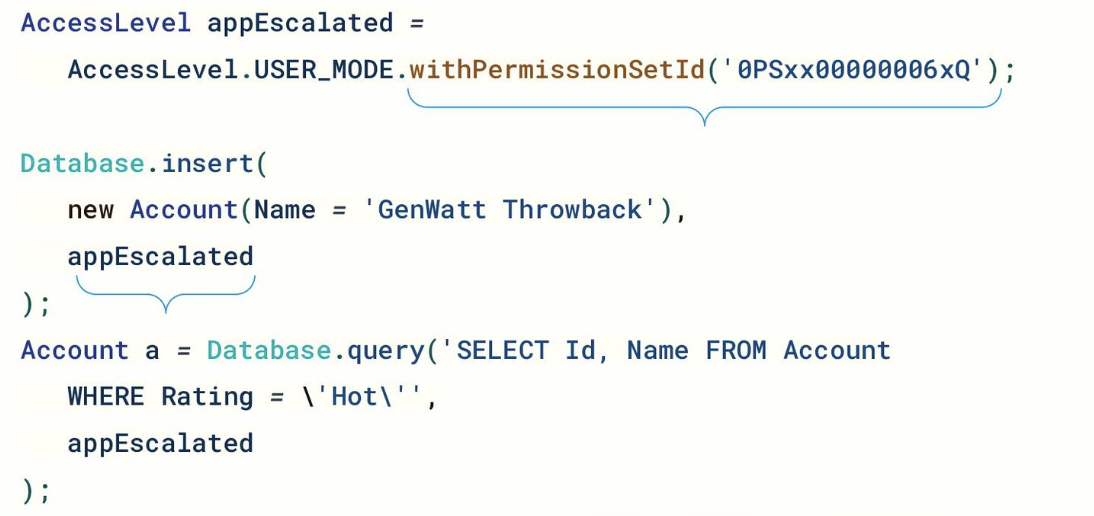


Packages aren't the only use case for this though, limiting the data that your Apex code has access to is good practice regardless of whether it's going into a package or being deployed directly to an org. Sadly it wouldn't stop my Evil Co-Worker, as when they have access to the code they can simply change it to run in System Mode in all cases. It will limit the impact of simple mistakes though, and keep your Information Security department a little happier.

More Information


Saturday, 4 March 2023

Such a Thing as a Free App Again

This post had a last minute change of tack, as Salesforce rowed back their plans to charge for security reviewing free apps. It's still something I wanted to publish, as I think free apps add real value to many customers and I'd hate to see them go away.

Earlier this year Salesforce announced changes to the way that app exchange listings are charged - a lot of us missed this, but Todd Halfpenny, one of my co-leaders of the London Salesforce Developers group, pointed us at it during the Feb event. Instead of a flat fee to list ($2550) and a yearly renewal ($150), the charges are switching to the security review - $999 per attempt. Apparently the stats showed that most apps take two attempts to pass the review, so for most publishers the cost would reduce slightly. So far so good. Then it turned out that these fees would also apply to free apps, whose costs to lists would go from $0 up front and $0 a year, to a minimum of $999 (potentially multiples of this) to list and an unpredictable cost for periodic re-reviews. Not such a good deal in this case. Obviously I understand that the security reviewers need to get paid, but for free apps it felt like something that Salesforce should invest in rather than pushing onto the publisher. 

I've listed a free app (BrightSIGN) since 2015, provided numerous bug fixes and enhancements, written blogs about how it use it in various scenarios, and supported end users when they had problems integrating it into their setup. All of this has been done in my own time at evenings and weekends. and I've never made a penny from it, or indeed tried to. In the interests of full transparency there may have been some marketing or other intangible benefits to my company - a few Salesforce people used it for demos which might have predisposed them to us over another partner, but I viewed this as a community contribution - something that a few hundred people a year found useful so worth a few hours of my time every month. To find out that in order to continue giving this away to Salesforce customers I was expected to cover any costs that the $170 billion company incurred didn't seem reasonable. 

When I read this I wasn't mad, just disappointed. Disappointed that none of the decision makers at Salesforce could see this was a bad look. Fleecing the very people who are already going the extra mile to help you is the kind of thing we expect from Mega Evil Corps, not Salesforce. 


I can understand charging for security reviews of freemium apps, as those are typically a sales channel for the full featured version, but free as in beer apps already represent a donation of someone's time. I can also understand that if there are bad actors chucking poorly written apps over the fence and relying on the security review to find all the issues, that they should feel some consequences. It should be targeting the problem with laser accuracy though, not taking out the rest of us who play by the rules as well.

When I submit my app for review I do everything possible to ensure it will pass - the submission requires a fair bit of effort on my part and I'd far rather only do it once. I go through the code with a fine-tooth comb to make sure it adheres to all the security requirements and I run it though the automated tools that Salesforce make available to me. Sadly, I still find that I fail at least once, with something that is either a new requirement or that the tooling I have access to doesn't pick up. If Salesforce are serious about ensuring that apps are in the best possible shape to pass the review, they should give us access to the same tools that they use. In a perfect world this would all be entirely automated and we'd just provide a link to the report showing we'd passed to the security review team. 

Another issue with this approach is the periodic re-review - often you have to go through this even if you've made no changes to your app since it passed the previous review. Salesforce being in full control of changing the requirements under you, mandating that you have to re-review, and charging you for it, feels like a process open to abuse. I'm not suggesting for a moment that they would use this as a mechanism to generate revenue, but if they did there's pretty much nothing we could do (aside from take to the socials!).

If Salesforce had pushed ahead with this plan, I would have pulled BrightSIGN from the app exchange without question. I might be able to get my company to cover app exchange fees, but that would involve a considerable amount of effort on my part to make the business case and there's no guarantee of success. I'd still publish it, but it wouldn't have the security review stamp of approval so potential users would have to decide if they trusted me or not. I'd likely supply the output from various security scanners, but there would be no way for anyone to prove that they applied to the package version that I was offering. I'd also tell everyone using it why I was having to do this, and I'm sure I'd bad mouth Salesforce quite a bit along the way.

While I'm a very trustworthy individual, I'm sure that some (like my evil co-worker) would be rubbing their hands at the thought of introducing disruptive packages into customer orgs. Like many attempts to block things in the past, it would just end up pushing them underground, almost certainly result in a less secure ecosystem, and give rise to the potential for data breaches that damage Salesforce's reputation. 

The good news it that Salesforce have decided, for now, not to charge for free app reviews after all. Hopefully this is a permanent change for apps that cannot be monetised, as long as we keep up our side of the bargain and bring our best work before the security review team. I can't help seeing the dabs of the activist investors all over this - not that I think they are determined to take down free apps, more pushing for every department to be profitable. Sometimes the costs need to be seen in a wider context - it might be a free app that turns a prospect into a customer, makes the difference at renewal time, or helps a non-profit with limited budget achieve their goals. I think that's worth investing in, which is why I built my app, and Salesforce should too.


Saturday, 18 February 2023

Conditional LWC Directives in Spring '23

 Introduction

The Spring '23 release of Salesforce is now fully live, after a last minute delay in the US. One of the new features was a set of Lightning Web Component directives for conditional rendering. A relatively minor change, but in my view one with a large impact, as it adds clarity. And as we all know, clarity is the gift that keeps on giving to everyone that works on the component after you.

Old Mechanism

The previous conditional directives were if:true and if:false. Nothing wrong with these per se, but once you start nesting things the clarity starts to leak away. Consider a made up example of a search results page where I want to :

  • display a placeholder if a search hasn't been run
  • display a message if the search has been run but there are no results
  • display the results if the search has been run and there are results
  • display the result count on the right hand side if the search is run and there are results
  • display an additional message if there are more than the 100 results displayed on the page

To assist me I have a few properties - searchRun, hasResults, hasMoreResults, resultCount, and my markup is:
<template if:true={searchRun}>
    <template if:true={hasResults}>
        Results go here!
        <template if:true={hasMoreResults}>
            More than 10 results - please refine your search
        </template>
    </template>
    <div style="float:right">{resultCount} results</div>
    <template if:false={hasResults}>
        Search returned no results
    </template>
 </template>
 <template if:false={searchRun}>
     No search run.
 </template>

While it's not terrible, it's also a bit confusing - lots of true/false and I have to examine the property binding to figure out the relationship between them. The eagle-eyed will also spot the bug - my result count sits outside of the conditional for hasResults, so will be displayed in all cases. This is easily done when the if and else conditionals are independent of each other.

New Mechanism

The new conditionals are lwc:if, lwc:elif and lwc:else. Note that these are dependent on each other - you can't have an lwc:else unless it follows an lwc:if, and it is executed if the lwc:if evaluates to false.

Reworking the markup from above gives me:

<template lwc:if={searchRun}>
    <template lwc:if={hasResults}>
        Results go here!
        <template lwc:if={hasMoreResults}>
            More than 10 results - please refine your search
        </template>
        <div style="float:right">{resultCount} results</div>
    </template>
    <template lwc:else>
        Search returned no results
    </template>
</template>
<template lwc:else>
    No search run.
</template>

which I think is much clearer. I can easily see the markup that will render when the properties evaluate to true or not, and I can see the dependencies as the lwc:else (or lwc:elif) always follows an lwc:if (or lwc:elif). Even more so when I collapse the if template body in VS Code:

Another benefit is that I can't misplace my result count div - if I try to place markup between two dependent lwc conditional directives, in this case between lwc:if and lwc:else, it is immediately called out as a problem:


Related Posts

I've waxed lyrical about clarity in the past, regarding the System.Assert class introduced in Winter '23.


Saturday, 17 December 2022

The Org Documentor and the Order of Execution Diagram

Introduction

Earlier this year (2022) Salesforce Architects introduced a diagrammatic representation of the order of execution, which was a game changer in terms of easing understanding. I've had a task on my todo list since then to figure out how I could incorporate it into the Org Documentor, and thanks to using up some annual leave in a freezing December, I've finally had time to work on it.

Click to View

I already have information about the configured automation organised by the order of execution step, but currently in a text format:


so it made sense to try to repurpose this. I really liked the idea of making the diagram clickable, via an image map, but I wasn't overly keen on adding JavaScript to display popups with the details of the configured automation, so I went hunting for a CSS/HTML only solution. 

I found it at Mate Marschalko's Medium post, which showed how to use the :target pseudo-class to show or hide overlay divs without a single line of JavaScript, so set about applying this technique to the Org Documentor via a new EJS template, heavily based on my existing order of execution template. I also needed to generate the image map element based on selected areas of the Salesforce diagram, for which I used <img-map> - I did find that it all went awry after I selected 4-5 areas, so I did them one at a time and copied the coordinates over to my new template. 

After a few hours work I had a reference to the Salesforce diagram in the generated documentation for each object, via the new Image Detail column:


but with elements that could be clicked on:


which would display the automation configured for the object for that specific step and a description if the user cared to read more.


Albeit with a couple of caveats:
  • Because the red line around the clickable element is applied to an <area> element, these only display when the element is clicked. This means that to find what is clickable you need to mouse around looking for the change in the pointer (or look at the text version of the order of execution for the object and identify what is supported there)

  • The page jumps around a bit under you. This is due to the nature of the :target psueudo class - when you click on an element, the URL is updated with a fragment identifying the popup required, which transforms from zero size to it's configured size in the centre of the page. This causes the browser to scroll down to show it correctly. When you close the popup, the URL is changed to remove the fragment, which makes the browser jump to the top of the page. This could be obviated by using a smaller image, but my view is it's better to live with this and have an image that you can read.

Try it Yourself


Version 4.1. 0 of the plugin includes this functionality and is available from NPM.

The sample output has been regenerated on Render,com, so if you access:


and click element 3 - Executes "Before Save" record triggered flows, you can see it in action.

Related Posts


Sunday, 4 December 2022

The Latest from the Org Documentor

Migrated Sample Output

November 28th 2022 marked a sad day in the Salesforce ecosystem, as Heroku free plans ended. From the learning perspective it's a real shame, as I'd used the free plans many times in the past to learn more about Node and other web technologies. From the live apps perspective it wasn't a huge impact, as the only work that I wanted to keep was a few static sties. Now we are into December it's happened, so time to find another home for my sites.

I ended up going for render, as it has a well regarded free tier and was very straightforward to set up. Going forward you'll find the sample output at:

    https://bbdoc-sample-output.onrender.com/

I've updated some of the references in this blog and elsewhere, but I'm sure I'll have missed some, so if you come across a broken Heroku link then let me know and I'll fix it up.

Version 4.0.6

There's also a new version of the documentor plug-in available from NPM - this is a community contribution from Carl Vescovi that fixes a couple of bugs in the flow handling and adds the flow type to the output. 

The Documentation Site

In case you haven't come across it before, the Documentor is documented (meta eh?) at:

     https://orgdoc.bobbuzzard.org/home

This has details of how to setup and configure the Documentor, as well as release information.

Related Posts


Sunday, 20 November 2022

LWC Alerts in Winter 23


Introduction

The Winter 23 release of Salesforce provided something that, in my view, we've been desperately seeking since the original (Aura) Lightning Components broke cover in 2014 - modal alerts provided by the platform. I'd imagine there are hundreds if not thousands of modal implementations out there, mostly based on the Lightning Design System styling, and all being maintained separately. Some in Aura, some in LWC, but all duplicating effort.

I feel like we have cross-origin alert blocking in Chrome to thank for this - if that wasn't breaking things then I can't see Salesforce would suddenly have prioritised it after all these years - but it doesn't matter how we got them, we have them!

Show Me The Code!

The alerts are refreshingly simple to use too - simply import LightningAlert:

import LightningAlert from 'lightning/alert';

and then execute the LightningAlert.open() function:

    async showAlert() {
        await LightningAlert.open({
            message: 'Here is the alert that will be shown to the user',
            theme: 'warning',
            label: 'Alerted',
            variant: 'header'
        });
    }

and the user sees the alert


The LightningAlert.open() function returns a promise that is resolved when the alert is closed. Note that I've used an async function and the await keyword - I don't have any further processing to carry out while the alert is open, so I use await to stop my function until the user closes the alert. 

Demo Site


When there's a component like this with a number of themes and variants, I typically like to create myself a demo page so I can easily try them all out when I need to. In this case I have a simple form that allows the user to choose the theme and variant, then displays the alert with the selected configuration. 


In the past I'd have exposed this through one of my Free Force sites, but those all disappeared a few months ago so I needed to start again. The new location is https://demo.bobbuzzard.org, which is a Google Site with a custom domain. This particular demo can be found at: https://demo.bobbuzzard.org/lwc/alerts  - it's a Lightning Web Component inside a Visualforce Page using Lightning Out, so with the various layers involved it may take a couple of seconds to render the first time. It does allow guest access though, so worth the trade off in my view. 

Related Posts


Saturday, 12 November 2022

Flow Tests in Winter 23

Flow Tests in Winter 23


Introduction 

Low code flow testing became Generally Available in the Winter 23 release of Salesforce. Currently limited to record triggered flows, and excluding record deletes, we now have a mechanism to test flows without having to manually execute them every time.

Of course we've always been able to include flow processing in Apex tests - in fact we had no choice. If a record was saved to the database, then all the configured automation happened whether we liked it or not. What we couldn't accurately test was whether the state of the system after the test completed was down to the flow, or something else that happened as part of the transaction. (Incidentally, this is why you shouldn't put logic in triggers - you can only test that by committing a transaction, which brings in all the other automation that has the potential to break your test). Now we can isolate the flow - although not as much as you might want to it turns out.

In this post I'm mainly focusing on what is missing from flow testing, as I'm comparing it to Apex unit testing which is obviously far more mature. While this might read as negative, it really isn't - I think it's great that flows are getting their own testing mechanism - something I've been demanding for a while!

To try this out, I've created a few tests against the Book Order Count flow from the process automation superset - this runs when a new order is received from a contact, iterating the contents of all of their orders and calculating the total number of books bought over their customer lifetime. 

Lack of Isolation

While record triggered flow tests are isolated from the need to write records to the database, they aren't isolated from the contents of the database. In one way this is a good thing - if I want to execute my flow with an order containing line items, I need to use an existing record as the test only allows me to supply fields for a test parent record, not create child records. In every other way, this is not a good thing. If I go this route my test relies on specific records being present in the database, so they'll fail if executed in a brand new org. It also relies on the specific records not changing, which is entirely out of my control and thus makes my test very fragile. 

Even when I'm not using line items, I find myself relying on existing data - to create an empty book order I need to identify a contact that exists in the system, instead of creating a contact as part of the test that is then discarded. This also leads to fragility - for example, I created a new contact named Testy McTest and used this in a test to confirm that if there are no orders for the contact the flow correctly identifies this. Here's a screenshot of my test passing - job done!


However, at some point in time another user running a manual test (or possibly my Evil Co-Worker, who has realised that randomly adding new data can mess up lots of tests) creates an order for Testy with a single book:


I'm blissfully ignorant of this, right up until I run my test again - knowing my luck in front of the steering committee to show the investment was worthwhile, and it no longer works:


Nothing in the flow has changed, but the data in the system that it relied on has, and that is entirely out of my control. 

For anything other than simple flows, I think right now you'd have to be looking at running flow tests in a dedicated scratch org or sandbox that you control the contents of and access to. 

Open the Box

Flow testing has the interesting concept of asserting that a node was visited rather than verifying the outputs are consistent with the node being visited. I can understand where this comes from - in Apex you can unit test the fine detail logic quite easily, as long as you've followed best practice around separation of concerns and functional decomposition, but in flows it's a lot more difficult as the UI doesn't really help you identify the relationships between subflows and parents. Understanding it doesn't mean I like it though - this is an example of Open Box Testing, where the test knows the intimate details of the implementation that it is testing. Open Box Testing does have some advantages, but the big disadvantage is that it tightly couples the test to the item being tested. If the logic needs to change and that involves removing nodes, you are likely to have to revisit your tests and remove your asserts around those nodes, whereas if you've used closed box techniques and are simply asserting the outcome, the entire implementation can change and your tests don't care.

Asserting 

Checking the contents of complex variables managed by the flow, collections for example,  also seems a little tricky. Right now I think I'd have to add variables to the flow to represent things like an empty collection, a record that I want to look for in the collection, or to store the length so that I can verify how many records I have. This is something that I really don't like to do - change my implementation purely for the benefit of the testing framework.

This is pretty much for the same reason as the lack of isolation I mentioned above - I don't have the ability to create variables in the test, so I have to compare against items that already exist. 

Launching from External Tools

I've scoured the docs around flow tests and the APIs, and I can't find any way to launch a flow test from an external tool like the Salesforce CLI. In my view this is something that will hold back adoption - if the only way include this in our CI/CD processes is something like Selenium driving the UI, it all becomes a bit too clunky and we'll likely continue with the Apex testing approach, in spite of the limitations. I'd love to have missed this, so if that is the case please let me know and I'll gladly add a mea culpa update.

Conclusion

As I said earlier, this post has mainly been calling out what I can't do in flow testing, based on what I'm used to doing with test frameworks for programming languages like Apex, Java and JavaScript. I'm sure that flow testing will continue to receive significant investment and will become much more powerful as the releases roll by. Even though it is of limited benefit right now, the benefit is still tangible and you'll be much better off with flow tests and without them. 

Related Posts