Showing posts with label documentation. Show all posts

Saturday, 17 December 2022

The Org Documentor and the Order of Execution Diagram

Introduction

Earlier this year (2022) Salesforce Architects introduced a diagrammatic representation of the order of execution, which was a game changer in terms of easing understanding. I've had a task on my todo list since then to figure out how I could incorporate it into the Org Documentor, and thanks to using up some annual leave in a freezing December, I've finally had time to work on it.

Click to View

I already have information about the configured automation organised by the order of execution step, but currently in a text format:


so it made sense to try to repurpose this. I really liked the idea of making the diagram clickable, via an image map, but I wasn't overly keen on adding JavaScript to display popups with the details of the configured automation, so I went hunting for a CSS/HTML only solution. 

I found it at Mate Marschalko's Medium post, which showed how to use the :target pseudo-class to show or hide overlay divs without a single line of JavaScript, so set about applying this technique to the Org Documentor via a new EJS template, heavily based on my existing order of execution template. I also needed to generate the image map element based on selected areas of the Salesforce diagram, for which I used <img-map> - I did find that it all went awry after I selected 4-5 areas, so I did them one at a time and copied the coordinates over to my new template. 

After a few hours work I had a reference to the Salesforce diagram in the generated documentation for each object, via the new Image Detail column:


but with elements that could be clicked on:


which would display the automation configured for the object for that specific step and a description if the user cared to read more.


Albeit with a couple of caveats:
  • Because the red line around the clickable element is applied to an <area> element, these only display when the element is clicked. This means that to find what is clickable you need to mouse around looking for the change in the pointer (or look at the text version of the order of execution for the object and identify what is supported there)

  • The page jumps around a bit under you. This is due to the nature of the :target psueudo class - when you click on an element, the URL is updated with a fragment identifying the popup required, which transforms from zero size to it's configured size in the centre of the page. This causes the browser to scroll down to show it correctly. When you close the popup, the URL is changed to remove the fragment, which makes the browser jump to the top of the page. This could be obviated by using a smaller image, but my view is it's better to live with this and have an image that you can read.

Try it Yourself


Version 4.1. 0 of the plugin includes this functionality and is available from NPM.

The sample output has been regenerated on Render,com, so if you access:


and click element 3 - Executes "Before Save" record triggered flows, you can see it in action.

Related Posts


Sunday, 4 December 2022

The Latest from the Org Documentor

Migrated Sample Output

November 28th 2022 marked a sad day in the Salesforce ecosystem, as Heroku free plans ended. From the learning perspective it's a real shame, as I'd used the free plans many times in the past to learn more about Node and other web technologies. From the live apps perspective it wasn't a huge impact, as the only work that I wanted to keep was a few static sties. Now we are into December it's happened, so time to find another home for my sites.

I ended up going for render, as it has a well regarded free tier and was very straightforward to set up. Going forward you'll find the sample output at:

    https://bbdoc-sample-output.onrender.com/

I've updated some of the references in this blog and elsewhere, but I'm sure I'll have missed some, so if you come across a broken Heroku link then let me know and I'll fix it up.

Version 4.0.6

There's also a new version of the documentor plug-in available from NPM - this is a community contribution from Carl Vescovi that fixes a couple of bugs in the flow handling and adds the flow type to the output. 

The Documentation Site

In case you haven't come across it before, the Documentor is documented (meta eh?) at:

     https://orgdoc.bobbuzzard.org/home

This has details of how to setup and configure the Documentor, as well as release information.

Related Posts


Sunday, 27 February 2022

Org Documentor - (Some of) The Order of Execution

Introduction

It's been a while since I made any changes to the Org Documentor, partly because I've been focused in other areas, and partly because I didn't need anything else documented. This changed with the Spring 22 release of Salesforce and the Flow Trigger Explorer

I really liked the idea of the explorer, but was disappointed that it showed inactive flows and didn't reflect the new ordering capabilities. Why didn't they add that, I wondered. How hard could it be? Then it occurred to me that I could handle this myself through the Org Documentor. It turns out I couldn't handle all aspects, but still enough to be useful. More on that later.

Flow Support

Up until now I hadn't got around to including flows in the generated documentation, and this clearly needed to change if I wanted to output the order they were executed in. 

As long as API version 54 is used, the execution order information comes back as expected, and getting these in the right order and handling collisions based on names is straightforward with a custom comparator function. Sadly I can't figure out the order when there is no execution information defined, as CreatedDate isn't available in the metadata. Two out of three ain't bad.

Order of Execution

As there are multiple steps in the order of execution, and most of those steps require different metadata, I couldn't handle it like I do other metadata. Simply processing the contents of a directory might help for one or two steps, but I wanted the consolidated view. To deal with this I create an order of execution data structure for each object that appears in the metadata, and gradually flesh this out as I process the various other types of metadata. So the objects add the validation rule information, triggers populate the before and after steps, as do flows. 

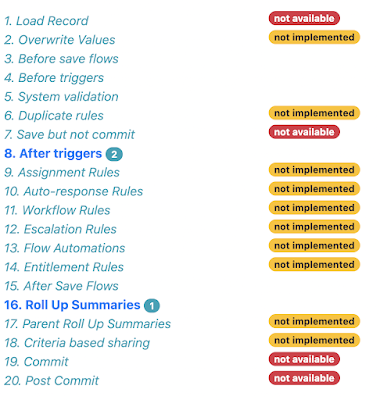
As everyone knows, there's a lot of steps in the order of execution, and I'm not attempting to support all of them right now. Especially as some of them (write to database but don't commit) don't have anything that metadata influences! Rather than trying to detail this in a blog post that I'd have to update every time I change anything, the order of execution page contains all the steps and adds badges to show which are possible to support, and which are supported:


As you can see, at the time of writing it's triggers and flows plus validation rules and roll up summaries. 

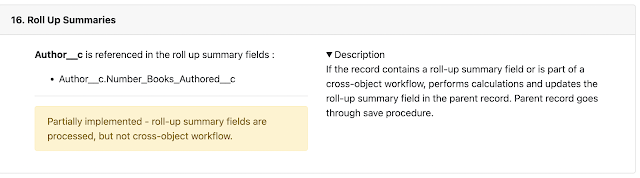
Steps where there is metadata that influences the behaviour appear in bold with a badge to indicate how many items there are. Clicking on the step takes you to the section that details the metadata:


You can see an example of the order of execution generated from the sample metadata at the Heroku site.

Updated Plug-in


Version 4.0.1 of the plug-in has this new functionality and can be found on NPM

If you already have the plug-in installed, just run sfdx plugins:update to upgrade to 4.0.1 - run sfdx plugins once you have done that to check the version.

The source code for the plug-in can be found in the Github repository.

Related Posts


Thursday, 18 March 2021

The Documentor Documented (and Moar Detail)


This week I closed a couple of issues on the Org Documentor, and added some more flexibility around the output.

Moar Detail


The first issue was a request from Andy Ognenoff for some additional fields - relatively straightforward as three came straight from the CustomField metadata and one combined a couple of fields if the first was true. 

This gave rise to the need for a little more flexibility, as the pages started to get pretty wide with the number of columns and the length of the detail rendered. So the latest version of the plug-in allows you to configure the columns that will be displayed - at the group level, for all objects, or you can leave configuration alone and pick up the default of all columns.

Here's the configuration from my sample metadata repo:
"groups": {
    "events": {
        "name":"events", 
        "columns":["Name", "Label", "Type", "Description", "Info", "Page Layouts", "Encrypted"],
        "description": "Objects associated with events",
        "objects": "Book_Signing__c, Author_Reading__c"
    },
    "other": {
       "name":"other", 
       "columns":["Name", "Label", "Type", "Description", "Info", "Page Layouts", "Security", "Compliance", "In Use", "Encrypted"],
       "title":"Uncategorised Objects",
       "description": "Objects that do not fall into any other category"
    }
}
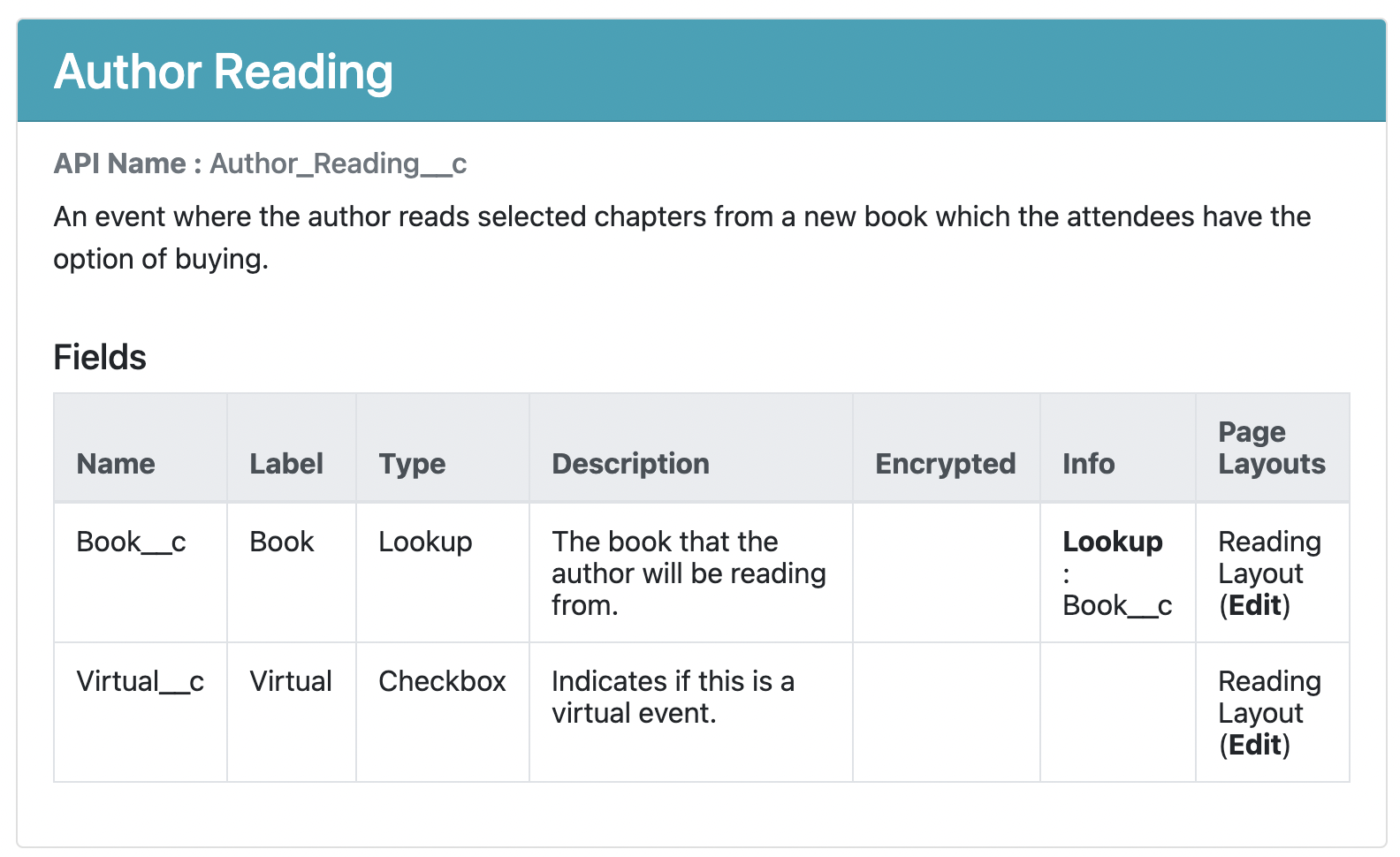
and the associated output, first for events, which just adds the Encrypted field (which is empty as I don't have Shield enabled!):


and then a new Email_Address__c field on the Author__c custom object, which includes compliance fields:


As always, you can view the output for the sample metadata on the public site.

The Documentor, Documented


The other issue that I finally got around to was documenting the configuration file. I used a Google Site for this, as I find them extremely easy to spin up and fill in. You don't get the same level of control that you would over something like Github pages, but if you want something out there quickly then they are hard to beat. There's not too much in there right now, mostly around setup and configuration, but more will come. If there's something that you particularly want to see, then create an issue in the Github repo and I'll see what I can do.

Updated Plug-in


Version 3.5.1 of the plug-in has this new functionality and can be found on NPM

If you already have the plug-in installed, just run sfdx plugins:update to upgrade to 3.5.1 - run sfdx plugins once you have done that to check the version.

The source code for the plug-in can be found in the Github repository.

Related Posts

Saturday, 6 February 2021

Org Documentor - Flag Non-Display Fields


Introduction

Towards the end of 2020, I pushed an update to the Org Documentor plug-in to include details of the page layouts that a field is referenced in. When I posted this on Linked In, I got the following comment from Anand Narasimhan (a blast from the past from the early days of the CTA program) :


Which chimed with some of the comments I'd received when I was asked to add this, around helping to retire old fields that weren't used any more.  This didn't seem like it would take a huge amount of work to implement, so I added an issue to the Github repository and forgot about it until today.

Solution


It certainly didn't take a huge amount of effort. As detailed when adding the page layout reference information, I build up a map of the page layouts that reference a field keyed by the field name. As I'm building a complex JavaScript object to pass to the EJS templating framework, I add the list of page layouts to a field property named pageLayoutInfo.  It was then simply a matter of setting the background colour for the field if the pageLayoutInfo property was empty. The slight complication was that if the field has been determined to be in an error (missing description) or warning (todo, deprecated in the field description) then it would already have a background colour and I wanted to leave that in place. 

All told, this was 4 lines of code (could be reduced to 3 with a wider screen ;):
  if ( (!field.pageLayoutInfo) && 
       (''==field.background) ) {
     field.background='#f5dfea';  
  } 

I then added a field to the sample metadata that isn't present on any page layouts - Internal Description - and regenerated the report, which highlights the field in pink as expected:


Bonus Changes


In response to an issue raised from the community, I also added the ability to configure the name of the report subdirectory for a metadata type via the reportDirectory property in the configuration file. The sample repository has been updated to write the pages pertaining to the objects metadata to the objs directory. If you don't provide the reportDirectory property, it will default to the metadata type name - e.g. objects, triggers. I've also added an issue to document the configuration file properties, as right now there is an example file and I leave everyone to draw their own conclusions.

I also fixed a bug in the aura enabled pages that detail the Apex controller classes for aura components - if the component extended a super component it all went to hell, but now it handles that correctly.

Updated Plug-in


Version 3.4.6 of the plug-in has this new functionality and can be found on NPM

If you already have the plug-in installed, just run sfdx plugins:update to upgrade to 3.4.6 - run sfdx plugins once you have done that to check the version.

if you aren't already using it, check out the dedicated page to read more about how to install and configure it.

The source code for the plug-in can be found in the Github repository.

Related Posts