Showing posts with label order of execution. Show all posts

Saturday, 17 December 2022

The Org Documentor and the Order of Execution Diagram

Introduction

Earlier this year (2022) Salesforce Architects introduced a diagrammatic representation of the order of execution, which was a game changer in terms of easing understanding. I've had a task on my todo list since then to figure out how I could incorporate it into the Org Documentor, and thanks to using up some annual leave in a freezing December, I've finally had time to work on it.

Click to View

I already have information about the configured automation organised by the order of execution step, but currently in a text format:


so it made sense to try to repurpose this. I really liked the idea of making the diagram clickable, via an image map, but I wasn't overly keen on adding JavaScript to display popups with the details of the configured automation, so I went hunting for a CSS/HTML only solution. 

I found it at Mate Marschalko's Medium post, which showed how to use the :target pseudo-class to show or hide overlay divs without a single line of JavaScript, so set about applying this technique to the Org Documentor via a new EJS template, heavily based on my existing order of execution template. I also needed to generate the image map element based on selected areas of the Salesforce diagram, for which I used <img-map> - I did find that it all went awry after I selected 4-5 areas, so I did them one at a time and copied the coordinates over to my new template. 

After a few hours work I had a reference to the Salesforce diagram in the generated documentation for each object, via the new Image Detail column:


but with elements that could be clicked on:


which would display the automation configured for the object for that specific step and a description if the user cared to read more.


Albeit with a couple of caveats:
  • Because the red line around the clickable element is applied to an <area> element, these only display when the element is clicked. This means that to find what is clickable you need to mouse around looking for the change in the pointer (or look at the text version of the order of execution for the object and identify what is supported there)

  • The page jumps around a bit under you. This is due to the nature of the :target psueudo class - when you click on an element, the URL is updated with a fragment identifying the popup required, which transforms from zero size to it's configured size in the centre of the page. This causes the browser to scroll down to show it correctly. When you close the popup, the URL is changed to remove the fragment, which makes the browser jump to the top of the page. This could be obviated by using a smaller image, but my view is it's better to live with this and have an image that you can read.

Try it Yourself


Version 4.1. 0 of the plugin includes this functionality and is available from NPM.

The sample output has been regenerated on Render,com, so if you access:


and click element 3 - Executes "Before Save" record triggered flows, you can see it in action.

Related Posts


Saturday, 2 April 2022

The Org Documentor Keeps On Executing


Introduction

Back in February I added support for some of the steps of the order of execution, mostly because of the flow ordering support added in Spring 22. This has created a nice backlog of work to support more of the steps, starting with duplicate rules which I added in today. 

Duplicate Rules

This is a slight departure from earlier releases of the documentor, in that I haven't added processing of duplicate rules to generate a dedicated page, I've just added them to the order of execution page. If you think they need their own page, or more likely their own section in the object detail pages, please raise a request in the Github repository and I'll see what I can do.


The order of execution page lists the active duplicate rules and the matching rules that they depend on. I'm undecided as to whether any more information is needed, but again if you think there is, please feel free to raise an issue in the repo.


As always, you can see an updated example of the order of execution, and the other pages, generated from the sample metadata at the Heroku site.

Updated Plug-in


Version 4.0.5 of the plug-in has this new functionality and can be found on NPM

If you already have the plug-in installed, just run sfdx plugins:update to upgrade to 4.0.5 - run sfdx plugins once you have done that to check the version.

The source code for the plug-in can be found in the Github repository.

Columbo Close


Just one more thing, not related to the Documentor itself but the Google site that I use to document it. This now has it's own custom domain - orgdoc.bobbuzzard.org. With a small amount of DNS changes to apply the custom domain to the site, Google provides the SSL certificate for me, which is nice.

Related Posts


Sunday, 27 February 2022

Org Documentor - (Some of) The Order of Execution

Introduction

It's been a while since I made any changes to the Org Documentor, partly because I've been focused in other areas, and partly because I didn't need anything else documented. This changed with the Spring 22 release of Salesforce and the Flow Trigger Explorer

I really liked the idea of the explorer, but was disappointed that it showed inactive flows and didn't reflect the new ordering capabilities. Why didn't they add that, I wondered. How hard could it be? Then it occurred to me that I could handle this myself through the Org Documentor. It turns out I couldn't handle all aspects, but still enough to be useful. More on that later.

Flow Support

Up until now I hadn't got around to including flows in the generated documentation, and this clearly needed to change if I wanted to output the order they were executed in. 

As long as API version 54 is used, the execution order information comes back as expected, and getting these in the right order and handling collisions based on names is straightforward with a custom comparator function. Sadly I can't figure out the order when there is no execution information defined, as CreatedDate isn't available in the metadata. Two out of three ain't bad.

Order of Execution

As there are multiple steps in the order of execution, and most of those steps require different metadata, I couldn't handle it like I do other metadata. Simply processing the contents of a directory might help for one or two steps, but I wanted the consolidated view. To deal with this I create an order of execution data structure for each object that appears in the metadata, and gradually flesh this out as I process the various other types of metadata. So the objects add the validation rule information, triggers populate the before and after steps, as do flows. 

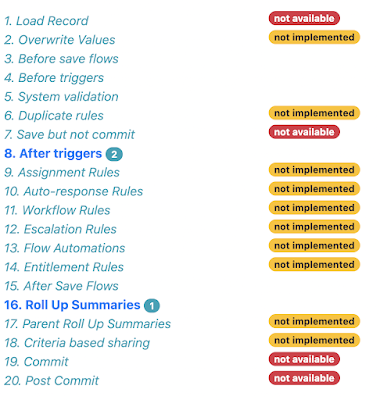
As everyone knows, there's a lot of steps in the order of execution, and I'm not attempting to support all of them right now. Especially as some of them (write to database but don't commit) don't have anything that metadata influences! Rather than trying to detail this in a blog post that I'd have to update every time I change anything, the order of execution page contains all the steps and adds badges to show which are possible to support, and which are supported:


As you can see, at the time of writing it's triggers and flows plus validation rules and roll up summaries. 

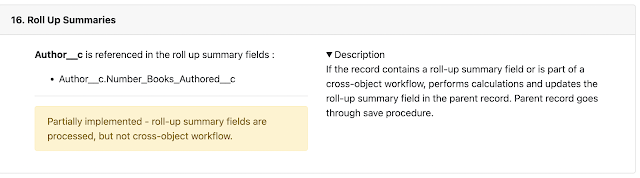
Steps where there is metadata that influences the behaviour appear in bold with a badge to indicate how many items there are. Clicking on the step takes you to the section that details the metadata:


You can see an example of the order of execution generated from the sample metadata at the Heroku site.

Updated Plug-in


Version 4.0.1 of the plug-in has this new functionality and can be found on NPM

If you already have the plug-in installed, just run sfdx plugins:update to upgrade to 4.0.1 - run sfdx plugins once you have done that to check the version.

The source code for the plug-in can be found in the Github repository.

Related Posts


Saturday, 29 January 2022

Record Triggered Flow Ordering and Explorer in Spring 22

Introduction

As is true of most releases over the last few years, Spring 22 has a bunch of flow enhancements in it, and two particularly caught my eye. I'm pretty sure that Apex developers will be casting a longing look in their direction and wondering why the same thing isn't available for pro code, although I have some opinions about that which I'll also share!

Flow Ordering

While best practice around no, low and pro code is one <insert automation tool here> per object and action, this isn't always achievable. Even if you've been able to achieve it with your own org metadata, as soon as you install a managed package from the app exchange you'll probably get some overlap. And if you've embraced the unmanaged package development approach, you stand a good chance of undoing your own good work. 

Spring 22 introduces the concept of ordering for record triggered flows, allowing an administrator to control the order they are executed in, and an evil co-worker to cause all sorts of havoc. There might have been havoc without ordering, but this allows the evil co-worker to guarantee things run in the wrong order!

A flow trigger order value can be specified between 1 and 2000 (so much for one flow per object and action!), but it things are a little more nuanced than they might first appear.

Order values 1 - 1000 execute first, and if multiple flows have the same order value, the API name is used as a tiebreaker. 

Then flows with no order value execute, in order of their Created Date. Note that you can't change the Created Date, so if you want to influence the order of flows in this section you'll have to supply an order value and take them out of this section. I see what you did there Salesforce!

Then flows with order values 1001-2000 execute, again with the order of any collisions being decided based on the API name.

I'm not sure why those without a value run in the middle section, but obviously if you keep all your order values below 1001, then those without a value run at the end, and if you have them all above 1000 then those without a value run at the start, so you really are in full control.

Note that each of before and after save flows have their own 1-2000 set of values that are independent. You can't specify an order value that would cause an after save flow earlier than a before save flow - what a merry time of misrule that would be!

Flow Trigger Explorer

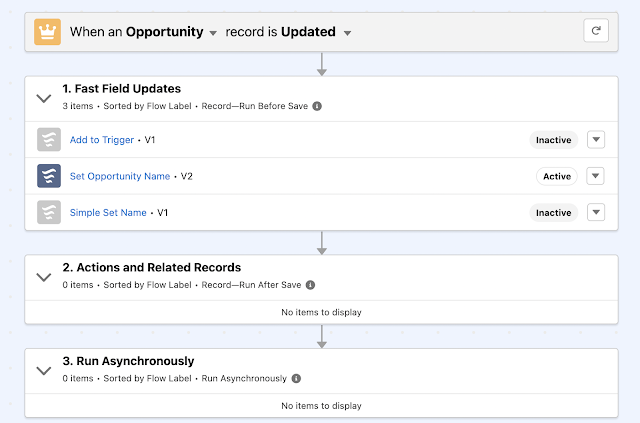
When I originally saw this I was really impressed, as I thought it was working in tandem with the new ordering functionality and showing me the exact automation in the order that it runs in. However, throwing a few examples in to show this at the January 2022 meeting of the London Salesforce Developers made me realise it's not quite as cool as that. If you look closely at the screenshot below you'll see a couple of issues if you are hoping this will show you what happens when:


First, the items in each section are sorted by flow label, not the order value, API name or Created Date. Second, inactive flows are mixed in with active ones, so you need to dig a little deeper. It does let you see at a glance the items that might impact an action on an object though, so I think it's a worthwhile start, and I'm sure that this will get more functionality as time goes on.

Why Doesn't Apex Have These?

Controlling the order that triggers run in is something that Apex developers have been looking for since forever. And finding. There are trigger handlers galore that solve this in a variety of ways, with different levels of configuration and complexity. Managed packages sometimes present a bit more of a challenge, but a well architected package will give you a way to merge their automation with yours if you need to. While I'm sure Salesforce could provide something like the order value for triggers, or indeed their own baked-in trigger handler, I'm willing to bet this would be a case of no good deed goes unpunished and those that care deeply about these things would all be upset about different aspects of the solution being forced on them. 

An Apex trigger explorer that listed the triggers involved in a single action and object would, in my view, be a solution looking for a problem. The setup pages show the triggers associated with an object, and a decent naming convention will make it clear which ones run under specific circumstances. A trigger handler framework would likely show the same trigger to rule them all for all actions for an object, or at most a dedicated trigger per action and object. 

So I don't think these are particularly needed for Apex, at least for Apex developers. Admins configuring Apex might find them useful, but with the ascent of low code tools there will probably be less of that in the future anyway. I'd still like to see some kind of unit test framework for low code though, so hopefully there's a team somewhere in Salesforce at least thinking about that.

Related