Showing posts with label Salesforce CLI. Show all posts

Tuesday, 13 January 2026

Run Relevant Tests in Spring '26

Image created by GPT5.2 based on a prompt by Bob Buzzard

Introduction


The Spring '26 release of Salesforce introduces a new way to execute tests when deploying - Run Relevant Tests. Specifying this option essentially hands over responsibility to Salesforce to identify and execute the tests associated with any Apex code in the deployment payload. Note that this is in beta in Spring '26, and everything following was based on trying it out in a pre-release org in the first half of January 2026, so really early days for it. 

This is the archetypal double-edged sword in my view. One the one hand, deployments can run way faster with little or no human effort, especially compared to manually specifying the tests that should be executed. On the other hand, it's abdicating responsibility for the quality of the deployment. Given that we're already looking at abdicating responsibility for the development of software to AI tools, does ceding another aspect of the lifecycle really matter? 

Who Chooses the Tests?


While conceptually this is something that should require many sleepless nights and lengthy discussions, I think in the majority of cases, especially outside of ISVs, it really doesn't matter. Yes, the test engine might not get it 100% right 100% of the time, but neither will most developers. If we're being honest the test suite itself is likely sub-optimal, especially in mature orgs at the Enterprise level where lots of disconnected parties have focused on getting things live over the years. In this scenario, if the odd test gets missed or an extra test gets run, it doesn't really change much from the quality perspective. 

This is not the case for ISVs though, who tend to put a lot of effort into designing a robust test suite, given that they need their solution to function under pretty much any scenario. Likely also not true for recent orgs that have been following good DevOps and Quality Assurance principles from the start, given that Salesforce and third-party tooling now makes this relatively straightforward to achieve. In these cases, the two new parameters for the @IsTest annotation allow tight coupling of tests to classes/deployments. Note that these only apply when the test level for the deployment is RunRelevantTests:

  • @IsTest(critical=true)

    I really like this one. If you've ever built an app that works with real money, you'll know that there are areas that must not fail or losses will be incurred. Executing tests for key areas, regardless of what changed, is a nice new feature.

  • @IsTest(testFor='<classes_and_triggers>')

    This is for the well-managed codebases. It allows you to guarantee that this test class will be executed if new/modified versions any of the identified dependencies are included in the payload. While this might feel like development overhead, my view is it's exactly what is needed in a robust test suite. Good development teams will likely hold this information elsewhere anyway, and apply it via RunSpecifiedTests, so I can see in many cases it will short cut that process.

How Does Salesforce Choose?


This is the $64,000 question, but right now we just don't know. The docs say :
the RunRelevantTests test engine analyzes the deployment payload and automatically runs a subset of tests based on that analysis.
which tells us what happens, but no detail about the analysis carried out. This isn't unusual in my experience, and by the time this feature goes GA I'd expect significantly more information to be available. That said I can't just sit idly and wait, so I've been doing some digging using a sample codebase with the following actors:
  • OpportunityUtils
    The protagonist in my little drama is a class named  This implements an interface (OpportunityUtilsIF) with a single method, getBigDeals(), which receives a collection of opportunities and returns a new collection containing just those opportunities with a value greater than or equal to 250,000.

    There is a dedicated test class (OpportunityUtilsTest) which directly instantiates the class and executes a zero/one test. 
  • OpportunityEOD
    This contains a single method (EODProcessing) that extracts all opportunities created today, creates an instance of OpportunityUtils, extracts just the big deals, appends ' - BIG DEAL' to their name and updates them.

    There is a dedicated test class (OpportunityEODTest) that inserts test opportunities of varying values, instantiates OpportunityEOD and executes the EODProcessing method, then extracts all opportunities from the database that are greater than or equal to 250,000 and asserts each name contains ' - BIG DEAL'.

  • OpportunityWrapLevel1
    This contains a single method (EODProcessingWrapLevel1) that instantiates the OpportunityEOD class and executes the EODProcessing method.

    There is a dedicated test class (OpportunityWrapLevel1) that inserts test opportunities of varying levels, instantiates OpportunityEODWrapLevel1, executes the EODProcessingWrapLevel1 method, then extracts all opportunities from the database that are greater than or equal to 250,000 and asserts each name contains ' - BIG DEAL'.

  • OpportunityEODInjection
    This ups the ante somewhat, is it contains a replica of the EODProcessing() method, but rather than directly instantiating OpportunityUtils it is passed a parameter (implementing the OpportunityUtilsIF interface. There is a dedicated test class (OpportunityEODInjectionTest) that delegates to a test factory to dynamically create an instance of OpportunityUtils based on the class name - at no point is OpportunityUtils directly referred to. The test mirrors the other EOD tests, inserting opportunities, carrying out the EOD processing and verifying that ' - BIG DEAL' is appended where appropriate.

After deploying these to a Spring '26 pre-release developer edition, I then changed the OpportunityUtils code to consider opportunities with a value of 300,000 and over as big deals, then tried to deploy it using the new -l RunRelevantTests Salesforce CLI option. There were unit test failures, but which ones?
  • OpportunityUtilsTest
    This test class was chosen, and the test for a single big deal failed. All as expected.

  • OpportunityEODTest
    This test class was chosen, and the EOD processing test failed. All as expected.

  • OpportunityWrapLevel1Test
    This test class was not chosen. I was surprised at this, as there is a dependency chain leading to OpportunityUtils.
    In case the selection of the OpportunityEODTest skewed the results, I removed the tests from that class and re-ran from the start. It still wasn't chosen, which suggests to me that currently only tests for classes with direct dependencies on the changed Apex will be chosen. 

  • OpportunityEODInjectionTest
    This test class was not chosen. This does not surprise me at all, as it would be really hard to pick up dynamically instantiated instances. The example I've given is straightforward, but the name could be generated by combining strings, through a lookup collection, or even configuration, so the only way to tell is to actually run the real code. I think this is a scenario where it would be up to the developer to ensure that this code was tested when the dependencies changed via the @IsTest(testFor='...') annotation.

I don't think this is too bad at all. I'd have liked the tests from the dependency chain to be picked up too, but I can see that is a bit of a balancing act. If every class that can possibly reach the changed code is executed, you could end up executing all of your tests every time. Taking the opposing view, if classes that could be impacted by a change aren't tested, what does that mean for our confidence in the deployed code? In this case I'm assuming good intentions, given this is in beta, and expecting this to be tightened up as the functionality makes its way towards general availability.

Conclusion


I like this new feature, but it requires careful consideration before relying on it for production (which, of course, you can't as it's in beta!). Personally I like to execute all tests whenever I deploy, but that isn't always feasible, especially if there is a large set of tests that have to execute serially and a high frequency release cadence. In that scenario I'd likely use the @IsTest(testFor='...') annotation approach to retain tight control. If, however, I was working in a mature org that showed clear signs of the big ball of mud anti-pattern, I'd happily leave it up to Salesforce.

Oh, and the UI hasn't quite caught up with this new functionality, as the deployment status always says that tests weren't required even if some of them failed:


so if you want to know which tests were actually picked, you need to use the Salesforce CLI with the --json flag and parse the output.

If you are interested in learning more about Apex testing, check out my in-progress book Software Testing on the Salesforce Platform.

More Information

Sunday, 6 August 2023

Salesforce CLI Open AI Plug-in - Function Calling

Image generated by Stable Diffusion online, based on a prompt by Bob Buzzard

WARNING: The new command covered in this blog extracts information from your Salesforce database and sends it to OpenAI in the US to provide additional grounding to a prompt - only use this with test/fake data, as there is no attempt at masking or restricting field access.

Introduction

Back in June 2023, only a couple of months ago on the calendar but a lifetime in generative AI product releases, OpenAI announced the availability of function calling. Now that my plug-in is integrated with gpt-3.5+, this is now something I can use, but what value does it add? 

The short version - this allows the model to progress past it's training data and request more information to satisfy a prompt. 

The longer version. As we all know, the data used to train gpt-3.5 cut off at September 2021, so often the response to a prompt will warn you that things may have changed. With function calling, when you prompt the model you also tell it about any functions that you have available that it can use to retrieve additional information. If the functions don't help it will return the response as usual, but if they would it will return function calls for you to make and pass back to it. Note that the model doesn't call the functions, it tells you which functions to call and the parameters to pass and expects you to make the decision as to whether you should call them, which is as it should be.

The Plug-in Command

In the latest version (1.2.2) of my plug-in, there's a new command that gives the model access to a function to pull data from Salesforce if needed. The function simply takes a query and returns the result as a JSON formatted string:

const queryData = async (query: string): Promise<string> => {
  const authInfo = await AuthInfo.create({ username: flags.username });
  const connection = await Connection.create({ authInfo });
  const result = await connection.query<{ Name: string; Id: string }>(query);

  return JSON.stringify(result);
}

When the command is executed, the request to the Chat Completion API includes the prompt supplied by the user, and details of the function:

const functions: ChatCompletionFunctions[] = [
  {
    name: 'queryData',
    description: 'A function to extract records from Salesforce via a SOQL query',
    parameters: {
      type: 'object',
      properties: {
        query: {
          type: 'string',
          description: 'The SOQL query to execute',
        },
      },
      required: ['query'],
    }
  }
];

Note that my function isn't targeting any specific objects, nor does it have any logic to figure out what might be needed based on the user's prompt - it simply executes a query and returns the results, which might be an error or an empty data set.

I execute this command as follows:

> sf bbai org data -t "Create an email introducing GenePoint, a new account we are tracking in Salesforce. Include the industry and number of employee details from our Salesforce database" -u keir.bowden@googlemail.com

Note that I have to tell the prompt that the GenePoint account details can be found in our Salesforce database - if I don't do that it won't see any value in the function. I've also provided the description of a couple of fields that I want it to extract, and finally I've supplied the username that I'll connect to Salesforce with if the model asks me to run a query.

When the model responds, it will indicate if it wants me to execute the function by specifying the finish_reason as 'function_call', and adding the details in the function_call property of the message:

{
  index: 0,
  message: {
    role: 'assistant',
    content: null,
    function_call: {
      name: 'queryData',
      arguments: '{\n' +
        `  "query": "SELECT Industry, NumberOfEmployees FROM Account 
                     WHERE Name = 'GenePoint' LIMIT 1"\n`
                  }'
    }
  },
  finish_reason: 'function_call'
}

In this case it wants me to call queryData with a query parameter of a SOQL query string that extracts details of the GenePoint account. I execute this, then add the results of the query to the prompt message and retry my request. This time I get a response with the email containing the details I wanted:

Subject: Introducing GenePoint - A Promising Addition to Our Portfolio

Dear Team,

I hope this email finds you well. I am excited to introduce you to our newest account, GenePoint, which we have recently started tracking in our Salesforce database. GenePoint is a biotechnology company that shows immense potential in its field. Allow me to provide you with some important details about this account.

Industry: Biotechnology

Number of Employees: 265

Conclusion

I think this is very cool because I haven't had to inspect the prompt in any way to decide to extract information from Salesforce. The model has been given a very basic function and knows (with some nudging, for sure) when it is appropriate to call it and, more importantly, the query that needs to be run to extract the details the user requested. 

Right now I've only told it about a single function, so it's either going to call that or nothing, but I can easily imagine a collection of functions that provide access to many internal systems. This allows the final request to be grounded with a huge amount of relevant data, leading to a highly accurate and targeted response.

Once again a reminder that this could result in sensitive or personally identifiable information being sent to the OpenAI API in the US to be processed, so while it's fun to try out you really don't want to go any where near your production data with this.

More Information


Sunday, 30 July 2023

Salesforce CLI Open AI Plug-in - Generating Records


Image generated by Stable Diffusion 2.1, based on a prompt from Bob Buzzard

Introduction

After the go-live of Service and Sales GPT, I felt that I had to revisit my Salesforce CLI Open AI Plug-in and connect it up to the GPT 4 Large Language Model. I didn't succeed in this quest, as while I am a paying customer of OpenAI, I haven't satisfied the requirement of making a successful payment of at least $1. The API function I'm hitting, Create Chat Completion, supports gpt-3.5-turbo and the gpt-4 variants, so once I've racked up enough cost using the earlier models I can switch over by changing one parameter. My current spending looks like it will take me a few months to get there, but such is life with competitively priced APIs.

The Use Case

The first incarnation of the plug-in asks the model to describe Apex, CLI or Salesforce concepts, but I wanted something that was more of a tool than a content generator, so I decided on creating test records. The new command takes parameters listing the field names, the desired output format, and the number of records required, and folds these into the messages passed to the API function. Like the Completion API, the interface is very simple:

const response = await openai.createChatCompletion({
     model: 'gpt-3.5-turbo',
     messages,
     temperature: 1,
     max_tokens: maxTokens,
     top_p: 1,
     frequency_penalty: 0,
     presence_penalty: 0,
   });

result = (response.data.choices[0].message?.content as string);

There's a few more parameters than the Completion API:

  • model - the Large Language Model that I send the request to. Right now I've hardcoded this to the latest I can access
  • messages - the collection of messages to send. The messages build on each other, and each message has a content (the instruction/request) and a role (where the instruction is being sent). This allows me to separate the instructions to the model (when the role is assistant, I'm giving it constraints about how to behave) from the request (when the role is user, this is the task/request I'm asking it to carry out).
  • max_tokens is the maximum number of tokens (approximately 4 characters of text) that my request combined with the response can be. I've set this to 3,500, which is approaching the limit of the gpt-3.5 model. If you have a lot of fields you'll have to generate a smaller number of records to avoid breaching this. I was able to create 50 records with 4-5 fields inside this limit, but your mileage may vary.
  • temperature and top_p guide the model as to whether I want precise or creative responses.
  • frequency_penalty and presence_penalty indicate whether I want the model to continually focus on tokens if they are repeated, or focus on new information.

As this is an asynchronous API, I await the response, then pick the first element in the choices array. 

Here's a few executions to show it in action - linebreaks have been added to the commands to aid legibility - remove these if you copy/paste the commands.

> sf bbai data testdata -f 'Index (count starting at 1), Name (Text, product name), 
            Amount (Number), CloseDate (Date yyyy-mm-dd), 
            StageName (One of these values : Negotiating, Closed Lost, Closed Won)' 
            -r csv

Here are the records you requested
Index,Name,Amount,CloseDate,StageName
1,Product A,1000,2022-01-15,Closed Lost
2,Product B,2500,2022-02-28,Closed Won
3,Product C,500,2022-03-10,Closed Lost
4,Product D,800,2022-04-05,Closed Won
5,Product E,1500,2022-05-20,Negotiating

> sf bbai data testdata -f 'FirstName (Text), LastName (Text), Company (Text), 
                            Email (Email), Rating__c (1-10)' 
                            -n 4 -r json

Here are the records you requested
[
  {
    "FirstName": "John",
    "LastName": "Doe",
    "Company": "ABC Inc.",
    "Email": "john.doe@example.com",
    "Rating__c": 8
  },
  {
    "FirstName": "Jane",
    "LastName": "Smith",
    "Company": "XYZ Corp.",
    "Email": "jane.smith@example.com",
    "Rating__c": 5
  },
  {
    "FirstName": "Michael",
    "LastName": "Johnson",
    "Company": "123 Co.",
    "Email": "michael.johnson@example.com",
    "Rating__c": 9
  },
  {
    "FirstName": "Sarah",
    "LastName": "Williams",
    "Company": "Acme Ltd.",
    "Email": "sarah.williams@example.com",
    "Rating__c": 7
  }
]

There's a few interesting points to note here:

  • Formatting field data is conversational - e.g. when I use Date yyyy-mm-dd the model knows that I want the date in ISO8601 format. For picklist values, I just tell it 'One of these values' and it does the rest.
  • In the messages I asked it to generate realistic data, and while it's very good at this for First Name, Last Name, Email, Company, it's not when told a Name field should be a product name, just giving me Product A, Product B etc.
  • It sometimes takes it a couple of requests to generate the output in a format suitable for dropping into a file - I'm guessing this is because I instruct the model and make the request in a single API call.
  • I've generated probably close to 500 records while testing this, and that has cost me the princely sum of $0.04. If you want to play around with the GPT models, it really is dirt cheap.
The final point I'll make, as I did in the last post, is how simple the code is. All the effort went into the messages to ask the model to generate the data in the correct format, not to include additional information that it was responding to the request, to generate realistic data. Truly the key programming language for Generative AI is the supported language that you speak - English in my case!

As before, you can install the plug-in via :
> sf plugins install bbai
or if you have already installed it, upgrade via :
> sf plugins update

More Information


Sunday, 16 July 2023

Salesforce CLI OpenAI Plug-in


Image generated using StableDiffusion 2.1 via https://huggingface.co/spaces/stabilityai/stable-diffusion

Introduction

I've finally found time to have a play around with the OpenAI API, and was delighted to find that it has a NodeJS library, so I can interact with it via Typescript or JavaScript rather than learning Python. Not that I have any issue with learning Python, but it's not something that is that useful for my day to day work and thus not something I want to invest effort in right now.

As I've said many times in the past, anyone who knows me knows that I love a Salesforce CLI Plug-in, and that is where my mind immediately went once I'd cloned their Github repo and been through the (very) quick overview. 

The Plug-In

I wasn't really interested in surfacing a chat bot via the Salesforce CLI - for a start, it wouldn't really add anything over and above the public OpenAI chat page. 

The first area I investigated was asking it to review Apex classes and call out any inefficiencies or divergence from best practice. While this was entertaining, and found some real issues, it was also wildly inaccurate (and probably something my Evil Co-Worker will move forward with to mess with everyone). 

I then built out a couple of commands to generate titles and abstracts for conference sessions based on Salesforce development concepts, but as the Dreamforce call for papers is complete for this year, that didn't seem worth the effort.

I landed on a set of explainer commands that would ask the AI model to explain something to help a more junior developer:

  • apex - explain a topic in the context of the Apex programming language
  • cli - explain a Salesforce CLI command, along with an example
  • salesforce - explain a Salesforce topic using appropriate language for a specific audience - admins, devs, execs etc.
Accessing the OpenAI API is very straightforward:

Install the OpenAI Package

> npm install openai

Create the API instance
    import { Configuration, OpenAIApi } from 'openai';

    const configuration = new Configuration({
        apiKey: process.env.OPENAI_API_KEY,
    });
    const openai = new OpenAIApi(configuration);
Note that the API Key comes from the OPENAI_API_KEY environment variable - if you want to try out the plug-in yourself you'll need an OpenAI account and your own key. 

Create the Completion

This is where the prompt is passed to the model so that it can generate a response:
    const completion = await openai.createCompletion({
        model: 'text-davinci-003',
        max_tokens: maxTokens,
        prompt,
        temperature
      });

      result = (completion.data.choices[0].text as string);
Note that the completions API is legacy and received it's final update in July 2023. I chose this simply because it's cheap. When you are writing a new plug-in connecting to a third party system you get a lot of stuff wrong and I was keen not to rack up too large a bill while I was learning! The Chat Completions API is slightly different, in that it receives a list of messages and can call functions with results. It's not dramatically different though, so I felt anything I learned applied to both.

I moved this into a shared function, hence most of the call is parameterised. The createCompletion function can take many parameters, but here's the explanation of those that I've used:
  • model - the large language model to use
  • max_tokens - the maximum number of tokens to generate the response. A token is typically thought to be around 4 characters, so will sometimes represent words and sometimes parts of words. Input and output token counts are how you get charged for API use, so you want to keep them down where you can. The function defaults to 16 which in practice is fairly useless for a response to a human, so I've typically upped it to 256
  • prompt - the question/task that I've set the model
  • temperature - a value between 0 and 2.0 that indicates how accurate a response I want. I find that 0.6 works pretty well. If you change this, do it in small increments, as I asked it to review an Apex class with a temperature of 1.5 and got pretty much gibberish.
And that's about it. The rest of the code is available at the Github repository - it's mostly standard CLI Plug-In stuff of handling flags and displaying the response.

The Plug-In In Action

Once I've installed the plug-in from NPM, using the following command :

> sf plugins install bbai

I can ask for some explanations. First, explain the Salesforce concept of groups. As I don't provide details of the audience, it defaults to programmers:

> sf bbai explain salesforce -t groups

Here are the results


Groups in Salesforce are a way to organize and manage users in the system. They allow you to categorize users based on their roles and responsibilities, allowing for more streamlined access to information. For example, you can create a group for all the programmers within your organization, allowing them to access the same resources, documents, and tasks. Additionally, groups can be used to assign tasks, send messages, and create reports. By creating groups, you can quickly and easily manage permissions, tasks, and data access for your programming team.


Now the same command for an exec audience - notice the difference?

> sf bbai explain salesforce -t groups -s executive

Here are the results


Groups in Salesforce allow organizations to manage and control access to records and data. Groups are used to assign users to roles within the organization and to grant them access to the appropriate records. By using groups, organizations can easily assign the same set of permissions to multiple users, allowing them to quickly and easily manage access rights. This makes it easier to manage user permissions, and also helps to ensure that users only have access to the data and records they need to do their job. Groups also streamline the process of granting and revoking access rights, making it easier for organizations to stay secure and compliant.


And now I want to start working with some of these concepts, but I don't understand how to get my code into the instance via the CLI:

> sf bbai explain cli -c "source push"             

Here are the results


Salesforce CLI command source push is used to deploy source from the local environment (e.g. a developer’s machine) to a Salesforce org. This command is useful in a DevOps process, as it enables developers to quickly and easily deploy their code changes to a Salesforce org for testing and deployment.


Example Execution: 

sfdx force:source:push --targetusername devorg --sourcepath /path/to/source/directory/


The command above will deploy all source code in the specified directory to the org with the username devorg.

Conclusions

Something that really stood out in this was the simplicity of the integration - it's literally a few lines of code. Which is as it should be - with generative AI, English is the programming language so most of the effort should go into the prompt rather than getting set up to send the prompt. Looking ahead a few years, I can see this being a game changer for integrating systems. Rather than starting with a book of API specifications that you need to adhere to, there will be a single entry point where you send conversational requests to a model trained on the specific data. "Return the id and all name and address fields of all the contacts we have that work for financial services customers in JSON format", without needing to develop that specific interface.

The Cost

This was top of mind for me during this experiment. I've seen situations in the past where request based charging really racked up during testing. OpenAI allows you to set a hard and soft limit, so that you can't get into that situation, but it also charges by the token for both input and output. When you aren't that familiar with how many tokens might be in a 2-3 line prompt. After building my plug-in, with the usual number of mistakes, and testing it for several hours, I'd used the princely sum of $0.16. 

While that might sound like there's nothing to worry about, but the latest models are more expensive per token and can handle significantly more tokens both for input and output, so you may find that things stack up quickly. I've seen news stories lauding the ability to send an entire book to a generative AI as context, but no mention of how much you'll be charged to do that!

More Information


Sunday, 4 December 2022

The Latest from the Org Documentor

Migrated Sample Output

November 28th 2022 marked a sad day in the Salesforce ecosystem, as Heroku free plans ended. From the learning perspective it's a real shame, as I'd used the free plans many times in the past to learn more about Node and other web technologies. From the live apps perspective it wasn't a huge impact, as the only work that I wanted to keep was a few static sties. Now we are into December it's happened, so time to find another home for my sites.

I ended up going for render, as it has a well regarded free tier and was very straightforward to set up. Going forward you'll find the sample output at:

    https://bbdoc-sample-output.onrender.com/

I've updated some of the references in this blog and elsewhere, but I'm sure I'll have missed some, so if you come across a broken Heroku link then let me know and I'll fix it up.

Version 4.0.6

There's also a new version of the documentor plug-in available from NPM - this is a community contribution from Carl Vescovi that fixes a couple of bugs in the flow handling and adds the flow type to the output. 

The Documentation Site

In case you haven't come across it before, the Documentor is documented (meta eh?) at:

     https://orgdoc.bobbuzzard.org/home

This has details of how to setup and configure the Documentor, as well as release information.

Related Posts


Saturday, 30 July 2022

Bob the Code Builder - Part 1

 Introduction

After rather long wait for those of us that were keen to get our hands on it, Salesforce Code Builder went into open beta on July 13th 2022. I was particularly interested in this as I'd been on the beta of the underlying technology - Visual Studio Codespaces back in 2020 and the beta of Github Codespaces in 2021. I couldn't get on the Code Builder pilot, in spite of twisting every Salesforce arm I knew of, so I had to replicate as best I could using those. If you are interested in seeing my attempts at this, check out this video on the London Salesforce Developers' Youtube channel - and why not subscribe while you are there? If you prefer the written word, check out my blog post on this topic.

Joining the Open Beta

The Salesforce blog post makes it sound like you just follow some instructions and you are in - that's not quite the case as you join a waitlist. I never heard back after joining, but when I checked the org I was using for the beta, I found I was good to go, so my advice is check early and often if you can create you environment.

The rest of it is pretty self-service - you install a managed package, authorise some third party sites and assign yourself the Code Builder permission set.  Then you try to create an environment and find out you need to join a waitlist as mentioned above, so you find something else to do for a day or two.

The managed package did complain that it didn't support my version of Salesforce, which is a developer edition, but thus far I haven't seen any issues.

Connecting to Salesforce

When I was attempting to replicate Code Builder using Codespaces, this required setting up JWT authentication for each Salesforce org I wanted to use. While this is more repetitive than difficult, it quickly becomes boring and was probably the main reason I didn't go a lot further.

With the advent of the Code Builder beta, I could forget all about that side of things - when I created my environment I was asked to login to the org that I wanted to work in, and connecting to another org is also very straightforward, although it did take me a few goes to get it to stop defaulting to my Code Builder beta org.

The Developer Experience


VS Code in the browser

It's still early days for me with the beta, but the developer experience thus far is pretty good. I connected up my dev hub, created a scratch org, pushed the code that I'm testing and everything went smoothly. There is a wrinkle around creating new Lightning Web Components, in that I get error output that the command failed to run, even though the component did get created. I can push it to a scratch org which means it's being picked up by the tracking, so I'm guessing it's an issue for the extension talking to the CLI in this architecture.

As Code Builder really is a virtual machine in the cloud, in this case AWS, it will be costing real money to provide workspaces, so the beta is limited to 20 hours over 30 days. This sounds like quite a lot of time for essentially a side gig, but try not to get distracted - I lost the best part of 30 minutes of my alloted time after opening the workspace and then getting caught up in something elsewhere. Shut it down when you aren't using it!

Related Posts


Saturday, 28 August 2021

The certificate associated with the consumer key has expired

This week a couple of my continuous integration builds started failing. This in itself isn't unusual - these are typically end to end builds that create scratch orgs, set up standing data, run a bunch of tests, so it doesn't take much to tip the odd one over.  I didn't find anything helpful about the error message online though, so I'm writing this post so that it will appear as a match for the next person that is trying to find out more!

The error was something I hadn't seen before - "The certificate associated with the consumer key has expired.".  Googling didn't bring up much, one person had reported it before and they had got around it by removing their CLI installation and starting again. Not an option for me as the CLI setup on my CI machine would take a fair amount of effort to recreate. Time to start digging.

The first place I looked was the CLI itself - I typically don't update this much on my CI machine, as it hasn't been the most stable tool in terms of working new releases over the last year or so. It seemed entirely plausible that something embedded in the CLI had expired, so I updated everything and waited. Sadly this didn't fix my scratch builds, but it did break one of my static code analysis jobs, as a rule had switched from Java to XPath, and I had references to the Java class in one of my custom configurations. That was a relatively quick fix, so shortly I was no worse than the day before.

Next was the JWT grant for the org that I'm using as a dev hub for these builds. I was able to query data from the org without any problem, so it didn't seem to be that. Then I tried creating a scratch org and got the same error, so it seemed likely that it was related, but not as obviously as it might have been. 

Once I'd remembered how to access a connected app's configuration, I could see that the self-signed certificate for the app had expired about 9 hours before the build started failing.  Clearly I had found the problem.  

My next thought was that I would have to go through the whole JWT grant again - not something I look forward to, mainly because I don't do it that often and I always remember it being worse than it is. The first thing I needed to do though, was create a new self-signed certificate for the connected app, which I duly did. I was tempted to make the certificate last 10 years (apparently openssl self-signed certs can go out for around 75 years), but that felt like trading security for convenience, which is never a good thing to do. Once I'd updated the cert I decided I'd have a quick go at creating a new scratch org and it worked! No need to generate a new grant, I was off to the races. I then encountered a problem deleting scratch orgs, but this is something I'm also seeing on another machine that is authorised to a different dev hub via web login, so it feels like that is a different issue. I can also work around it with some scheduled Apex, so I'm happy to wait and see if it goes away!


Saturday, 31 July 2021

The CLI GUI Plays Favourites


Introduction


My last change to the CLI GUI was to add the capability to decode a Salesforce CLI command string and regenerate the command page for it. This was the first step towards favourites functionality, so that I could save frequently used commands and quickly re-run them. As usual, it wasn't quite as straightforward as that, but this afternoon I pushed an update to the repository to add support for favourites.

A Few of My Favourite Things


If you are already using the CLI GUI, you'll need to run npm install as I'm using a different mechanism to convert the command string into it's component parameters - string-argv. Previously I had a very complicated regular expression that I found online, but it didn't handle string parameters containing spaces too well, or MacOS directories.

The first change you'll notice when the GUI starts is the new datalist and a couple of buttons. The datalist allows you to select from the favourites you've saved, and you can either Open the command window with the favourite decoded, or run it immediately. As an aside, running a favourite that does something destructive or that can't be undone (like deleting a scratch org) is a pretty dangerous thing to do, so you'll be asked to confirm it. I really only use this for opening orgs without having to go via the command window:


Obviously there won't be anything in the datalist yet, as you'll need to create a favourite or two first.

Favourites are added and removed from the command window, which now has a section at the bottom of the page for this. Once you have set the various parameters, give it a name and click the Save Favourite button:


Note that the directory you are working in is saved with the favourite.

Returning back to the main screen, the new favourite is now available in the datalist, and selecting it enables the buttons:


Clicking the Open button opens the command window with the favourite details, and a button to remove it:


Clicking the Run button first asks you to confirm you really want to do it:


If you choose to continue, the command will immediately execute, in the directory you were in when you saved the favourite, and the output shown in a similar modal to that of the command window:


Right now there's no mechanism to update a favourite - you have to remove the existing one and then save the updated command with the same name. Yes it's a couple more clicks, but think of how grateful you'll be if I do add this capability.

The latest code is in the Github repository, and this week I'm back to the usual test environments of MacOS and Windows 10.  I haven't flogged it to within an inch of its life though, so I'm sure if you look hard enough you'll find something that doesn't work. If you do, feel free to raise an issue.

Related Posts

Saturday, 10 July 2021

The CLI GUI Decodes Command Strings

Introduction

Something I've been meaning to add to the CLI GUI for a while is the ability to enter a CLI command string and decode that into a command page with the appropriate parameters set. This would allow someone to understand more about a command without having to run a help command, match to the parameters, and the additional instructions etc defined in the GUI configuration file can be displayed.

I finally got around to adding that capability this week, which wasn't quite as clunky as I was expecting it to be, although to be fair it is still a little clunky.

The Solution

The decoder is offered as part of a new group named 'Built In' - this is so named because it is added to the configured set of commands in the code and will always be present.


Clicking this opens up the command window with a single input to capture the command string:

In this case it's the command I've used in the past to create an org depdendent package, and made sure to write it down for the next time I needed it,

Clicking the Decode Command changes the page to reflect this command, with any additional instructions. And the first clunky bit, in that I always use the short version of the flags so the command generated in this page doesn't match character for character the one pasted in, although it effectively is the same.


The other clunky part is excluding certain functionality from the page when the command is the decoder, but unless I created a whole new page just for that, I was always going to have to do something along those lines. My command configuration file also now knows about the long and short version of every flag, so that it can decode either. 

The Latest Code

I've pushed the latest code to the Github repository - at the moment it's only tested against MacOS as I won't have access to my Windows machine for a day or so. I can't think of any reason why these changes wouldn't work equally well, but if you hit problems before I get a chance to test, raise an issue in the repo.

One thing to bear in mind is that this can only decode the commands and parameters that it knows about. For example, I haven't configured any of the commands to extract data, so there will be no match found when decoding those. 

Related Posts


Saturday, 27 March 2021

Org Documentor - Field Count Badges


Introduction


With large, mature implementations, it's sometimes difficult to keep track of how close you are getting to the field limits - for example, the total number of fields on an object, which varies from instance to instance, or the total number of relationship fields, which is 40 unless Salesforce are willing to raise it for you. This is compounded when you have multiple development streams working in parallel, as the total number of relationship fields in only known when the various branches are merged ready for cutting a release branch. 

As Peter Drucker said, if you can't measure it you can't improve it, so the Org Documentor is getting into the measurement business.


Field Count Badges


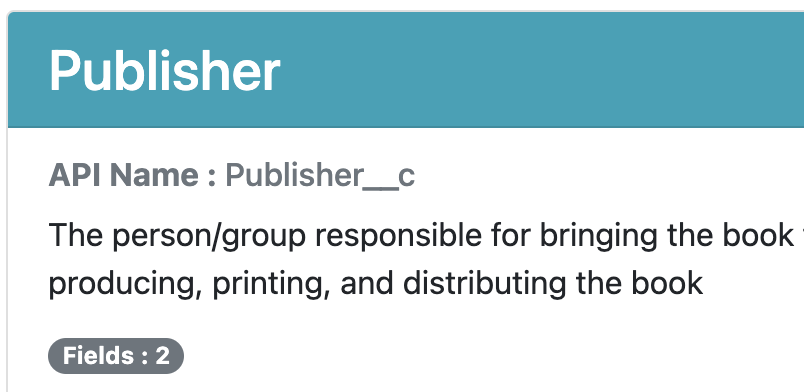
The latest release (3.6.0) of the Org Documentor aims to help with this, by adding Bootstrap badges containing field counts to the object documentation. Right now it's the total number of fields on the object and the total number of relationship fields, as the screen grab below from the sample metadata output shows:


If there are no relationship fields, the badge isn't rendered:


Right now the badges don't change colour to flag up that the count is close to the limit, as there's no way to know if that is the case, as the Documentor is designed to work against object metadata and doesn't have access to any orgs that the metadata is installed into. Flagging the total number of fields as close to the Enterprise Edition limit isn't helpful if it will only be installed into Unlimited Edition, and vice versa is even worse.  It's also possible that there are other fields on the object that aren't version controlled - added by a managed package for example.

So I decided to leave it as the standard Bootstrap secondary badge colour, which will remain the case unless I get feedback from users that they'd like something else. I'm also open to suggestions for additional badges - if you have any strong feelings on either of these topics, please create an issue at the plug-in Github repo.

As always, you can view the latest output for the sample metadata on the public site.


Updated Plug-in


Version 3.6.0 of the plug-in has this new functionality and can be found on NPM. 

If you already have the plug-in installed, just run sfdx plugins:update to upgrade to 3.6.0 - run sfdx plugins once you have done that to check the version.

The source code for the plug-in can be found in the Github repository.

Related Posts