Showing posts with label pro code. Show all posts

Wednesday, 5 November 2025

Screen Flow LWC Local Actions in Winter '26


Original image created by GPT 5o based on a prompt from Bob Buzzard

Introduction

The Winter '26 release of Salesforce introduced Lightning Web Components as local actions in screen flows. This allows client-side JavaScript to be executed as a 'function' in the flow, without the need for a round trip to the server for an Apex action. 

Sample Actions

For this blog post I created a couple of LWCs to act as local actions :

  • A modal that displays a warning/reminder to a user and make them think about what they were about to do
  • A toast that displays the results of the user's request
In order to use an LWC as a local action, it must implement a function named invoke, which carries out the JavaScript processing. The flow runtime executes this function when it encounters a local action element tied to an LWC. The invoke method for my modal local action is shown below:

  @api title;
  @api size;
  @api content;

  @api async invoke() {
  const result=await ModalDemo.open({
            size: this.size,
            title: this.title,
            content: this.content
        });
  console.log(result);
}
This opens the modal and displays a message based on the title, size and content properties supplied by the flow, making it suitable for reuse across multiple scenarios. In order to allow a flow to pass properties to an LWC, you need to decorate the property with @api in the LWC and define it in the targetConfigs section of the js-meta.xml file:
   <targets>
        <target>lightning__FlowAction</target>
    </targets>
    <targetConfigs>
        <targetConfig targets="lightning__FlowAction">
            <property name="title" type="String" label="Modal title" role="inputOnly" />
            <property name="content" type="String" label="Modal content" role="inputOnly" />
            <property name="size" type="String" 
                      label="Modal size" default="large" role="inputOnly" />    
        </targetConfig>
    </targetConfigs>

Note that I've defined these with a role of inputOnly, as the component only uses these properties to display the modal.

The Flow


I have simple flow based on the scenario of deleting a contact:


The Warning Modal configuration supplies the property values for the modal for this scenario. 


These properties are simple text values here, but any resource can be used, as this the case for the Success Toast action which uses the contactInformation formula resource:


which is constructed from the record detail of the contact to be deleted:


Executing the Flow


For demo purposes I've added the flow to a Lightning App Builder page - note that it doesn't delete anything, just claims to have done so!


A Gotcha


Fun fact - my original idea for this demo was to have a confirmation dialog asking if you were sure you wanted to delete the record. I had to pivot from this, as it appears that it is currently not possible to pass information back to the flow from the LWC. 

This would typically be achieved by publishing a FlowAttributeChangeEvent to update a property indicating if the user has confirmed or not, but when I try this (even when that is all the invoke method does!) I get the following error from the LWC:


I'm not sure whether this is me (I don't think so, as I've confirmed I'm doing the right thing based on multiple blogs and articles), unsupported (I can't find anything in the docs), or a bug, but it does rather limit the usefulness of this feature so hopefully it's either my mistake or Salesforce sort it out soon!

Related Posts/More Information


Saturday, 11 March 2023

Apex Roadmap: User Mode with Permission Sets

As has been the case since the first TrailheaDX in 2016, the stars didn't align so that I could attend in person. Luckily a lot of the content is already up on Salesforce+, including a very interesting session on the Apex roadmap from Daniel Ballinger and Chris Peterson. One feature that is currently in development really stood out for me - User Mode with Permission Sets. 

User Mode

User Mode went GA in the Spring 23 release of Salesforce, and is a real benefit for those of us with app exchange packages containing Apex code. For those who haven't attempted this and the associated security review, here's a brief summary of what you are up against with the previous tooling:

  • You need to respect the CRUD and FLS permissions set by the subscriber org (the Salesforce instance into which the package has been installed) administrator. This is of course quite right, otherwise your package could just help itself to confidential information that it has no business accessing.
  • There isn't much support in the platform for this, so you need to either create your own methods to check this for each object and field, or use one of the myriad third party offerings.
I've always been in agreement with this governance being enforced in the security review, and also of the strong opinion that if this is a requirement it should be baked into the platform, rather than pushed back on everyone that is developing a package with code. There must be tens of thousands of lines of code in all the packages out there, all re-solving the same problem. 

There were previous attempts to solve this, but they all had compromises. User Mode genuinely takes the transaction out of system mode so that all configured permissions apply for the database operation. If the database operation attempts to use fields or objects that aren't accessible, errors are returned for every disallowed item.

All well and good when you are respecting the admin's decision about access, but what happens if access to objects and fields managed by the package is required in order for the package to function correctly? You could put the user through death by a thousand cuts, allowing them to get slightly further each time before an error is thrown and they request additional permissions from their admin, or you can execute your database operations in System Mode.  This is quite the nuclear option though, as it opens up access to every object and field in the instance. If all you need is to get at the value for a single checkbox, it's an extremely large hammer to crack a small nut.

User Mode with Permission Sets


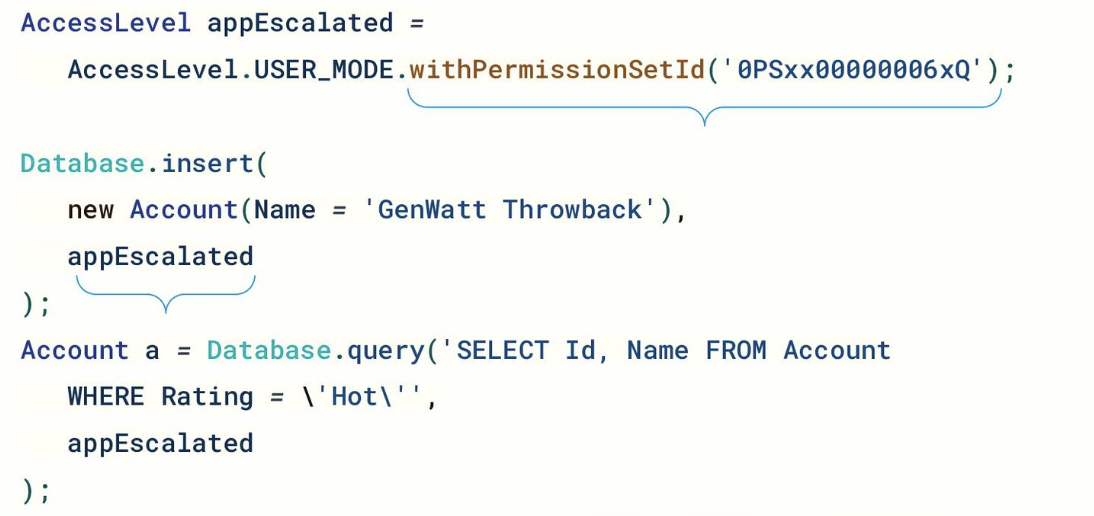
User Mode with Permission Sets allows you to select an appropriate sized hammer for the nut in question. Rather than elevating the user's access to everything, everywhere, you can give them the minimal amount of additional privilege required for your package to function correctly, just for the database operations that it is needed. To continue the example of needing access to a single checkbox value, you'd also package a permission set that grants access to just that field and execute the database operation in user mode plus that permission set. Much better from a security and governance perspective. 

Here's a code snippet snatched from the session - note that as this is still in development the syntax is likely to change, but it gives a sense of the direction of travel:


Packages aren't the only use case for this though, limiting the data that your Apex code has access to is good practice regardless of whether it's going into a package or being deployed directly to an org. Sadly it wouldn't stop my Evil Co-Worker, as when they have access to the code they can simply change it to run in System Mode in all cases. It will limit the impact of simple mistakes though, and keep your Information Security department a little happier.

More Information