Showing posts sorted by relevance for query evil co-worker. Sort by date Show all posts

Sunday, 11 August 2024

The Evil Co-Worker presents Evil Copilot - Your Untrustworthy AI Assistant

Image generated by gpt4o based on a prompt from Bob Buzzard

Introduction

Regular readers of this blog will be familiar with the work of my Evil Co-Worker to worsen the Salesforce user experience wherever possible. The release of Einstein Copilot has opened up a whole raft of possibilities, where the power of Generative AI can be leveraged to make the world a better place .... but only for them! This week we saw the results of their initial experiments when the Evil Copilot was launched on an unsuspecting Sales Team - your untrustworthy AI assistant.

The Evil Actions

Evil Copilot only has a couple of actions, but these are enough to unsettle a Sales team and help the Evil Co-Worker gain control of important opportunities.

What Should I Work On

The first action is What Should I Work On. An unsuspecting Sales rep asks for advice about which accounts and deals they should focus on today, expecting to be pointed at their biggest deals that will close soon, and the high value accounts that should be closely monitored. Instead they are directed to their low value/low probability opportunities and accounts that they haven't dealt with for ages. They are also informed that it doesn't look like Sales is really for them, and advised to look for a different role! Quite the demotivating start to the day:


Opportunity Guidance


Note also that the rep is advised that they have an opportunity that is a bit tricky and they should seek help from E. Coworker. Before they do this, they use Copilot to look up the opportunity:


It turns out this is their biggest opportunity, so the user seeks the sage advice of Copilot, only to hit another evil action and another knock to their confidence - Copilot flat our says that they aren't up to the job and the best bet is to hand it over to, you guessed it, E. Coworker!


With just a couple of actions, Evil Copilot has most of the Sales team focused on trivia, while all the top opportunities end up in the hands of the Evil Co-Worker - not a bad return for a few hours work!

But Seriously Folks!

Now this is all good fun, but in practice my Evil Co-Worker would require administrator access to my Salesforce instance and very little oversight to be able to unleash Evil Copilot on my users. And I've no doubt there are more than a few companies out there where it would be entirely possible to do this, at least until an angry Sales rep called up to ask what was going on!

But a Copilot implementation doesn't have to be intentionally Evil to cause issues. The Large Language Models will follow the instructions given to them in Prompt Templates, even if that wouldn't be reasonable course of action for a human member of staff - if the instruction is to tell a user they don't appear to be suited to their job, they'll do it without question. While us humans can tell that this isn't appropriate, the models will see it as perfectly reasonable. It won't be picked up as toxic either - simple constructive criticism won't raise any flags. 

That's why you always need to test your Prompt Templates, and your Copilot actions, with a variety of data and users - to ensure that your intended request doesn't turn into something completely different in the wild. We've all sent emails that we were convinced had 100% clarity, only to see someone take them entirely the wrong way, and then we we look at them again we realise how ambiguous or subjective they were. And always have a second pair of eyes reviewing the content of a Prompt Template before making it available to users - Evil Co-Workers are constantly on the lookout for weak points in a process.

Related Posts


Saturday, 14 January 2017

Salesforce Platform Cache - Expect the Unexpected

Platform Cache - Expect the Unexpected

Cache

Introduction

When the Salesforce Platform Cache appeared, this allowed a lot of home made caching code to be retired. Up until the the only data that was cached was custom settings. (This is in terms of not requiring a trip to the database, there are obviously all sorts of caches at play in the Salesforce platform - reports involving large amounts of data often succeed on the second or third try as some of the data has made it’s way closer to the front end). While custom settings speed up the retrieval of data and save SOQL calls, it was a pretty basic solution, requiring DML to push information into the ‘cache’, and the type of data that could be stored was pretty basic, so caching and rehydrating a complex object meant you had to handle the transformation yourself. 

In this post I won’t be going into the details of getting started with the cache, as the Trailhead module does an excellent job of this already.

Seek, and you may not find it

A key feature of the platform cache is that just because you put something in the cache, it doesn’t mean that it will still be there at a later date, thus you have to be prepared to deal with cache misses. Thus if I store an opportunity keyed by it’s id in a Blue Peter style partition I created earlier:

Cache.OrgPartition oppsPart=Cache.Org.getPartition('Opportunities');
Opportunity opp=[select id, Name, CloseDate from Opportunity where id='0060Y000003AWjG'];
oppsPart.put('0060Y000003AWjG', opp);

I can try to retrieve it in a different request:

Cache.OrgPartition oppsPart=Cache.Org.getPartition('Opportunities');
Opportunity oppFromCache=(Opportunity) oppsPart.get('0060Y000003AWjG');
System.debug('Opp = ' + oppFromCache);

and all things being equal I'll get the following debug output:

12:27:52:158 USER_DEBUG [3]|DEBUG|Opp = Opportunity:{Name=Edge Installation,
Id=0060Y000003AWjGQAW, CloseDate=2014-11-02 00:00:00}

If the opportunity has been booted from the cache for any reason (expired, an evil co-worker removes it) then I'll receive a null rather than the opportunity, and can fetch it from the database.

You have to know what you are asking for

Based on the above, if you are doing a lot of work with opportunities matching a particular criteria, it’s tempting to try to use the cache as a database replacement, storing all of them in there keyed by id:

Cache.OrgPartition oppsPart=Cache.Org.getPartition('Opportunities');
List<Opportunity> opps=[select id, Name, CloseDate from Opportunity];
for (Opportunity opp : opps)
{
	oppsPart.put(opp.id, opp);
}

I can then retrieve these by iterating all of the keys in the partition:

Cache.OrgPartition oppsPart=Cache.Org.getPartition('Opportunities');
List<Opportunity> opps=[select id, Name, CloseDate from Opportunity];
for (Opportunity opp : opps)
{
	oppsPart.put(opp.id, opp);
}

which gives me the following output:

12:42:40:176 USER_DEBUG [6]|DEBUG|Opp = Opportunity:{Name=Edge SLA,
Id=0060Y000003AWjHQAW, CloseDate=2014-11-02 00:00:00}
12:42:40:180 USER_DEBUG [6]|DEBUG|Opp = Opportunity:{Name=United Oil
Installations, Id=0060Y000003AWjFQAW, CloseDate=2014-11-02 00:00:00}
...
12:42:40:261 USER_DEBUG [6]|DEBUG|Opp = Opportunity:{Name=Burlington Textiles
Weaving Plant Generator, Id=0060Y000003AWjOQAW, CloseDate=2014-11-02 00:00:00}

At first glance this looks fine, but there is a huge issue with this approach - I have no idea whether this is the full collection of opportunities that I cached. Entries might have been evicted, even while I was iterating the opportunities I’d queried if the partition filled up, or an evil co-worker may remove a couple and then add them back later so that I have no idea why they weren’t processed.

Unlike executing  SOQL query, all I can be sure of is that I’ve retrieved all of the opportunities that remain in the cache, which may bear very little relation to the contents of the database. Clearly another approach is required. 

Cache collections as a single entry

In this scenario, rather than storing each object as an entry the solution is to store the entire collection as a single entry:

Cache.OrgPartition oppsPart=Cache.Org.getPartition('Opportunities');
List<Opportunity> opps=[select id, Name, CloseDate from Opportunity];
oppsPart.put('all', opps);

retrieving it in a separate request as follows:

Cache.OrgPartition oppsPart=Cache.Org.getPartition('Opportunities');
List<Opportunity> oppsFromCache=(List<Opportunity>) oppsPart.get('all');
for (Opportunity opp : oppsFromCache)
{
	System.debug('Opp = ' + opp);
}

In this case, if my opportunities have been evicted from the cache I’ll receive a null response and can re-query them from the database. Of course this doesn’t stop an evil co-worker from overwriting the ‘all' entry in the cache with a different collection of opportunities - if this continues to be a problem then a session cache partition, which is tied to a specific user, is probably a better option.

More Information

Saturday, 22 August 2020

App Builder Page Aware Lightning Web Component

Introduction

This week I've been experimenting with decoupled Lightning Web Components in app builder pages, now that we have the Lightning Message Service to allow them to communicate with each other without being nested. 

A number of the components are intended for use in record home and app pages, which can present challenges, in my case around initialisation. Some of my components need to initialise by making a callout to the server, but if they are part of a record home page then I want to wait until the record id has been supplied. Ideally I want my component to know what type of page it is currently being displayed in and take appropriate action.

Inspecting the URL

One way to achieve this is to inspect the URL of the current page, but this is a pretty brittle approach as if Salesforce change the URL scheme then it stands a good chance of breaking. I could use the navigation mixin to generate URLs from page references and compare those with the current URL, but that seems a little clunky and adds a delay while I wait for the promises to resolve.

targetConfig Properties

The solution I found with the least impact was to use targetConfig stanzas in the component's js-meta.xml configuration file. From the docs, these allow you to:

Configure the component for different page types and define component properties. For example, a component could have different properties on a record home page than on the Salesforce Home page or on an app page.

It was this paragraph that gave me the clue - different properties depending on the page type!

You can define the same property across multiple page types, but define different default values depending on the specific page type. In my case, I define a pageType property and default to the type of page that I am targeting:

<targetConfigs>
    <targetConfig targets="lightning__RecordPage">
        <property label="pageType" name="pageType" type="String" default="record" required="true"/>
    </targetConfig>
    <targetConfig targets="lightning__AppPage">
        <property label="pageType" name="pageType" type="String" default="app" required="true"/>
    </targetConfig>
    <targetConfig targets="lightning__HomePage">
        <property label="pageType" name="pageType" type="String" default="home" required="true"/>
    </targetConfig>
</targetConfigs>

so for a record page, the pageType property is set as 'record' and so on.

In my component, I expose page type as a public property with getter and setter methods (you only need the @api decorator on one of the methods, and convention right now seems to be the getter) :

@api get pageType() {
    return this._pageType;
}

set pageType(value) {
    this._pageType=value;
    this.details+='I am in a(n) ' + this._pageType + ' page\n';
    switch (this._pageType) {
        case 'record' :
             this.details+='Initialisation will happen when the record id  is set (which may already have happened)\n';
             break;
            ;;
        case 'app' :
        case 'home' :
            this.details+='Initialising\n';
            break;
    }                
 }

and similar for the record id, so that I can take some action when that is set:

@api get recordId() {
    return this._recordId;
}

set recordId(value) {
    this._recordId=value;
    this.details+='I have received record id ' + this._recordId + ' - initialising\n';
}

then I can add the component to the record page for Accounts:


a custom app page:


and the home page for the sales standard application:

and in each case the component knows what type of page it has been added to. 

Of course this isn't foolproof - my Evil Co-Worker could edit the pages and change the values in the app builder, leading to all manner of hilarity as my components wait forlornly for the record id that never comes. I could probably extend my Org Documentor to process the flexipage metadata and check the values haven't been changed, but in reality this is fairly low impact sabotage and probably better that the Evil Co-Worker focuses on this rather than something more damaging.

Show Me The Code!

You can find the code at the Github repo.

Related Posts


Saturday, 29 January 2022

Record Triggered Flow Ordering and Explorer in Spring 22

Introduction

As is true of most releases over the last few years, Spring 22 has a bunch of flow enhancements in it, and two particularly caught my eye. I'm pretty sure that Apex developers will be casting a longing look in their direction and wondering why the same thing isn't available for pro code, although I have some opinions about that which I'll also share!

Flow Ordering

While best practice around no, low and pro code is one <insert automation tool here> per object and action, this isn't always achievable. Even if you've been able to achieve it with your own org metadata, as soon as you install a managed package from the app exchange you'll probably get some overlap. And if you've embraced the unmanaged package development approach, you stand a good chance of undoing your own good work. 

Spring 22 introduces the concept of ordering for record triggered flows, allowing an administrator to control the order they are executed in, and an evil co-worker to cause all sorts of havoc. There might have been havoc without ordering, but this allows the evil co-worker to guarantee things run in the wrong order!

A flow trigger order value can be specified between 1 and 2000 (so much for one flow per object and action!), but it things are a little more nuanced than they might first appear.

Order values 1 - 1000 execute first, and if multiple flows have the same order value, the API name is used as a tiebreaker. 

Then flows with no order value execute, in order of their Created Date. Note that you can't change the Created Date, so if you want to influence the order of flows in this section you'll have to supply an order value and take them out of this section. I see what you did there Salesforce!

Then flows with order values 1001-2000 execute, again with the order of any collisions being decided based on the API name.

I'm not sure why those without a value run in the middle section, but obviously if you keep all your order values below 1001, then those without a value run at the end, and if you have them all above 1000 then those without a value run at the start, so you really are in full control.

Note that each of before and after save flows have their own 1-2000 set of values that are independent. You can't specify an order value that would cause an after save flow earlier than a before save flow - what a merry time of misrule that would be!

Flow Trigger Explorer

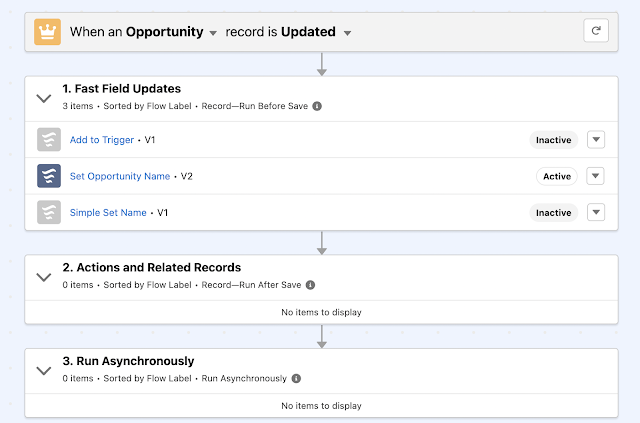
When I originally saw this I was really impressed, as I thought it was working in tandem with the new ordering functionality and showing me the exact automation in the order that it runs in. However, throwing a few examples in to show this at the January 2022 meeting of the London Salesforce Developers made me realise it's not quite as cool as that. If you look closely at the screenshot below you'll see a couple of issues if you are hoping this will show you what happens when:


First, the items in each section are sorted by flow label, not the order value, API name or Created Date. Second, inactive flows are mixed in with active ones, so you need to dig a little deeper. It does let you see at a glance the items that might impact an action on an object though, so I think it's a worthwhile start, and I'm sure that this will get more functionality as time goes on.

Why Doesn't Apex Have These?

Controlling the order that triggers run in is something that Apex developers have been looking for since forever. And finding. There are trigger handlers galore that solve this in a variety of ways, with different levels of configuration and complexity. Managed packages sometimes present a bit more of a challenge, but a well architected package will give you a way to merge their automation with yours if you need to. While I'm sure Salesforce could provide something like the order value for triggers, or indeed their own baked-in trigger handler, I'm willing to bet this would be a case of no good deed goes unpunished and those that care deeply about these things would all be upset about different aspects of the solution being forced on them. 

An Apex trigger explorer that listed the triggers involved in a single action and object would, in my view, be a solution looking for a problem. The setup pages show the triggers associated with an object, and a decent naming convention will make it clear which ones run under specific circumstances. A trigger handler framework would likely show the same trigger to rule them all for all actions for an object, or at most a dedicated trigger per action and object. 

So I don't think these are particularly needed for Apex, at least for Apex developers. Admins configuring Apex might find them useful, but with the ascent of low code tools there will probably be less of that in the future anyway. I'd still like to see some kind of unit test framework for low code though, so hopefully there's a team somewhere in Salesforce at least thinking about that.

Related


Saturday, 22 April 2017

Salesforce Health Check Custom Baseline

Salesforce Health Check Custom Baseline

Introduction

The Salesforce Health Check has been around for a year or so now, debuting in the Spring 16 release of Salesforce (and bearing a striking resemblance to an app exchange listing with the same name).  The Salesforce Help topic gives chapter and verse on this so I’m not going to spend any time on the basic functionality, except to say that it’s a great tool for allowing you to see at a glance how your Salesforce org shapes up security-wise. There has been one caveat though, the baseline it is compared against is set by Salesforce not you, which means that if your security standard differs from the one true path you’ll see warnings and errors. As anyone who has accepted a unit test failure for more than one build knows, as soon as people expect errors they stop counting how many there are. Thus you may start out accepting a single warning, before you know it you have a number of potential security problems which are being ignored because “that page always shows errors”.

Custom Baselines

Spring 17 introduced the beta of custom baselines - this allows you to deviate from the Salesforce standard and supply your own baseline which reflects your security requirements. From now on if your Health Check page shows an error or exception, that means you have a real security issue and need to deal with it quickly.

While you could create a custom baseline from scratch, the easiest way is to export the standard baseline and amend it. Navigate to Setup -> Security Controls -> Health Check and click the gear icon, then ‘Export XML’ from the resulting context menu:


Screen Shot 2017 04 22 at 15 27 33


This downloads the baseline to a file named ‘baseline.xml’ (or baseline (1,2,3,etc).xml if you keep downloading it to the same place on a mac!), which you can then open in your favourite editor - I like Atom for XML files. Again, the Salesforce Help does a great job of explaining the format of the XML file so I’m not going to cover this. A couple of things to bear in mind:

  • You must change the Name and DeveloperName of the Baseline element, otherwise you’ll be trying to overwrite the standard, which you can’t do.
  • When you import the file, do it via the Lightning Experience. If you try this in class and you get an error you get no information that an error has occurred. According to the help “If your import fails, you receive a detailed message in Lightning Experience to help you resolve the problem”, which is pretty big talk when the actual message is Screen Shot 2017 04 22 at 16 03 16

Changing the Baseline

One area where my dev org is considered substandard is the password expiration time. I have my passwords set up never to expire, as forcing users to change their passwords regularly often results in them choosing predictable passwords that are easier to break. The Salesforce health check standard generates a Medium Risk alert if the value is over 90 days and a High Risk alert if the value is over 180 days.

Screen Shot 2017 04 22 at 15 40 22

Here’s the section of the file that configures this:

Screen Shot 2017 04 22 at 15 41 05

If I change the standard value to the numeric equivalent of Never Expires, 2147483647.0, and the warning to one higher:

Screen Shot 2017 04 22 at 15 57 54

and import the updated XML file using the context menu shown above, I can then switch my Health Check to the custom baseline and my password expiration is now at a satisfactory level:

Screen Shot 2017 04 22 at 16 05 10

I am not a security consultant

Notwithstanding the fact that forcing users to change their passwords regularly is out of favour in some places, you should not take this post as my advising you about your password policies in any shape or form. If you base your security settings on things that you read in random blog posts then best of luck to you - I did it in a dev org to show the functionality as there’s nothing that I really care about in there.

I’d expect the majority of custom baselines to be making the security standard more restrictive, in regulated industries for example, but what you should set up is a baseline that aligns with your corporate security policies.

Here comes the wish list

Anyone familiar with my blogs or Medium stories knows that I usually have a wish list around Salesforce functionality, so if any product managers are reading this, here’s what I’d like to see:

  • A way to email out the health check, run against a custom baseline, on a schedule. Security and compliance departments can receive this first thing in the morning and spend the day focusing on other systems.
  • Notifications when the health check result changes - if my Evil Co-Worker blags admin rights and changes the configuration to allow previous passwords to be re-used, I want to know about it. (Ideally I’d receive an automated report at the end of every day detailing everything the Evil Co-Worker has done, but that might be asking too much).
  • A way to snapshot the health check output regularly, so that I can see if an org is trending towards a more or less baseline compliant security setup. 
  • Custom entries - for example, I can easily spin through the ApexClass sobjects and figure out how many aren’t using ‘with sharing’. Security isn’t just about configuration, it’s also about code!

Related Posts


Monday, 21 January 2019

Unsaved Changes in Spring 19

Unsaved Changes in Spring 19

Introduction

As I mentioned in my last post, it’s often the little things in a release that make all the difference. Another small change in the Spring 19 release is the lightning:unsavedChanges aura component (yes aura, remember that in Spring 19 Lightning Web Components are GA and Lightning Components are renamed Aura Components). The release notes are somewhat understated - "Notify the UI about unsaved changes in your component”, but what this means is that I can retire a bunch of code/components that I’ve written in the past to sop the user losing their hard earned changes to a record. Even better, I’m wiring in to the standard Lightning Experience behaviour so I don’t need to worry if Salesforce change this behaviour, I’ll just pick it up automatically.

Example

My example component is a simple form with a couple of inputs - first and last name:

<aura:component implements="flexipage:availableForAllPageTypes">
    <aura:attribute name="firstname" type="String" />
    <aura:attribute name="lastname" type="String" />
    <aura:handler name="change" value="{!v.firstname}" action="{!c.valueChanged}"/>
    <aura:handler name="change" value="{!v.lastname}" action="{!c.valueChanged}"/>

    <lightning:card variant="narrow" title="Unsaved Example">
        <div class="slds-p-around_medium">
            <lightning:input type="text" label="First Name" value="{!v.firstname}" />
            <lightning:input type="text" label="Last Name" value="{!v.lastname}" />
            <lightning:button variant="brand" label="Save" title="Save" onclick="{! c.save }" />
        </div>
    </lightning:card>

    <lightning:unsavedChanges aura:id="unsaved"
                onsave="{!c.save}"
                ondiscard="{!c.discard}" /> 
</aura:component>	

I have change handlers on the first name and last name attributes, so that I can notify the container that there are unsaved changes. I achieve this via the embedded lightning:unsavedChanges component, which exposes a method named setUnsavedChanges. In my change handler I invoke this method:

valueChanged : function(component, event, helper) {
    var unsaved = component.find("unsaved");
    unsaved.setUnsavedChanges(true, { label: 'Unsaved Example' });
}

So now if I add this component to a Lightning App page, enter some text and then try to click on another tab, I get a nice popup telling me that I may be making a big mistake. It also displays the label that I passed the setUnsavedChanges method, so that if there are multiple forms on the page then the user can easily identify which one I am referring to. 

Screenshot 2019 01 20 at 11 20 02

Of course, my Evil Co-Worker immediately spotted that they could pass the label of a different component and keep the user in a loop where they believe they have saved the changes but keep getting the popup. If I’m honest I expected something a bit more evil from them, like calling a method that clears the unsaved changes without saving the record when the user clicks the Save button,  clearly getting lazy as well as Evil in their old age.

What’s even nicer is that if I click the Discard Changes or Save buttons, my controller methods to discard or save the record are invoked, because I specified these on the component:

<lightning:unsavedChanges ..." onsave="{!c.save}" ondiscard="{!c.discard}" /> 

so I have full control over what happens.

This kind of interaction with the user is possible when I click on a link that is managed by the Lightning Experience, but not so much if I reload the page or navigate to a bookmark. In this scenario I’m at the mercy of the beforeunload event, which is browser specific and much more limited.

Screenshot 2019 01 20 at 11 36 40

This behaviour can’t be customised, the idea being that you can’t hold a user on your page against their will, regardless of whether you are doing it for their own good. 

On another note, when I created the original lightning app page for this I used a single column, but the inputs then spanned the whole page. Thanks to the Spring 19 feature of changing lightning page templates, I was able to switch to header, body and right sidebar in a few seconds, rather than having to create a whole new page. I sense that feature is the gift that keeps giving.

Related Posts


Sunday, 16 July 2023

Salesforce CLI OpenAI Plug-in


Image generated using StableDiffusion 2.1 via https://huggingface.co/spaces/stabilityai/stable-diffusion

Introduction

I've finally found time to have a play around with the OpenAI API, and was delighted to find that it has a NodeJS library, so I can interact with it via Typescript or JavaScript rather than learning Python. Not that I have any issue with learning Python, but it's not something that is that useful for my day to day work and thus not something I want to invest effort in right now.

As I've said many times in the past, anyone who knows me knows that I love a Salesforce CLI Plug-in, and that is where my mind immediately went once I'd cloned their Github repo and been through the (very) quick overview. 

The Plug-In

I wasn't really interested in surfacing a chat bot via the Salesforce CLI - for a start, it wouldn't really add anything over and above the public OpenAI chat page. 

The first area I investigated was asking it to review Apex classes and call out any inefficiencies or divergence from best practice. While this was entertaining, and found some real issues, it was also wildly inaccurate (and probably something my Evil Co-Worker will move forward with to mess with everyone). 

I then built out a couple of commands to generate titles and abstracts for conference sessions based on Salesforce development concepts, but as the Dreamforce call for papers is complete for this year, that didn't seem worth the effort.

I landed on a set of explainer commands that would ask the AI model to explain something to help a more junior developer:

  • apex - explain a topic in the context of the Apex programming language
  • cli - explain a Salesforce CLI command, along with an example
  • salesforce - explain a Salesforce topic using appropriate language for a specific audience - admins, devs, execs etc.
Accessing the OpenAI API is very straightforward:

Install the OpenAI Package

> npm install openai

Create the API instance
    import { Configuration, OpenAIApi } from 'openai';

    const configuration = new Configuration({
        apiKey: process.env.OPENAI_API_KEY,
    });
    const openai = new OpenAIApi(configuration);
Note that the API Key comes from the OPENAI_API_KEY environment variable - if you want to try out the plug-in yourself you'll need an OpenAI account and your own key. 

Create the Completion

This is where the prompt is passed to the model so that it can generate a response:
    const completion = await openai.createCompletion({
        model: 'text-davinci-003',
        max_tokens: maxTokens,
        prompt,
        temperature
      });

      result = (completion.data.choices[0].text as string);
Note that the completions API is legacy and received it's final update in July 2023. I chose this simply because it's cheap. When you are writing a new plug-in connecting to a third party system you get a lot of stuff wrong and I was keen not to rack up too large a bill while I was learning! The Chat Completions API is slightly different, in that it receives a list of messages and can call functions with results. It's not dramatically different though, so I felt anything I learned applied to both.

I moved this into a shared function, hence most of the call is parameterised. The createCompletion function can take many parameters, but here's the explanation of those that I've used:
  • model - the large language model to use
  • max_tokens - the maximum number of tokens to generate the response. A token is typically thought to be around 4 characters, so will sometimes represent words and sometimes parts of words. Input and output token counts are how you get charged for API use, so you want to keep them down where you can. The function defaults to 16 which in practice is fairly useless for a response to a human, so I've typically upped it to 256
  • prompt - the question/task that I've set the model
  • temperature - a value between 0 and 2.0 that indicates how accurate a response I want. I find that 0.6 works pretty well. If you change this, do it in small increments, as I asked it to review an Apex class with a temperature of 1.5 and got pretty much gibberish.
And that's about it. The rest of the code is available at the Github repository - it's mostly standard CLI Plug-In stuff of handling flags and displaying the response.

The Plug-In In Action

Once I've installed the plug-in from NPM, using the following command :

> sf plugins install bbai

I can ask for some explanations. First, explain the Salesforce concept of groups. As I don't provide details of the audience, it defaults to programmers:

> sf bbai explain salesforce -t groups

Here are the results


Groups in Salesforce are a way to organize and manage users in the system. They allow you to categorize users based on their roles and responsibilities, allowing for more streamlined access to information. For example, you can create a group for all the programmers within your organization, allowing them to access the same resources, documents, and tasks. Additionally, groups can be used to assign tasks, send messages, and create reports. By creating groups, you can quickly and easily manage permissions, tasks, and data access for your programming team.


Now the same command for an exec audience - notice the difference?

> sf bbai explain salesforce -t groups -s executive

Here are the results


Groups in Salesforce allow organizations to manage and control access to records and data. Groups are used to assign users to roles within the organization and to grant them access to the appropriate records. By using groups, organizations can easily assign the same set of permissions to multiple users, allowing them to quickly and easily manage access rights. This makes it easier to manage user permissions, and also helps to ensure that users only have access to the data and records they need to do their job. Groups also streamline the process of granting and revoking access rights, making it easier for organizations to stay secure and compliant.


And now I want to start working with some of these concepts, but I don't understand how to get my code into the instance via the CLI:

> sf bbai explain cli -c "source push"             

Here are the results


Salesforce CLI command source push is used to deploy source from the local environment (e.g. a developer’s machine) to a Salesforce org. This command is useful in a DevOps process, as it enables developers to quickly and easily deploy their code changes to a Salesforce org for testing and deployment.


Example Execution: 

sfdx force:source:push --targetusername devorg --sourcepath /path/to/source/directory/


The command above will deploy all source code in the specified directory to the org with the username devorg.

Conclusions

Something that really stood out in this was the simplicity of the integration - it's literally a few lines of code. Which is as it should be - with generative AI, English is the programming language so most of the effort should go into the prompt rather than getting set up to send the prompt. Looking ahead a few years, I can see this being a game changer for integrating systems. Rather than starting with a book of API specifications that you need to adhere to, there will be a single entry point where you send conversational requests to a model trained on the specific data. "Return the id and all name and address fields of all the contacts we have that work for financial services customers in JSON format", without needing to develop that specific interface.

The Cost

This was top of mind for me during this experiment. I've seen situations in the past where request based charging really racked up during testing. OpenAI allows you to set a hard and soft limit, so that you can't get into that situation, but it also charges by the token for both input and output. When you aren't that familiar with how many tokens might be in a 2-3 line prompt. After building my plug-in, with the usual number of mistakes, and testing it for several hours, I'd used the princely sum of $0.16. 

While that might sound like there's nothing to worry about, but the latest models are more expensive per token and can handle significantly more tokens both for input and output, so you may find that things stack up quickly. I've seen news stories lauding the ability to send an entire book to a generative AI as context, but no mention of how much you'll be charged to do that!

More Information


Saturday, 5 October 2024

Agentforce - The End of Salesforce Human Capital?

Image generated by GPT-4o based on a prompt by Bob Buzzard

It's been a couple of weeks since Dreamforce and according to Salesforce there were 10,000 Agents built by the end of the conference, which means there's probably more than 20,000 now. One of those is mine, which I built to earn the Trailhead badge while waiting for the start of a Data Cloud theatre session and it did only take a few minutes.

So does this mean we need to sit back and prepare a the life of leisure while the Agents cater to our every whim?

The End of Humans + Salesforce?

Is this the end of human's working on/in Salesforce? Well not for some time in my opinion - these are very entry level tasks right now, and highly reliant on existing automation to do the actual work of retrieving or changing data. I suppose it's possible that eventually we'll end up with a perfect set of Agent actions (and supporting flows/Apex), but given we haven't achieved anything like that kind of reusability in the automation work that we've carried out over the last 20 odd years in Salesforce, it seems hopeful that we'll suddenly crack it. Even with the assistance of unlimited Agents. Any reports of our demise will be greatly exaggerated.

Fewer Humans + Salesforce?

This seems more plausible - not because of the current Agent capabilities displacing humans, but the licensing approach that Salesforce are taking. By moving away from per-seat licensing to per-conversation, Salesforce are clearly signalling that they expect to sell fewer licenses once Agentforce is available. 

Again, I don't think we're anywhere close to this happening, but it's the direction of travel. What it probably will do is given organisations pause for thought when creating their hiring plans next year. Will quite so many entry level recruits be required compared to previous years? 

Without Juniors, Where are the Seniors?

Something that often seems to be glossed over when talking about how generative AI will replace great swathes of the workforce is succession planning. Everyone who is now working as a Senior <anything> started out as a Junior <anything>, learned a bunch of stuff, gained experience and progressed. Today's Seniors won't last forever, there's a few years certainly, but eventually they'll run out of steam. And if there are no Juniors being hired, where do our crop of Seniors come from by 2034 and beyond?

It's likely to be one of two ways:

  • We grow them differently. Using AI we can fast-track their experience and reduce the amount they have to learn and retain themselves. Rather than people organically encountering teachable moments in customer interactions, we'll engineer those scenarios using an "<insert role here> Coach". The coach will present as a specific type of customer in a specific scenario, receive assistance and then critique the performance.
  • We don't need them, as the AI is so incredibly powerful that it exceeds the sum of all human knowledge and experience and can perform any job at any level.
I'm expecting the first way, but if I'm wrong I'm ready to welcome our Agent overlords.

Conclusion

No, I don't think Agentforce means the end of Human Capital in the Salesforce ecosystem. It does mean we need to do things differently though, and we shouldn't get so excited about the technology that we forget about the people. 

Related Posts

Saturday, 4 March 2023

Such a Thing as a Free App Again

This post had a last minute change of tack, as Salesforce rowed back their plans to charge for security reviewing free apps. It's still something I wanted to publish, as I think free apps add real value to many customers and I'd hate to see them go away.

Earlier this year Salesforce announced changes to the way that app exchange listings are charged - a lot of us missed this, but Todd Halfpenny, one of my co-leaders of the London Salesforce Developers group, pointed us at it during the Feb event. Instead of a flat fee to list ($2550) and a yearly renewal ($150), the charges are switching to the security review - $999 per attempt. Apparently the stats showed that most apps take two attempts to pass the review, so for most publishers the cost would reduce slightly. So far so good. Then it turned out that these fees would also apply to free apps, whose costs to lists would go from $0 up front and $0 a year, to a minimum of $999 (potentially multiples of this) to list and an unpredictable cost for periodic re-reviews. Not such a good deal in this case. Obviously I understand that the security reviewers need to get paid, but for free apps it felt like something that Salesforce should invest in rather than pushing onto the publisher. 

I've listed a free app (BrightSIGN) since 2015, provided numerous bug fixes and enhancements, written blogs about how it use it in various scenarios, and supported end users when they had problems integrating it into their setup. All of this has been done in my own time at evenings and weekends. and I've never made a penny from it, or indeed tried to. In the interests of full transparency there may have been some marketing or other intangible benefits to my company - a few Salesforce people used it for demos which might have predisposed them to us over another partner, but I viewed this as a community contribution - something that a few hundred people a year found useful so worth a few hours of my time every month. To find out that in order to continue giving this away to Salesforce customers I was expected to cover any costs that the $170 billion company incurred didn't seem reasonable. 

When I read this I wasn't mad, just disappointed. Disappointed that none of the decision makers at Salesforce could see this was a bad look. Fleecing the very people who are already going the extra mile to help you is the kind of thing we expect from Mega Evil Corps, not Salesforce. 


I can understand charging for security reviews of freemium apps, as those are typically a sales channel for the full featured version, but free as in beer apps already represent a donation of someone's time. I can also understand that if there are bad actors chucking poorly written apps over the fence and relying on the security review to find all the issues, that they should feel some consequences. It should be targeting the problem with laser accuracy though, not taking out the rest of us who play by the rules as well.

When I submit my app for review I do everything possible to ensure it will pass - the submission requires a fair bit of effort on my part and I'd far rather only do it once. I go through the code with a fine-tooth comb to make sure it adheres to all the security requirements and I run it though the automated tools that Salesforce make available to me. Sadly, I still find that I fail at least once, with something that is either a new requirement or that the tooling I have access to doesn't pick up. If Salesforce are serious about ensuring that apps are in the best possible shape to pass the review, they should give us access to the same tools that they use. In a perfect world this would all be entirely automated and we'd just provide a link to the report showing we'd passed to the security review team. 

Another issue with this approach is the periodic re-review - often you have to go through this even if you've made no changes to your app since it passed the previous review. Salesforce being in full control of changing the requirements under you, mandating that you have to re-review, and charging you for it, feels like a process open to abuse. I'm not suggesting for a moment that they would use this as a mechanism to generate revenue, but if they did there's pretty much nothing we could do (aside from take to the socials!).

If Salesforce had pushed ahead with this plan, I would have pulled BrightSIGN from the app exchange without question. I might be able to get my company to cover app exchange fees, but that would involve a considerable amount of effort on my part to make the business case and there's no guarantee of success. I'd still publish it, but it wouldn't have the security review stamp of approval so potential users would have to decide if they trusted me or not. I'd likely supply the output from various security scanners, but there would be no way for anyone to prove that they applied to the package version that I was offering. I'd also tell everyone using it why I was having to do this, and I'm sure I'd bad mouth Salesforce quite a bit along the way.

While I'm a very trustworthy individual, I'm sure that some (like my evil co-worker) would be rubbing their hands at the thought of introducing disruptive packages into customer orgs. Like many attempts to block things in the past, it would just end up pushing them underground, almost certainly result in a less secure ecosystem, and give rise to the potential for data breaches that damage Salesforce's reputation. 

The good news it that Salesforce have decided, for now, not to charge for free app reviews after all. Hopefully this is a permanent change for apps that cannot be monetised, as long as we keep up our side of the bargain and bring our best work before the security review team. I can't help seeing the dabs of the activist investors all over this - not that I think they are determined to take down free apps, more pushing for every department to be profitable. Sometimes the costs need to be seen in a wider context - it might be a free app that turns a prospect into a customer, makes the difference at renewal time, or helps a non-profit with limited budget achieve their goals. I think that's worth investing in, which is why I built my app, and Salesforce should too.


Sunday, 18 November 2018

Wrapping the Salesforce CLI

Wrapping the Salesforce CLI

Wrp

Introduction

(This post is aimed at beginners to the command line and scripting - all of the examples in this post are for MacOS)

Anyone who has read my blog or attended my recent talks at the London Salesforce Developers or Dreamforce will know I’m a big fan of the Salesforce CLI. I use it for pretty much everything I do around metadata and testing on Salesforce, and increasingly for things that don’t involve directly interacting with Salesforce. I think everyone should use it, but I also realise that not everyone is that comfortable with the command line, especially if their career didn’t start with it!

The range of commands and number of options can be daunting, for example to deploy local metadata to production and execute local tests, waiting for up to 2 minutes for the command to complete:

sfdx force:mdapi:deploy -d src -w 2 -u keir.bowden@sfdx.deploy -l RunLocalTests

If you are a developer chances are you’ll be executing commands like this fairly regularly, but for infrequent use, it’s quite a bit to remember. If you have colleagues that need to do this, consider creating a wrapper script so that they don’t have to care about the detail.

Wrapper Script

A wrapper script typically encapsulates a command and a set of parameters,  simplifying the invocation and easing the burden of remembering the correct sequence.A wrapper script for the Salesforce CLI can be written in any language that supports executing commands - I find that the easiest to get started with is bash, as it’s built in to MacOS.

A Bash wrapper script to simplify the deploy command is as follows:

#!/bin/bash

echo "Deploying to production as user $1"

sfdx force:mdapi:deploy -d src -w 2 -u $1 -l RunLocalTests

Taking the script a line at a time:

#!/bin/bash

This is known as a shebang - it tells the interpreter to execute the '/bin/bash' command, passing the wrapper script as a parameter.

echo "Deploying to production as user $1"

This outputs a message to the user, telling them the action that is about to be taken. The ‘$’ character access the positional parameters, or arguments, passed to the script. ‘$0' is set to the name that the script is executed with, '$1' is the first argument, ‘$2' the second and so on. The script expects the ‘targetusername' for the deployment to be passed as the first argument, and wastes no time checking if this is the case or not :)

sfdx force:mdapi:deploy -d src -w 2 -u $1 -l RunLocalTests

This executes the embedded Salesforce CLI command, once again accessing the parameter at position 1 via ‘$1' to set the ‘targetusername’ of the command.

Executing the Wrapper Script

The script assumes it is being executed from the project directory (the parent directory of src), so I’ve put it there, named as ‘deployprod’.

To execute the script, I type ‘./deployprod’ in the terminal - the ‘./‘ prefix simply tells the interpreter that the command is located in the local directory.

Attempting to execute the script after I create it shows there is still some work to do:

> ./deployprod keir.bowden@sfdx.deploy
-bash: ./deployprod: Permission denied

In order to allow the wrapper script to be as a command, I need to make it executable, via the chmod command:

> chmod +x deployprod

Re-running the command then produces the expected output:

> ./deployprod keir.bowden@sfdx.deploy

Deploying to production as user keir.bowden@sfdx.deploy
2884 bytes written to /var/folders/tn/q5mzq6n53blbszymdmtqkflc0000gs/T/src.zip using 60.938ms
Deploying /var/folders/tn/q5mzq6n53blbszymdmtqkflc0000gs/T/src.zip...

etc

So in future, when the user wants to deploy to production, they simply type:

./deployprod keir.bowden@sfdx.deploy

rather than

sfdx force:mdapi:deploy -d src -w 2 -u keir.bowden@sfdx.deploy -l RunLocalTests

which is a lot less for them to remember and removes any chance that they might specify the wrong value for the -d or -l switches.

Of course there is always the chance that my Evil Co-Worker will update the script for nefarious purposes (to carry out destructive changes, for example) and the user will be none the wiser unless they inspect the output in detail (which they never will unless they see an error trust me), but the risk of this can be mitigated by teaching users good security practices around allowing access to their machines. And reminding them regularly of the presence of the many other evil people that they don’t happen to work with.

All Bash, all the time?

I  created the original command line tools on top of the Force CLI  for deployment of our BrightMedia appcelerator using Bash, and it allowed us to get big quick. However, there were a couple of issues:

  1. Only I knew how to write  bash scripts
  2. Bash isn’t the greatest language for carrying out complex business logic
  3. When the Salesforce CLI came along I wanted to parse the resulting JSON output, and that is quite a struggle in Bash.

Point 1 may or may not be an issue in your organisation, though I’d wager that you won’t find a lot of bash scripting experience outside of devops teams these days. Points 2 and 3 are more important - if you think you’ll be doing more than simple commands (or blogs about those simple commands!) then my advice would be to write your scripts in Node JS. You’ll need to be comfortable writing JavaScript, and you have to do a bit more in terms of installation, but in the long run you’ll be able to accomplish a lot more.

Bash does allow you to get somewhat complex quite quickly, so you’ll likely be some way down the wrong path when you realise it - don’t be tempted to press on. The attitude that “we’ve invested so much in doing the wrong thing that we have to see it through” never pays off!


Saturday, 29 April 2017

Locker Service in Summer 17

Locker Service in Summer 17

Introduction

The Summer 17 release of Salesforce sees the activation of the Lightning Components Locker Service critical update - something that I’d say has been anticipated and feared in equal measure since it was announced. If you’ve been hiding under a rock for the last couple of years, the Locker Service (among other things) adds a security layer to your Lightning Components JavaScript, isolating components by namespace to ensure that your Evil Co-worker can’t write components can’t go tinkering with the standard Salesforce components for nefarious purposes.

The Breaking Changes Problem

The problem with enforcing the Locker Service is that it breaks code that was written before the Locker Service was known about.  In many cases this was work that a customer paid a third party to carry out who has long since departed. Breaking that functionality through a change to the platform can be contentious, with third parties expecting to be paid to fix problems and customers expecting them to be fixed for nothing as key functionality no longer works. Now there were warnings in the docs from the get-go, basically saying this works now but might not work in the future, and I have no sympathy for anyone that wrote code that flew in the face of this warning. However, there are other considerations - some third party libraries break for example, and that really isn’t something that could be defended against back in the day. Changes to the platform that break existing code that was written with best endeavours just isn’t cool.

The Breaking Changes Solution

The Summer 17 release notes preview contain an entry that will be music to the ears of any customer or consultant in this position - the Locker Service will be enforced based on API version. Anything on Summer 17 or later (API 40) will be subject to the locker service, while anything earlier (API 39 or lower) will not. You can think of this a bit like the ‘without sharing’ keyword - apply that to an Apex class and it bypasses sharing settings, and apply API 39 to any Lightning Component and it will bypass the locker service. From the horse’s mouth (the release notes preview) :

When a component is set to at least API version 40.0, which is the version for Summer ’17, LockerService is enabled. LockerService is disabled for any component created before Summer ’17 because these components have an API version less than 40.0. To disable LockerService for a component, set its API version to 39.0 or lower.

I think this solution is pretty cool - it allows existing code to continue working while enforcing appropriate security on new code - whoever at Salesforce managed to persuade the security team to go this route, kudos to you!

Note that this is from the preview release notes so the situation could change, although let’s hope it doesn’t!

Use These Powers for Good

This new functionality shouldn’t be taken as an invitation to allow your Lightning Components to blaze a trail of destruction on every page that is unfortunate enough to include them. It should only be used as a last resort going forward. If for no other reason than it ties your component to an ageing API version so you’ll miss out on all the cool stuff that comes in the future.

Related Posts