Showing posts with label event. Show all posts

Saturday, 20 March 2021

London's Calling 2021


London's Calling 2021 was an all remote affair - the 2020 edition started this trend, but there was a small in person presence as the physical facilities were all in place. A sound decision this year, as we are currently under restrictions that mean we can meet one person for exercise/coffee in a public open space. I guess we could all have our own mini-event where two of us get together and present a talk to each other, but quite hard to scale I feel.

It was a very different day for me - typically I'd be up around 05:30 to walk the dogs before catching the bus to the station for the trip up to London. I still did the walk, but with an extra hour or two in bed. At 07:30 rather than wandering around near The Brewery waiting for it to open, I was sat on the sofa refreshing the Attendify app waiting for it to open! The commute was a lot easier though, and I could spend most of the day barefoot which I'd be reluctant to try in the real city. Lunch was a lot easier to come by as well - hardly any queueing in my kitchen, although the menu wasn't as varied.

The sessions were pre-recorded and replayed as live with the speaker on hand in the chat to answer questions. This is definitely my preferred route for these kind of events - while I like the "anything can happen" excitement of presenting live, home broadband connections just aren't solid enough to rely on for 50+ sessions across a whole day. Mine decided to drop just after I joined the BrightGen sponsor room and it took me a couple of minutes to reconnect via my phone - I suspect I'd have lost most of my audience during that time.  You don't get a lot of questions as the schedule is pretty compressed and most people are jumping on to the next session rather than sticking around to chat, but remember that all of us speakers are contactable via the usual channels after the event. The deck from my talk is available on SlideShare.

The keynote was, as always, thought provoking. The key takeaway for me was that I'm Batman! Or all of us attendees are Batman. Or more accurately, the skill sets that the attendees have will be key to the new normal. A talk will always go down well when the audience are told they are super heroes. 

A common thread between physical and virtual events is not being able to make most of the sessions that look interesting, and this was no exception. Typically half a dozen sessions on at any one time meant that I had to make my decisions based on whether I wanted to ask any questions. The organisers have done a sterling job to make the sessions available immediately after the event, so I'll be catching up over the coming week.

The bit I really missed was the networking - there's an element of this through the Attendify activity feed and the sponsor rooms, but nothing like the in person experience of bumping into someone in a corridor that you haven't seen for ages and hearing about what they've been up to. London's Calling brought this into sharp relief as I've known a lot of the attendees for years but don't catch up with them in person that much, even when there isn't a pandemic.

The other part this is very difficult to replicate is the after party, although if we'd had one of those I might not be sitting here writing this post at 07:00 on Saturday morning!

There's definitely an upside to the all remote approach - no travel means the opportunity to speak for those who don't have the spare funds to jet around the world. Likewise no visas means individuals aren't at the mercy of government departments, and I hope that when things are back to "normal" next year(?) some aspect of this will be retained for a hybrid event - maybe a virtual room or two so the physical audience can listen to virtual speakers, and a virtual ticket so that people who can't get over to London can still get access to the content and join in via the app. I'll be watching what happens with great interest.

The event might have been a little different in its location and execution, but once again it was awesome. Kudos to the organisers, all volunteers let's not forget, for showing some of the bigger events how things should be done. One pure virtual is enough for me though, and I can't wait for next year when we'll (hopefully) be able to get together in person.

Subscribe to my Substack

Saturday, 17 October 2020

Automation with Platform Events


Introduction

During the Trailblazers Innovate live session on 13th October, Wade Wegner made a comment about modern development being event driven rather than trigger driven, which is an approach I've been following for a while now, as in my view it maximises flexibility. Most of us are experiencing event driven development on the client side as we are working more and more with JavaScript, where user interactions generate events. It also applies server side, where platform events can be used to drive automation.

(As an aside, if you google trigger driven development with Salesforce, one of the top hits is an April Fool's Day post of mine about moving all of your code into triggers and faking record changes to make it run. Don't do that!)

Trigger Driven

The trigger approach (and I'm using this term to cover pro/low/no code mechanisms including Apex triggers, process builders, flows, workflow rules) typically means that you (via the Salesforce platform) monitor records and react to specific changes involving those records. 

An example of this, loosely based on some of the code behind my toolbox site where I keep details of really useful sites, tools, documents etc, would be to notify me if the number of clicks on an Entry goes up.  I can add automation that fires when an Entry record is updated and the clicks field is updated, and sends me the an email to that effect. This works a treat and I'd imagine there are about a billion automations similar to this out in the wild.

The downside to this is the automation is tightly coupled to the data model. If I decided for that I wanted to move the dynamic information out of the Entry and into another object, let's call it EntryInteraction, my automation has to reflect the change to the data model. I need something that monitors EntryInteraction records and emails me when the clicks field on that changes. 

Event Driven

In the event approach, rather than monitor records, my automation subscribes to a platform event that is fired when the clicks are updated. It neither knows nor cares where the clicks are stored - it could be off platform - it just knows that when it receives this event, the clicks changed somewhere, so it should send the email. The code that updates the clicks fires this platform event, and if the location of the clicks changes, that code changes. But regardless of what the code does, the event that it fires stays the same.

The automation is now decoupled from the data model and knows nothing of the internals of how the application works. As the application author, I don't need to worry about dependencies on automation, and I can change my data model as I want to reflect my changing needs. A much better situation, I'm sure you will agree.

Resources

Monday, 31 August 2020

Now What for Dreamforce?


The cancellation of the in-person 2020 Dreamforce conference brought my 10 year attendance streak to a shuddering halt. I'll shortly be taking my (late) summer holiday, and it will be the first one I can remember where I'm not building applications, putting together presentations for one or more sessions, or joining conference calls to cover how round table events will be run. While it will be nice to have that time back, I'll very much miss the trip to San Francisco and the chance to catch up with a bunch of people that I rarely see in person.

We're now notionally a couple of months out from the digital version of Dreamforce, which has already been put in doubt by comments made by Marc Benioff to The Information. For what it's worth I don't think a like for like replacement of Dreamforce will take place online, nor would it make a lot of sense to do that.

Duration

Dreamforce is a 4 day event, often bookended by additional summits (think CTA) or training events (get certified for half price!). For those outside of North America it typically involves a week plus out of the office - this aspect is key - we've all flown over with not much more to do but attend the conference and network. 

For a virtual event, nobody is taking a week off work to sit in front of their screen watching presentations. The best that can be hoped for is that the audience watch some of the sessions live, fitting in around their real work. 

Location

Dreamforce takes place in San Francisco, which is a popular destination in its own right. A virtual event takes place in your own home (or possibly in an office now that some have reopened) which doesn't have the same cachet. 

Attendees are also going to be in their own timezone, rather than struggling to adjust to PST. They aren't likely to stay up until 2am to see the latest report builder enhancements, but by the same token they won't be jet-lagged and should be able to stay awake.

Networking

This is one of the biggest attractions for me - the chance to meet with a whole bunch of people from product managers, to answer burning questions, to fellow developers from the community, to find out what cool things others are working on. Hang around the Trailhead forest for a few hours and you'll be amazed how many people you can tick off your list. This just doesn't happen at virtual events - you can fire off questions via videoconference chat channels, but the one to one connection simply won't be an option at the scale you can achieve in person.

I'd also include things like parties, the Gala and after parties in the networking column, and clearly none of that is going to happen virtually. You might see some virtual happy hour concept where a group of people sip drinks and try not to talk over each other on a zoom call, but it won't be the same.

Expo

I've attended a bunch of virtual events this year, sometimes because I'm interested in the topic and sometimes just to see the approach. In my opinion, one area that consistently struggles is the expo. People dialling in from home to watch a session on a specific topic typically sign off afterwards rather than browsing a virtual expo. If you are interested in a product and know Dreamforce is coming up, you might wait to talk to the vendor in person. When you can't do that, you'll sign up for a virtual demo at the first possible opportunity rather than wait for a day when you are already going to be stuck in front of a screen for hours. There is also the swag, or lack thereof.. From personal experience, I can tell you that a surprising number of people at any event expo just want free swag, and they aren't joining your virtual expo demo without some incentive. 

This feels to me like one area that will have to be completely rethought in these continuing Covid times - simply taking the expo concept online isn't cutting it. Organisers will still want sponsor dollars, but they'll have to find a new mechanism. Some kind of session sponsorship is my guess, which showcases the partner's offering alongside the main product, in this case Salesforce. 

Community Content

This is the other area that will need to be rethought. If it will be a struggle to get people to join sessions involving product management, I really can't see Salesforce giving up space to speakers from the community. They won't have loads of breakout rooms to fill, so I can see them keeping the vast majority of virtual space to themselves. Maybe this will push the community content completely to community events like London's Calling or the many flavours of Dreamin' 

Diluting the Brand

Dreamforce is the Salesforce event of the year. It's something that everyone wants to go to and always sells out. By running something less than this online, the name is devalued. I'm sure the numbers would still be pretty good, because of the sheer reach that Salesforce has, but it would always be compared to the in person event and found wanting.

Now What?

Instead of trying to recreate Dreamforce in a virtual setting, do something different. It could still leverage the Dreamforce name, but not try to be a like for like replacement. Rather than squashing a ton of content into 4 days that we won't have time to consume, spread it out - maybe as a half-day event around a theme every month or six weeks - Dreamforce Bi-Fortnightly has a nice ring, as does Dreamforce Semi-Quarterly. The sessions need to be useful though - if they aren't the audience will vote with their feet, and they won't have the ticket cost to guilt them into staying.

The one exception to the above is the keynote. This is something that should still happen as a one-off with attendant folderol. We need this see the performance versus the previous year, the focus for the next year and some key customer stories. Also, without the keynote I won't be able to hear about the new features that I won't make the pilot for and thus won't get access to for a couple of years, and I need that envy to keep my interest up. I'm not sure how well the multiple product keynotes would work - maybe a half-day keynotes event that starts with Marc Benioff and friends, and hands over to the the various clouds, or perhaps each Dreamforce Semi-Quarterly includes a keynote and has a major focus on the specific cloud. 


Thursday, 13 September 2018

Background Utility Items in Winter 19

Background Utility Items in Winter 19

Introduction

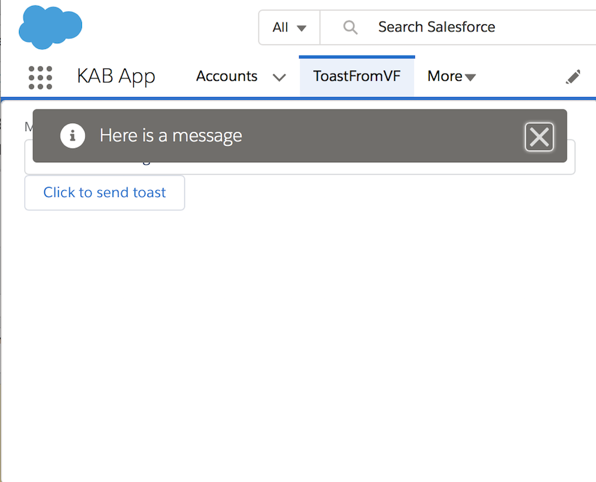
The Winter 19 release of Salesforce introduces the concept of Background Utility Items, Lightning Components that are added to the Lightning Experience utility bar but don’t take up any real estate, can’t be opened and have no user interface. This is exactly what I was looking for when I put together my Toast Message from a Visualforce Page blog - the utility bar component that received the notification to show a toast message doesn’t need to interact with the user, but still has an entry. The user can also click on the item and receive a lovely empty popup window:

Screen Shot 2018 09 08 at 08 09 52

Not the worst user experience in the world, but not the best either. I guess in production I’d probably put a message that this item isn’t user configurable. One item like this isn’t so bad, but imagine if there were half a dozen - a large chunk of the utility bar would be taken up with items that only serve to distract the user, although I’d definitely loo to combine them all into a single item if I could.

Refresher

In case you haven’t committed the original blog post to memory (and I’m not going to lie, that hurts), here’s how it works:

Toast


I enter a message in my Lightning component, which fires a toast event (1), this is picked up by the event handle in the Visualforce JavaScript, which posts a message (2) that is received by the Lightning component in the utility bar. This fires it’s own toast event (3) that, as it is executing in the one.app container, displays a toast message to the user.

Implement the Interface

Removing the UI aspect is as simple as implementing an interface - lightning:backgroundUtilityItem. Once i’ve updated my component definition with this (and changed the domain references to match my pre-release org):

<aura:component 
    implements="flexipage:availableForAllPageTypes,lightning:backgroundUtilityItem" 
    access="global" >

    <aura:attribute name="vfHost" type="String"
             default="kabprerel-dev-ed--c.gus.visual.force.com"/>
    <aura:handler name="init" value="{!this}" action="{!c.doInit}"/>
</aura:component>

When I open my app now, there’s nothing in the utility bar to consume space or attract the user, but my functionality works the same:

Toast2

You can find the updated code at my Winter 19 Samples github repo.

Related


Thursday, 3 May 2018

Lightning Application Events and Caching

Lightning Application Events and Caching

Spidey

Introduction

The lightning component framework has two types of event for intra-component communication:

  • Component
    Component events can be handled by the component that fired it, or any component above it in the containment hierarchy, so essentially any ancestor.

  • Application
    Application events can be handled by any ancestor, but also have an additional propagation phase that allows any component to receive the events, assuming they’ve already registered. 

I typically use application events in a broadcast scenario, where one of my components fires an event and a bunch of other components in my app receive it and take action. For example, when a user selects a value in a picklist and other components need to react to it. Which all worked fine until I had some cached pages.

Lightning Experience Caching

By default, the Lightning Experience will cache up to 5 last visited pages in order to speed up the browser back button. If I create a page that manages an account, and access this with the account id for Universal Contains and then AW Computing, both of these will be cached in the browser. This really speeds up performance, but has an unexpected side effect when using application events,

Even though the page managing Universal Containers is not visible, the components on it are still “live”. If my page has a custom component on it that receives application events, it will continue to receive application events while cached and not visible. This may not sound that bad, but in my case the component was receiving an event asking it to validate its contents and responding with another event to indicate the status. Both the component for AW Computing (that was visible) and the component for Universal Containers (that was not visible) received the event and responded to it. 

Once this happened I was caught in a classic race condition - whichever one responded first would be taken as the current state of my component. As always seems to happen with race conditions, it was the worst outcome that prevailed most of the time. I would be working on the AW Computing page, in which the component was in an invalid state, but the Universal Containers component, which was in a valid state, would respond first and processing would proceed when it should have been blocked. What it looked like at the time was that duplicate events were being fired - tracking down what was actually happening was rather a challenge.

What to do?

Sadly there was no way for the component to know that it had been cached, everything about the visible one was the same as the invisible one. I did try a solution where I destroyed the component once the user navigated off the page, but that meant that if I used the back button the page was cached but the component missing, which meant the user had to refresh the page - also not a great experience.

The actual fix was to move away from application events in this case and use component events. As the communication was between a custom component and it’s parent, it all worked fine. If that hadn’t been the case then I’d probably have MacGyvered something where (un)rendering the component updated a window expando to indicate which version is actually “live” - it would work but I’d feel a bit dirty for having to resort to such tricks.

Related Posts