Showing posts with label training. Show all posts

Saturday, 2 May 2020

Speaker Academy is back - and it's twice as good!


We're Back!

A few years ago, Jodi Wagner and I started up a community effort called Speaker Academy, after we noticed that most of the events that we attended had the same faces speaking each time. As I was one of those faces I didn't necessarily see it as a bad thing, but I know it's possible to have too much of a good thing!

We figured that a lot of people liked the general idea of raising their profile and sharing their experience, but hated the thought of being up on stage in front of an audience. That's pretty much how I felt about it when I started public speaking many years ago - I could see all the upsides and very much wanted those, but the potential pitfalls seemed overwhelming. I got past this by forcing myself to speak whenever the opportunity arose, and reading lots of articles about conquering your fear of failure, but it wasn't the smoothest road to travel.

So we offered candidates the chance to take advantage of our experience through a multi-week course, with a mix of presentations, hands on exercises, and dry runs of real talks with feedback. Our candidates used to graduate by presenting at a special meetup of the London Salesforce Developers, but since we went online and are pulling in people from Europe and beyond, we now ask candidates to speak at an event of their choosing and send us some pictures to prove it happened!

We've run a couple of iterations online, and each time had to rework the curriculum a little. It turns out people are much more comfortable sat in their own home in front of a screen, so we had to figure out new ways to take them out of their comfort zone. The expectations of event organisers also changed, so we had to increase our focus on things like writing an abstract.

Double Trouble!


We also ended up on different continents when Jodi moved back to the US, which made the logistics more challenging. For the last round, Jodi very kindly gave up an hour of her morning to fit around us starting just after work in the UK, but it was clear to us both that this was a short term solution.

We decided to split our teaching efforts up - we'd each find new co-hosts and run the program in parallel in Europe and the US, and I'm very pleased to announce that my co-host for the next iteration run out of the UK is Julia Doctoroff. Julia is well known in the Salesforce community and is a graduate of the very first round of Speaker Academy, and I'm excited to be facilitating with her.

The Next Round

Our next iteration of Speaker Academy Europe will be starting in the next couple of weeks - if you are interested in being a part of it, fill out the interest form to let us know. This requires a commitment to attend a weekly class of an hour or so and involves homework, so please don't sign up if you can't commit. If you drop out half way through you don't get to graduate, you've blocked someone else who could have made better use of the opportunity, and it's unlikely we'll let you back in to a future iteration.

As we give 1-1 feedback and mentoring, we are limited in terms of the number that we can accept per iteration, but if you don't make this one you will move up the list for future iterations and eventually you will get lucky!


Saturday, 3 August 2019

Mentz - Where We Do What We Want!

Mentz - Where We Do What We Want!

Introduction

In the TV adaptation of David Peace’sRed Riding" quartert of books, there’s a great scene where a group of corrupt West Yorkshire policemen are toasting their success in moving towards controlled vice : "Off the streets and out the shop windows, under our wing and in our pocket”. The final line of the toast is “To the North - where we do what we want!”.

An unusual introduction to a tech blog post, I’m sure you’ll agree, but there is a link, however tennis. Doing what we want is the ethos behind the Mentz community initiative (and I’ve always loved that scene).

Moar Developers

One reason I started Mentz is that we need more developers in the Salesforce ecosystem, and by developers I mean people that can write code to solve complex business problems, understanding the fine details of the Apex language and the pros and cons to specific approaches. There are plenty of initiatives around to get started learning Apex, but not too many where a more experienced developer casts an eye over your code and gives you feedback, about things both good and bad, and pointing you to resources where you can learn more.

Tapping into Top Talent

Another reason I started Mentz is that I felt we were missing out on accessing a lot of top talent by insisting on commitments to a set number of weeks, or a fixed set of hours (duration and/or fixed start/end times). People at the very top of our profession often can’t make those type of commitments - they don’t have that many hours to spare, they can’t commit to specific hours every week, or they are subject to the whims of a project or customer which means that plans have to change at the last minute. These people are often running companies so they can’t step away when the pressure is on. The upshot of all this is that they may not be participating as much as they want to, because they don’t want to let others down. This is a crying shame, as these are often extremely experienced and talented developer who have a lot to share.

Fear of Commitment

When you join Mentz, as a mentor or mentee, you commit to absolutely nothing. Nada. Zip. When you register an interest, you’ll receive a chatter login and if you never sign in, that’s fine. Mentors don’t get assigned mentees, and vice versa. Mentors and mentees aren’t assigned to each other, it’s much more relaxed than that. If a mentee feels like taking a challenge, they do so and upload their solution to the challenge chatter group. If a mentor feels like looking at someone’s work and giving feedback, they pick any unanswered solution (there’s a lightning web component that shows these, because we don’t want mentors wasting their valuable time scouring chatter groups). There are no programs, timelines, schedules, courses. Just people who take challenges and people who review the solutions, doing what they want when they want to. I’m not the boss of you, and nor is anyone else.

Dipping a Toe

If you’ve been put off signing up for Mentz because you think you might disappoint your assigned mentor or mentees, don’t be. If you want to try the challenges without signing up you can, just take a look at the Github organisation - you won’t be able to submit your solution until you sign up for Mentz, but it will give you an idea of what is involved. If you want to sign up for Mentz, head over to the home page and follow the appropriate signup link. It might take a while for your request to be approved, as I also do what I want with regard to Mentz, but it will happen eventually.

And Finally

Please join me in raising a glass to Mentz - where we do what we want!


Related Posts


Sunday, 23 June 2019

Mentz - The Mentee Workflow

Mentz - The Mentee Workflow

This post was updated on 03/08/2019 to remove the concept of separate mentoring and solutions chatter groups for a single challenge - this turned out to be confusing so we now have a single chatter group per challenge.


Introduction

Mentz has been around for a couple of weeks now and we’ve had our first solutions published from Jesse Twum-Boafo that received some great mentoring from Clara Perez. The one key thing that this tells me is that the process works - up until now it was only me that had been through this so I had no idea if it would work on anyone else’s setup. Now that I know it does I’ll start adding the rest of those people that have registered an interest in being a Mentor or Mentee, so if you have registered, look out for an email. 

I’m also getting rid of the ask that anybody registering be in the same timezone. I originally added this because I had some weird idea that people could only register for a single Mentz login, but I’ve since realised that this is bonkers - there’s no reason why someone can’t cut their teeth in my instance and then start/join another instance to leverage that experience. There’s also no reason why someone couldn’t have a login to every Mentz instance there is, although I’d be rather suprised if that was the case as Mentz is aimed at those that don’t necessarily have a huge amount of time. I guess we’ll see what happens.

Mentees

One area I don’t think I’ve done a fantastic job on so far is explaining the Mentee process, so a blog post dedicated to this seemed an appropriate next step.

Mentz Login

The first thing a Mentee needs is a login to a Mentz instance. Without one of these you are still free to work on the challenges, but you won’t be able to publish your solutions and receive mentoring. To sign up for a login, visit the Candidate Signup page. (I’ve also not been very consistent about what to call Mentees, but I hope to improve upon that!).

Git and Github

The Mentz challenges are hosted on Github and you need to use Git to create your local copy. If you haven’t used Git before, complete the Git and Github Basics Trailhead module.

Salesforce CLI Plugin

The next thing a Mentee needs to do is install the Mentz Salesforce CLI Plugin. This provides the solution publishing capability, ensuring that the solution is published to the correct chatter group in the appropriate format. 

If you don’t have the Salesforce CLI installed, head over to the Home Page and follow the instructions.

Once the CLI is in place, install the Mentz plugin by executing the following command:

sfdx plugins:install mentz

You can verify that the installation was successful by executing:

sfdx mentz -h

and confirming that you see the following output:

Mentz commands

USAGE
  $ sfdx mentz:COMMAND

COMMANDS
  mentz:publish publishes a solution, optionally asking for mentor feedback

Finally, authorise the Salesforce CLI to use your Mentz login:

sfdx force:auth:web:login -a MENTZ

when the browser opens, login using your Mentz instance credentials. The ‘-a MENTZ’ switch creates a shortcut alias of ‘MENTZ’ which you can use when submitting challenges - use anything you like here, but remember to replace any instances of ‘MENTZ’ in the examples below with your chosen alias.

And that’s it - you are now all set to take on a challenge.

Challenges

All Mentz challenges live at the mentzbb organisation on Github - each challenge has a brief description of what it covers:

Click into a challenge to see the underlying details and code. If you want to take a challenge you need to clone the repository and change some of the code. For the purposes of this post I’ll be using the SimpleConditional challenge as an example, but all challenges follow the same pattern.

First step is to clone the repository - there’s a helpful button on the challenge main page to steer you in the right direction

Click the ‘Clone or Download’ dropdown button and you can copy the URL you need to clone. 

I use Git from the command line, so from my home directory I execute:

$ git clone https://github.com/mentzbb/SimpleConditional1.git

which does its thing and produces the following output:

Cloning into 'SimpleConditional1'...
remote: Enumerating objects: 25, done.
remote: Counting objects: 100% (25/25), done.
remote: Compressing objects: 100% (17/17), done.
remote: Total 25 (delta 7), reused 19 (delta 4), pack-reused 0
Unpacking objects: 100% (25/25), done.

The contents of the repository are as follows:

Where:

  • CHALLENGE is a file that the Salesforce CLI plugin uses to determine which challenge this is.
  • force-app contains the source format version of the challenge.
  • README.md is the home page for the challenge repository on Github.
  • src contains the metadata format of the challenge.

Completing a Challenge

To complete a challenge, you build out the sample class so that all the tests in the associated test class pass.

In the case of the SimpleConditional1 challenge, the sample class to be built out is SimpleConditional1.cls, and the tests from SimpleConditional1_Test.cls need to pass to complete the challenge. It doesn’t matter which of the source or metadata format classes you build out, and you only need to build out one of them.

Each method in the sample class has a comment that explains what processing it needs to carry out, e.g.

public static Boolean IsPositive(Integer num)
{
    // change this method to return true when
    // the number is greater than zero and false otherwise
    return null;
}

In order to run the unit tests, you need to send the code to a Salesforce instance. There are several ways of doing this, detailed in the following sections.

Scratch Org Development

If you want to develop against a scratch org, you’ll work on the source format code. Edit the code under the force-app directory and send to the scratch org using the command:

sfdx force:source:push

You can execute the tests in the org using the developer console, or the Salesforce CLI command:

sfdx force:apex:test:run -t SimpleConditional1_Test

Once you are happy with your code, you can request mentoring using the command:

sfdx mentz:publish -c "<comment>" -u MENTZ -m
-f ./force-app/main/default/classes/SimpleConditional1.cls

Where ‘<comment>’ is anything you wish to say to draw the mentor’s attention too.

Developer Edition Development

If you want to work against a developer edition, you’ll work on the metadata format code. You will need to authenticate the Salesforce CLI against the developer edition instance using the same approach as you did to authenticate against Mentz - don’t forget to set up a different alias!

Edit the code under the src directory and deploy to the developer edition using the command:

sfdx force:mdapi:deploy -d src -w 10 -u <username>

Where <username> is the alias for this org.

You can execute the tests in the org using the developer console, or the Salesforce CLI command:

sfdx force:apex:test:run -t SimpleConditional1_Test -u <username>

If you don’t want to actually deploy the code anywhere, but just run the tests, you can add the -c switch and ask the deploy command to run the tests using the following command:

sfdx force:mdapi:deploy -d src -w 10 -u <username> -c
-t SimpleConditional1_Test

Once you are happy with your code, you can request mentoring using the command:

sfdx mentz:publish -c "<comment>" -u MENTZ -m
-f ./src/classes/SimpleConditional1.cls

Where ‘<comment>’ is anything you wish to say to draw the mentor’s attention too.

Using the Developer Console

If you don’t want to deploy the code, you can use the developer console as follows:

  1. Open the developer console
  2. Click the File menu and select New -> Apex Class
  3. Name the Apex class SimpleConditional1
  4. Copy the contents of the force-app/main/default/classes/SimpleConditional1.cls and paste this into the new apex class.
  5. Save the class
  6. Click the File menu and select New -> Apex Class
  7. Name the Apex class SimpleConditional1_Test
  8. Copy the contents of the force-app/main/default/classes/SimpleConditional1_Test.cls and paste this into the new apex class.
  9. Save the class
  10. Work on the SimpleConditional1 apex class as you usually would until all the tests in SimpleConditional1_Test pass.
  11. Copy the contents of the SimpleConditional1 class from the developer console and paste this into force-app/main/default/classes/SimpleConditional1.cls in your local filesystem.

You can then publish a solution, optionally requesting mentoring using the command:

sfdx mentz:publish -c "<comment>" -u MENTZ -m
-f ./force-app/main/default/classes/SimpleConditional1.cls

Where ‘<comment>’ is anything you wish to draw the mentor’s attention to and the ‘-m’ switch adds a comment requesting mentoring.

Discussion

Once you have published your solution, a Mentor will pick this up when one is available. As the idea behind Mentz is that people dip in when they have time, it may take a few days before anyone responds. It will be worth the wait.  The discussion takes place in a chatter group dedicated to the specific challenge, so you just login with your Mentz credentials and start talking.

Still in Beta

Mentz is still in beta, so things are likely to change, for example:

  • Now that Summer 19 is live and deployment from source format to non-scratch orgs is GA, the metadata format version of the challenges will be going away
  • Separate commands and chatter groups for mentoring and publishing solutions may be merged.

Related Posts

 Follow @bob_buzzard

Friday, 15 March 2019

O Trailhead! myTrailhead!

O Trailhead! myTrailhead!

Captain

Introduction

After a fairly lengthy wait (announced at DF 17 and 18) myTrailhead officially launched on March 6th 2019. Simply put, this allows you to provide much of the Trailhead features that you know and love (minus some, plus some others) within your organisation to create your own continuous learning system. Trails, modules, badges and points are all there.

The main addition is you can add items such as corporate presentations and documents to a trail, so you can re-use existing collateral without having to migrate it to Trailhead quiz format. You can also combine standard Salesforce Trailhead modules into your own trails, so there’s no need to reinvent the wheel.

The big minus is that (I think) the automated checking of code/configuration assignments isn’t (currently) available. While I’ve seen references to Trail Checker, as far as I can tell this is more of a manual check than the kind of automation we are familiar with from Superbadges. I can’t say I’m surprised by this - turning a verification system of this nature into a product is no small undertaking, but it would be a very powerful addition for those of us regularly on boarding admins and developers to maintain our existing Salesforce applications.

Familiarity Goes a Long Way

The familiar styling should help adoption. Trailhead is extremely widely used by Salesforce admins, devs, and users (and many of their children, for some reason) and a UI/UX that they are already intimately familiar with will immediately remove some barriers. I’m also pretty sure that the chance to earn more badges and points will be jumped on with alacrity.

Content is King

myTrailhead also includes content management - modules and trails are combined into releases that can be published (accessible to your users) or unpublished (the next iteration, currently being created or reviewed), giving fine grained control on when users can access content and ensuring that it is fit for purpose. As mentioned earlier, you can link to existing Trailhead content so you have a head start in terms of material that isn’t specific to your business.

This is the mechanism of managing content that is provided by myTrailhead. However, creating the content is a task that is all yours and should absolutely not be underestimated. Managing a library of engaging training content and ensuring this is kept up to date when underlying processes or applications change can be a huge task. I can’t imagine how long the Trailhead content team spend on this for a new Salesforce release, but one thing I can tell you is that they don’t ask the developers to do it in their spare time, so if you want a system that will be used, be prepared to invest in a content team of your own. By the same token, if you library consist of half a dozen badges from a couple of years ago, don’t be surprised if nobody is interested in earning them.

Licensing

Up until now I’ve been broadly positive about this, which might come as a surprise to regular readers of this blog, and here comes the negativity. I think Salesforce have made a bit of a mistake with the licensing.

myTrailhead is a $25/user/month add-on. While this isn’t cheap, that isn’t where my beef lies. Instead it’s the fact that it’s an add-on to an Enterprise Sales/Service/Platform license. So if I’m part of a large company (I’m not) and I want to use myTrailhead for staff that aren’t Salesforce users, I have to buy them a Salesforce license they will never use and then add myTrailhead on top of it. And of course I won’t do that, as it makes the cost prohibitive. Instead I’ll do it all on another platform or run two training systems, one for Salesforce users and one for everyone else, which will cause confusion. Or I’ll buy 10 licenses and continually cycle them around users when new training content becomes available.

A standalone license including myTrailhead and chatter, for example, would make much more sense from a purchasing perspective and allow me to train all my users through a single system. Hopefully this is being used to throttle uptake in the short term and we’ll see more licensing options in the future, otherwise I fear that it will only achieve a fraction of its potential.

Related Posts


Monday, 5 November 2018

Situational Awareness

Introduction

Train

This is the eighth post in my ‘Building my own Learning System” series, in which I finally get to implement one of the features that started me down this path in the first place - the “Available Training” component.

The available training component has situational awareness to allow it to do it’s job properly. Per Wikipedia, ituational awareness comprises three elements:

  • Perception of the elements in the environment - who the user is and where they are an application
  • Comprehension of the situation - what they are trying to do and what training they have taken
  • Projection of future status - if there is more training available they will be able to do a better job

Thus rather than telling the user that there is training available, regardless of whether they have already completed it, this component tells the user that there is training, how much of it they have completed, and gives them a simple way to continue. Push versus pull if you will.

Training System V2.0

Some aspects were already in place in V1 of the training system - I know who the user is based on their email address, for example, However, I only knew what training they had taken for the current endpoint so some work was required there. Polling all the endpoints to find out information seemed like something that could be useful to the user, which lead to sidebar search. Sidebar search allows the user to enter terms and search for paths or topics containing those terms across all endpoints:

Screen Shot 2018 11 05 at 15 47 18

Crucially the search doesn’t just pull back the matching paths. it also includes information about the progress of the currently logged in user for those paths - in this case, like so much of my life, I’ve achieved nothing:

Screen Shot 2018 11 05 at 15 47 24

In order to use this search, the available training component needs to know what the user is trying to do within the app. It’s a bit of a stretch for it to work this out itself, so it takes a topic attribute. 

I also want the user to have a simple mechanism to access the training that they haven’t taken, so the available training component also takes an attribute of there URL of a page containing the training single page application. 

Examples

Hopefully everyone read this in the voice of Jools from Pulp Fiction, otherwise the fact that there’s only a single example means it doesn’t make a lot of sense.

An example of using the new component is from my BrightMedia dev org. It’s configured in the order booking page as follows:

<c:TrainingAvailable modalVisible="{!v.showTraining}" 
    trainingSPAURL="https://bgmctest-dev-ed.lightning.force.com/lightning/n/Training" 
    topic="Order Booking" />

where trainingSPAURL is the location of the single page application.

Also in my booking page I have an info button (far right): 

Screen Shot 2018 11 05 at 16 12 45

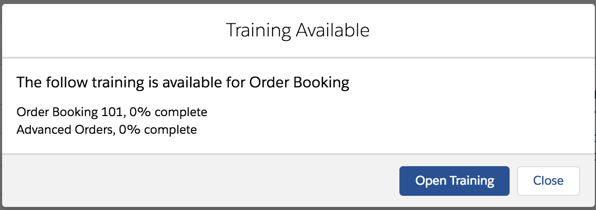
clicking this toggles the training available modal:

Screen Shot 2018 11 05 at 16 15 10


Which shows that there are a couple of paths that I haven’t started. Clicking the ‘Open Training’ button takes me to the training page with the relevant paths pre-loaded:

Screen Shot 2018 11 05 at 16 15 24

Related Posts


Saturday, 31 March 2018

Building My Own Learning System - Part 6

Building My Own Learning System - Part 6

Versions

Introduction

In previous posts in this series I covered the initial idea and development through to sharing the code with installation, configuration etc instructions. Now that I have the basics working I’ve started to iterate and add a few features. Oddly the first feature I added was the one that I most recently thought of - the ability to display a custom message to the user when they complete a path, retrieved from the path itself. I’m thinking that this will allow me to carry use the system for more interesting challenges - complete a path to get a keyword, or a location, something like that anyway,. I did say I’d just thought of it, not that I’d thought it through!  It was only a few lines of code to implement this, just a change to the PassStep method so that it returned a tuple of a completed state and message to display, A few tweaks to the unit tests and I carried out an sfdx deployment to my sample endpoint and verified with my updated client code that all was working as expected and my sample Bob Buzzard character path was displaying the custom message:

Screen Shot 2018 03 31 at 16 14 48

Then it hit me - anyone that didn’t have my new client would get errors when accessing the sample endpoint, and they’d have to dig into the debug logs to figure out why. Suddenly it was important to add another feature. (Looking at my sample endpoint it appears that there’s only me using it at the moment anyway, so I guess if you are going to break things then the earlier the better!).

Versioning

Like most things in the tech world, there are loads of different ways to handle versioning. I considered the Salesforce route of having different endpoints for each version and discounted it. I’m not convinced that I want to be supporting older versions and I don’t particularly want to get into managing a number of classes representing historic versions. Salesforce can do this because they have more than one person maintaining things in their downtime, and if I ever become a multi-billion dollar company I’ll reconsider.

The route I ended up going was defining the version for each of the client and server in code, and having the client send its version with every request to an endpoint. The endpoint then compares this to its version and decides if it can handle the request. This gives me the option of supporting older versions if I want to, without committing me to any level of service! If the endpoint can't handle the request it throws an exception indicating what needs to happen - either upgrade the client or ask the admin of the endpoint to upgrade that. The updated client displays the error message to the user who can jump on any required action.

Installing the Latest ... Version

The current version of the system is now V1.0, and I’ve created github releases for both the endpoint and client, both of which have been tagged as V1.0. 

The unmanaged package the client V1.0 release is : <Salesforce instance>/packaging/installPackage.apexp?p0=04t0O000001IqIm

Related Information

As I plan to continue with these posts as I add new features or learn that I’ve made a terrible mistake should have done things differently, I’ve moved the list of posts into a dedicated page on this blog. 


Saturday, 24 March 2018

Building My Own Learning System - Part 5

Building My Own Learning System - Part 5

Backend server theres something very familiar about all this

Introduction

In Part 1 of this blog series I covered the problem I was trying to solve (on-boarding/accrediting internal/external staff using common content, but without opening up everything to the entire world) and the data model I was using to manage this. Part 2 was around the fledgeling user interface and a fake service to prove confidence in the method. Part 3 covered the backend, or at least the initial implementation of this - as long as there is a local interface implementation to connect to it, the concrete backend can live anywhere. Part 4 walked through the front end setup and configuration and shared the code.

In part 5 I’ll cover installing the backend code, setup of a remote endpoint, creating a training path and configuring the new endpoint for your client to access. I’ll also share the code.

Code First

 The back end code lives at : https://github.com/keirbowden/bbtrnremote

Installation

As the back end manages the data, an unmanaged package isn’t an option as it would mean recreating all training paths etc each time there was an update. As I mentioned in Part 4, I don’t think a private managed package is the right thing for something that people might install in orgs with real data, so the back end is intended to be installed as a discrete set of components. For example, using the Salesforce CLI you could deploy from the cloned repository directory using 

    sfdx force:mdapi:deploy -d src -u <username>

where <username> is from an org that you’ve previously authorised. If you are using something other than the Saleforce CLI then best of luck - I’d switch to the CLI myself ;)

Configuration

There’s a bit more to the back end compared to the front end:

  1. Enable MyDomain (there is a Lighting action and overrides, although not as many as I’d like)
  2. Assign the Training Admin permission set to your user
  3. Create a tab for Training Paths - everything else is reachable from that
  4. Create a Training Path, including at least one step and at least one question in that step. You can also create a badge to go with it if you want -  the code will handle it either way.
  5. Create a Force.com site and note down it’s address.
  6. Add the Training Site permission set to the Guest User for the site (via Public Access Settings -> View Users)

Then switch over to your client org and configure the endpoint:

  1. Add a Training Endpoint custom metadata entry - name and label as you desire and the following fields populated:

    Hostname: https://<site address>
    Path: /services/apexrest/TrainAPI
    Rewrite Image Links: Checked

  2. Add the site address to the remote site settings

And away you go. If you get any errors, have a look at the debug logs. Typically errors will be data related and I find that the stack trace in the client logs shows me what the problem is.

Caveat Emptor

Same as with the front end, the error handling is pretty basic, I just let the errors make their way back to the client. If you are authoring a training path, make sure you have a test front end to try it out on before you make it available to your users.

Same as the front end again, nothing is labels. 

Creating a training path and most of the associated data is via the regular Salesforce object pages, so be prepared to traverse a bit. The exception to this is when creating a question. The New Question action on the Training Step page will create a new question and take you to a Lightning page that allows you to manage the question and all of it’s associated answer on a single page. Over time more of this type of assistance will be added. I haven’t really focused on it yet as this is the kind of thing that admins rather than users will be accessing as a rule.

Conclusion

If you hit problems, raise an issue in the appropriate Github repo:

I’m not sure what will be in the next instalment. I might go through some of the code in more detail, or there might be new features to talk about. Stay tuned.

Related Posts


Sunday, 4 February 2018

Building My Own Learning System - Part 2

Building My Own Learning System - Part 2

Introduction

In Part 1 of this blog series I covered the problem I was trying to solve (on-boarding/accrediting internal and external users with the same content, but without opening up all my content to everyone) and the data model to support this.I also mentioned that this isn’t an attempt to rebuild Trailhead, and that is still the case.

In this post I’ll cover the user interface and the elements of the solution that allowed me to test it without having the build out the entire backend.

The “Design"

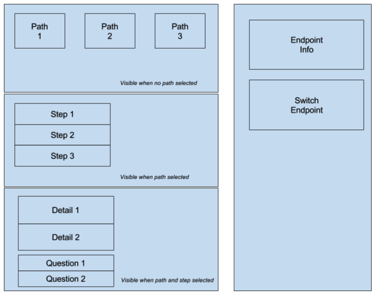
The first thing I did was to sketch out what I wanted a couple of the components to look like. The original sketches are below, and I think we can all agree that this communicates the entire concept of the look and feel I’m trying to achieve ;)

Screen Shot 2018 02 04 at 07 35 23 png

It did help me to think about how I wanted things to work though.

Single Page Application

I wanted a single page application (SPA) as I wasn’t going to have the sobjects in the same instance as the client, so lightning navigation between sobjects wasn’t an option. This does present a challenge with regard to bookmarking, but that is something I think I can do by making the SPA support URL parameters. The user might have to jump through a couple of extra hoops, but nothing too arduous, so I felt happy kicking that down the road to a later release.

The SPA consists of a central section and right hand sidebar,  The sidebar contains details of the current content endpoint and allows switching of endpoints, while the central section contains the actual learning content. The page is constructed from a number of lightning components and styled using the SLDS, as I want people to use it from inside Salesforce so it’s important that the styling is familiar.

Screen Shot 2018 02 04 at 08 04 50 png

Fake News

When I’m building an application of this nature, I’ll usually create a fake data provider so that I can get the UI flow without having to put a lot of effort into writing the actual server side implementation. Usually this is because I’m building it out in my spare time and it allows me to get something to throw stones at in place quickly.  As I’m looking at a distributed system in this case, it was even more useful as I didn’t have to create remote content endpoints and manage the integration with them. Instead I created the initial cut of the Apex interface that I want an endpoint to support and then wrote a faker implementation class that would return indicative but hardcoded responses.  This approach has the added benefit of allowing me to iterate on the interface without having to update multiple implementations of it.

Training Page

My training page is a lightning page with the training SPA added to it. Notice that I didn’t create a header aspect for my SPA - this is because a lightning page automatically adds a header that I can’t customise. The page thus has the lightning experience global header and the standard page header, so if I add a third one then most of the visible area is consumed. 

The SPA initially displays the available training paths from the fake service, laid out as a wrapping grid that shows 3 paths per row for the desktop and 1 per row on mobile:

Screen Shot 2018 02 04 at 08 39 08 png

Clicking on any of the paths shows the underlying steps that I need to complete:

Screen Shot 2018 02 04 at 08 39 20 png

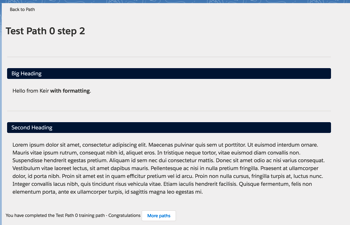
and clicking into a step takes me to the actual content with any questions that have been defined, although for the demo step I’ve chosen here the fake service pretends I’ve completed it:

Screen Shot 2018 02 04 at 08 39 42 png


And that wraps up this post. In the next instalment I’ll cover the integration with a remote endpoint.

Related Posts


Saturday, 13 January 2018

Building My Own Learning System - Part 1

Building My Own Learning System

Learn

Introduction

Before I get started on this post, I want to make one thing clear. This is not Trailhead. It’s not Bob Buzzard’s Trailhead. It’s not a clone or wannabe of Trailhead. While it would be fun to build a clone of Trailhead, all it would be is an intellectual exercise to see how close I could get. So that’s not what I did. I didn’t build my own Trailhead. Are we clear on that? Nor is it MyTrailhead, although it could be used in that way. But again, I’m not looking to clone an existing solution, even if it is still in pilot and likely to stay there for a couple of releases. I’m coming at this from a different angle, as will hopefully become clear from this and subsequent blog posts. Put the word Trailhead out of your mind.

All that said, I was always going to build my own training system. Pretty much every post I’ve written about Trailhead had a list of things I’d like to see, and I can only suppress the urge to write code in this space for so long. This might mean that I moderate my demands, realising how difficult things really are when you have to implement them rather than just think about them in abstract form.

The Problem

Trailhead solves the problem of teaching people about Salesforce at scale, with content that comes from the source and is updated with each release. MyTrailhead is about training/onboarding people into your organisation. The problem I was looking to solve was somewhat different, although closer to MyTrailhead. I wanted a way to onboard people from inside and outside my organisation onto a specific application or technology, but without sending everyone through the same process.

For example, regular readers of this blog or my medium posts will know that I run product development at BrightGen, and that we have a mature Full Force solution in BrightMedia. We also have a bunch of collateral and training material around BrightMedia that I’d like to surface to various groups of people:

  • Internal BrightGen sales team
  • Internal BrightGen developers
  • External customer users

I don’t particularly want a single training system, as this would mean giving external users access to internal systems. It’s also likely that I’ll have a bunch of training information that isn’t BrightMedia specific, and I don’t really want to colocate this with everything else.

Essentially what I’m looking for is a training client that can connect to multiple endpoints, each endpoint containing content specific to a product/application/team. That, and a way to limit who can access the content, allows me to colocate the content with the application, potentially in the packaging org that contains the application.

The First Stirrings of the Solution

Data Model

As the client won’t be accessing data from the same Salesforce org, or potentially any Salesforce org, my front end is backed by a custom apex class data model rather than sObjects:

Screen Shot 2018 01 13 at 18 12 00

I’ve deliberately chosen names that are different to Trailhead, because as we all know this isn’t Trailhead. I was very tempted to use insignia rather than badge, as I think that gives it a somewhat British feel, but in the end I decided that would confuse people. Each path has topics associated with it so that I can see how strong a candidate is in a particular field. The path and associated steps are essentially the learning template, while the candidate path/step tracks the progress of a candidate through the path. A path has a badge associated with it and once a candidate completes all steps in the path they are awarded the badge. The same(isn) data model as myriad training systems around the globe.

The records that back this data model live in the content endpoint. Thus the candidate doesn’t have a badge count per se, instead they have a badge count per functional area. In the BrightGen scenario they will have a badge count for BrightMedia, and a separate badge count for other product areas. The can also have multiple paths in progress striped across content endpoints.

User Interface

I created the front end to work against these custom classes as a single page application. As the user selected paths and steps the page would re-render itself to show the appropriate detail. I’m still tweaking this so I’ll cover the details in the next post in the series.

Show me the Code

I don’t plan to share any code in these posts until the series is complete, at which point I’ll open source the whole thing on github, mainly because it isn’t ready yet. I’m pretty sure I’ve got the concepts straight in my head, but the detail keeps changing as I think of different ways of doing things.


Wednesday, 13 April 2016

The Case of the Missing Mascot

The Case of the Missing Mascot

Trailhead module wheres astro

Introduction

There's just over a day to go to help the Trailhead team in the search for missing mascot Astro, so if you haven't already pitched in, get yourself over to :

https://developer.salesforce.com/trailhead/module/wheresastro

where you can earn the badge and even get the chance to win a prize*

Where’s Astro?

This is a somewhat different module to the others - rather than learning about a particular feature of Salesforce and then answering some questions or completing a challenge, you are instead helping to solve a mystery (where is Astro) by searching for clues in the Trailhead content.

The clues will direct you to other modules, so if you don't have the badges for those (really, you don't have them all?) its a perfect opportunity to improve your Salesforce knowledge while investigating. If I'd been setting this up we'd have to complete the modules, but the Trailhead team were clearly overwhelmed with worry about their missing mascot and went easy on us.

Of course, it wouldn't be Trailhead if you didn't have to carry out some setup and configuration,so you can expect to track the progress of your investigation in a Salesforce Developer Edition, much like Sherlock Holmes would, if the modern version wasn't on the BBC and thus not allowed to advertise products :)

There's no coding involved, and the setup is pretty straightforward, so this is very much a module for all (or no!) skill sets - when a mascot's life hangs in the balance you need all the help that you can get, especially people that aren't averse to leaving their computer and going outside!

Keeping Everyone in the Loop

One aspect that I particularly liked were the tweet buttons at various points that posted out cryptic updates about progress:

Screen Shot 2016 04 13 at 16 57 23

a great way to get others interested and let the concerned population know that the search continues at full steam. Continuing with the Sherlock Holmes association, this is the modern equivalent of the agony columns that featured in many of the stories.

Leaving Everyone Hanging

The first rule of earning the Where’s Astro badge is that you don’t talk about the outcome of the investigation. If you don’t complete this module yourself you’ll have to wait until the Trailhead team spills the beans some time after the competition closes, and I hope you can live with yourself in the meantime.

As mentioned earlier, the search finishes on April 14th, so get your magnifying glass and deerstalker hat and join in while there is still time.

* Confession time - I didn't realise this was a competition until earlier today. What happened, as is always the case, is that I saw a new badge was available and I had to have it :)

Saturday, 20 February 2016

Learn to Lead with Trailhead

Learn to Lead with Trailhead

Screen Shot 2016 02 20 at 15 40 50

Introduction

In what seems like an ever reducing timescale, a set of seven new Trailhead badges are with us. Continuing the theme from the last round, some of these go outside the comfort zone of developer/administrator, covering leadership topics. Which I think is awesome. Its also a testament to the versatility of the Trailhead system, although obviously there is no automated challenge checking on those badges as there isn’t a developer edition that allows you to try out leading a team of people. That would be beyond awesome. And prohibitively expensive.

The Badges

  • Coaching and Feedback

    The basics on motivating and coaching members of your team. Useful for both new team leaders, and those who have got into the habit of only talking to their team when mistakes have been made or they want something. Don’t assume your people know how much you value their contribution - make sure to tell them.
     
  • Great Management

    Learn how Salesforce managers manage. This module also covers understanding your strengths and weaknesses as a leader. Assuming you have any weaknesses, which many people think they don’t. They are wrong and this module will help them to realise that.
     
  • Microsoft Integration Basics

    Getting to grips with the options for integration with Microsoft Outlook. To App for Outlook or not to App for Outlook, that is the question.
     
  • Microsoft Integration Benefits

    A high level overview of why you should integrate Microsoft products with Salesforce, and which product is most appropriate for your organisation. I’m a Mac users, so this doesn’t affect me directly, but I’m also a consultant so I need to know it. 
     
  • ISV App Strategy

    Choosing the right license model, supporting multiple editions, and what you should think about before you start building an app. An excellent primer.
     
  • Asynchronous Apex

    A more old-school trailhead module - hard core Apex with challenges to test you can apply what you have learned. 
     
  • Spring 16 Release

    Another new area for Trailhead training - key release features. I’m a big fan of anything that helps get the word out about whats in new Salesforce releases, as the BrightGen youtube channel webinars playlist will attest. The Trailhead format is a good fit for this, and I’d expect the gamification around the challenge questions will get people to dig into things in a bit more detail.

Ever Increasing Topics

One thing is clear from each update to the Trailhead content - as its popularity increases the scope widens. I’d imagine there’s a long queue of Product Managers outside the office of Chris Duarte in Salesforce HQ, all desperate to get a module or two published in the next release. Make ‘em work for it I say - require implementation of ideas from the success community to get access to the Trailhead community. My ideas, for example, would be an excellent start.

Everyone’s a Critic

While its great to see Trailhead branch out from its Salesforce config/development roots, there’s always room for improvement.

  • Org-Specific Trails - I’ve mentioned this before and I’m going to keep banging on about it until I get what I want. I’d love to be able to build trails specific to my own orgs, to train up users for whom I’ve built a custom application for example. All I want is a small piece of the traction and take-up that Trailhead has had.
     
  • MegaBadges - I wrote this post with Mega Shark versus Giant Octopus playing in the background, and Giant Badges didn’t have the same ring to it. The trick is obviously to decide what differentiates a MegaBadge from a regular badge, as some of the project badges already require quite a bit of effort. Maybe they are badges that are only unlocked once you have earned a bunch of qualification badges. I’m just the ideas man really.

Related Posts


Wednesday, 30 December 2015

New Year, New Trailhead Badges

Badges

Overview

The Trailhead juggernaut keeps rolling, with a new trail and 6 (count ‘em) new badges, taking the totals up to 13 trails and 70 badges (not counting the community badges which you get for earning a new badge on a particular date, such as halloween, which is always tricky for those of us who already have all the badges, but these are the first world problems I am cursed with).

So What’s New?

  • Advanced Formulas
    This strikes me as an excellent fit for Trailhead, as the challenges will be tightly focused on a single formula field which satisfies a well-defined set of requirements. I’d imagine there was some competition in the team that writes the code that checks the challenges for this one.
     
  • Apex Integration Services
    If you haven’t done much of this before, get cracking. Its a good grounding in the topic and gets you writing code that carries out real integrations, but in a much safer environment than a customer org! 
     
  • Lighting Experience Chatter Basics
    One aimed more at the newbies than the experienced administrator or developer, which is a good thing as we want new people using the platform.

  • Lightning Data Management
    Getting data in and out. Useful information if you are considering a career with a Salesforce partner, as I guarantee that any project you work on will have some form of data migration, and it always takes longer than you expect!

  • Application Lifecycle Management
    Okay, so this is a rewrite rather than a new module. If you’ve taken this in the past you won’t be able to retake it, but if you held off waiting for some different words your masterful inactivity has paid dividends.

    and saving the best until last
     
  •  Build a Battle Station App
    A themed project to coincide with a film that you might have heard about. This kind of thing is what makes Trailhead fun and keeps it interesting. This is one of the few badges that I have remembered to add to my LinkedIn profile, which shows how valuable it is

So What’s Next?

I wish I knew. Or maybe I do and those pesky NDAs stop me from telling you. Unfortunately I don’t. But is that what the NDA forces me to say. Its all so uncertain.

One prediction I will make is that the number of badges will break 100 in 2016, and I’d expect this to happen around July/August time.

New Year, New You

As I mentioned above, there are now 70 badges available, so if you haven’t made a dent in them by the start of 2016 you’ll struggle to catch up and be forever chasing those last x badges.

Make a New Year’s resolution that will have real impact (on your career, your reputation, your battle station building capabilities) and resolve to earn more badges!

Related Posts


Saturday, 14 November 2015

Trailhead in the Wild

Trailhead in the Wild

Screen Shot 2015 11 14 at 16 54 32

Available, generally 

Trailhead is out of beta and generally available, so if you’ve been holding back in case it disappeared (pretty unlikely given the dev zone at DF15 was built around it) you can now jump in with both feet. It also has an updated UI, which feels a lot faster to me, even on what passes for an internet connection to my home!

Find what you need faster

Its now easier to find the right content for you - after clicking on the ‘Learn Trailhead for Free’ button, you are presented with a popup dialog where you choose between Admin, Developer or Business User:

Screen Shot 2015 11 14 at 16 51 51

of course the correct approach to Trailhead is to take everything, so this is really more a case of deciding the order in which you want to cover things!

Trailhead has also been incorporated into the search functionality, so if, for example, you search for ‘Lightning’ you’ll get details of the 30 trails with Lightning content - perfect if you are looking to learn about a specific feature of Salesforce.

Look mother, I’m dancing!

Its now even easier to seek and get the attention you deserve for your Trailhead accomplishments.

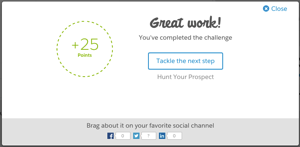
After passing a step you get some nicely styled flattery and the option to share this milestone with your social media followers.

Screen Shot 2015 11 13 at 21 18 17

Gain a badge and the ante is upped considerably - not only can you ram this down the throat of the badge-poor on social media:

Screen Shot 2015 11 13 at 21 25 57

but you can also post this to your LinkedIn profile and thus receive further connection requests and messages from recruiters desperate for Salesforce candidates:

Screen Shot 2015 11 13 at 21 27 10

Here’s my latest badge on my LinkedIn profile (Look, there’s my Technical Architect cert, how did that get in there? Oh well, best leave it in for now!).

Screen Shot 2015 11 13 at 21 28 46

At the moment it looks like you can only add new badges to LinkedIn, something that LinkedIn are probably okay with, given that they’d be looking at the flood of over 250,000 badges that have been earned to date!

All I want for Christmas

So what does the future hold for Trailhead? Even if I knew, one of the many NDAs that I’ve signed over the years would no doubt preclude me from talking about it. What’s the first rule of the future of Trailhead?

Given how successful and high profile Trailhead has been to date, I think it's safe to assume we’ll continue to see the content expanded and the experience improved. Here’s a few things that I’d really like to see, and be assured that I have given no thought to how expensive or difficult they might be to achieve:

  • Private trails
    I’d imagine that pretty much every Salesforce customer and partner would find this useful - the ability to create trails around your own custom processes and applications, along with exercises, verification and badges would be a great benefit when on-boarding new staff.
  • Groups of users
    Obviously I’d use this to pit my colleagues against each other to see who could upskill on a particular area the fastest. I think I’d have a lot of fun with this.
  • API Access to Trailhead Profiles
    I’d use this to build a leaderboard for my company, to shame the badge-poor give new hires something to aim for. Then I’d probably use it for evil, so oauth would be a good authorisation mechanism as users could easily revoke my access.
  • Fantasy Trailhead
    Team Managers would pick teams of community users and get points as they gained Trailhead badges. Maybe they would lose points if their team didn’t gain badges quickly enough. Gamification squared if you will. It would also open up Fantasy Fantasy Trailhead, where you would pick teams of Team Managers, and so on, for ever.

Still free, as in beer

Shutup

Nothing down and nothing a month.

Saving the best until last

When you open the Trailhead home page and scroll down, you’ll see my face over the Developer Trails link, and I think we can all agree it doesn’t get any better than that.

Related Posts


Saturday, 8 August 2015

Trailhead - Bigger, Better, Badgier

Trailhead - Bigger, Better, Badgier

Screen Shot 2015 08 08 at 08 06 29

Introduction

Trailhead has received a major injection of new content in the run up to Dreamforce, and now boasts 30 projects, 7 trails and 6 projects.

If you haven’t used Trailhead yet (Seriously? What have you been doing with your free time?), take a look at my intro blog post to cover the basics.

New Trails

A number of trails have received additional content, but there are also two brand new trails to get tackle:

  • Admin Trail - CRM
    Up until now the trails tended to be focused on customisation or development of the platform side of Salesforce, but that’s no longer the case. This trail introduces the concepts of Accounts, Contacts, Leads and Opportunities, and takes you through configuring sobjects, creating records, setting up a sales process and assigning and converting leads. These are all key skills for administering a Sales Cloud implementation, so if you are thinking of taking your career in that direction its an excellent starting point
  • Dreamforce Trail
    A short trail, comprised of a single module with 3 steps. If you are going to Dreamforce for the first time this year, get the heads up on the general experience and specifics for admins and developers. I’ll be there again this year, but in a change of pace I’ll be manning a stand in the customer success zone so I won’t be able to spend the whole week in the dev zone as I usually do.

New Badges

There are 5 new badges available - 4 across the two new trails covered above, and one for the new Event Monitoring module.

Event Monitoring

Screen Shot 2015 08 08 at 08 11 00


This is a new module on the Intermediate Developer Trail, this is an example of why you should check back with Trailhead regularly - just because you completed a trail a couple of months ago doesn’t mean that’s still the case!

The Event Monitoring module is a shining example of another Trailhead benefit - it gets you working on aspects of the platform you might otherwise miss out on. The event log is something I’ve read about and answered questions on when maintaining certifications, but its not something that I’ve had reason to use up to now. This module not only gets into the details, but also has you working with the event log in your developer edition via the workbench.

Quick Starts and Projects

These aren’t new, but are something that I’ve only just picked up on. The quick starts are ideal if you want to get a rapid, hands on introduction to a particular area of the platform but you only have half an hour or so to spare. The projects require a more significant investment of time, and consist of a number of modules that layer on each other to build a full blown application.

Don’t Delay

There’s a lot of content on Trailhead already. and its only going to get bigger (and badgier!), so the sooner you get started the sooner you’ll have a plethora of badges to brag about on your social media channel of choice.

Screen Shot 2015 08 08 at 08 26 03

Related Posts


Tuesday, 24 March 2015

Lightning Strikes the Trails

Lightning Strikes the Trails

Lightning london

Overview

Just in time for Lightning Developer Week around the globe, new Lightning modules were released for Trailhead including one for Lighting Components. Up until now, most of the content on Trailhead has been subjects that i’m very familiar with (although that hasn’t stopped me dropping points through not reading the challenges properly :) 

The Lightning Components was a different experience - as these have not long made it into beta, and more importantly still don’t play nicely with canvas apps, I’d been dabbling at best, mainly around follow along tutorials where I didn’t have to concentrate too hard.  The Trailhead challenges get you to write real code against a set of requirements and then automatically validates whether you’ve succeeded.

We’re not in Kansas any more

This is really useful as Lightning Components present a different programming challenge to the Apex/Visualforce paradigm we’ve used in the past:

  • The majority of the code is in JavaScript. This will no doubt scare a few old school developers who think anything not related to presentation should be handled by the server, but its the future - of that I have no doubt.
  • The Apex that you do use is stateless - if you don’t send information from the front end as a parameter, the controller won’t have access to it.
  • Communication between components is via JavaScript events.  This is awesome.  Previously to communicate between Visualforce components you had to pass instances of a parent page or component controller around so that they could know there was something there to communicate with. Where this is really powerful is in the Lightning App Builder, as I demonstrated at the London Lightning Developer week by dropping two components into the app builder which were able to communicate with each other without any further wiring up. 

The Lighting module has a guide time of four hours, which is a pretty good estimate.  This isn’t something you’ll want to dip into for 5 minutes here and there. Its also a good idea to have the Lighting Components Developer’s Guide open while you are working it, so that you can read more around the various concepts.

Debugging JavaScript - oh the humanity

There are currently 9 steps in the Lightning Components module. In addition to the steps that cover the points I’ve made above, there’s one that I’d like to particularly draw attention to: Debugging Your Components - this will stand you in good stead when you apply the learning from the module to build your own components when they inevitably don’t work.

Douglas Crockford described browsers as “the most hostile software development environment imaginable” and he should know!  Knowing the tools that are available and how to use them will make things a little easier on you.

So what’s keeping you?

As Columbo would say, just one more thing: if you haven’t tried Trailhead yet,consider how much content is now available and hazard a guess at how much you’d have to pay for that sort of training elsewhere. If that isn’t a reason to get started straight away I don’t know what is.

Related Posts

Tuesday, 3 February 2015

Head for the New Trails

Head for the New Trails

Screen Shot 2015 02 03 at 17 57 15

Trailhead was launched at the Dreamforce 14 Developer keynote, and the contact has remained fairly static for the last couple of months. That all changed today with the launch of two new modules and enhancements to a number of existing challenges. In my usual selfless fashion I dived in and completed the new modules and updated challenges, so that my readers would be fully prepared to tackle them.

New Module - Data Security

The Data Security module is part of the Getting Started with the Force.com Platform trail. To my mind there are two aspects to this topic :

  • Making sure that users only see the records they need to do their job. In other words, protecting data from unauthorised or unnecessary access.
  • Making sure that users can see the records they need to do their job. Locking things down too tightly often results in duplicate records, as users don’t have access to the record that already exists.

In my experience this is one of the more difficult concepts for users, administrators and developers to grasp. Its also key, especially if you are planning to attempt any of the Salesforce certifications - understanding how to lock down and open up access to data forms part of every certification, from Administrator through to Technical Architect. A good understanding of the concepts will stand you in good stead for years to come.

New Module - Change Management

The Change Management module is part of the Intro to Visual App Development trail and covers both the processes and available tools for managing change in your Salesforce instance. Whether you are an administrator/developer for an end user or a consultant, this is an important topic to master. Defending your production instance from configuration or code that has not been fully thought through or tested will save you a lot of grief and rework in the long run, and your users will be grateful for a solid environment to work in.

Enhanced Challenges

When Trailhead originally launched, a number of challenges consisted of confirming that you had read and understood the information presented for 100 points. While there’s nothing particularly wrong with this, it does lead to easy points and is a little open to abuse. In the latest iteration these challenges have been upgraded to 500 points, but also require you to carry out configuration or development in your trailhead developer edition:

  • Visualforce Basics - these challenges now require you to build functioning Visualforce pages tied to data in your developer edition
  • Apex Testing - these challenges now require you to build working unit tests to cover code provided by the challenge. I’m particularly pleased to see this, as testing is still something that seems to confuse or scare a lot of people, judging by the cries for “help me write the test class” on the discussion boards and stack exchange

New Challenge Type

The final enhancement on the challenges front is a new type of challenge - multiple choice questions at the end of the module step to ensure you fully understand the concepts. The points on offer drop each time you try the questions and fail, and my advice would be to read the questions properly! I dropped a few points through missing the key word in a question.

Related Posts


Wednesday, 5 November 2014

Musings of a Trailheader

Screen Shot 2014 11 02 at 16 09 03

Introduction

Trailhead is a new interactive learning initiative for Salesforce developers - you can read more about it at my introductory post, or on any of what seems like hundreds of write ups in the developer community blogosphere. Having been through all of the available exercises and had a couple of days to reflect, here are a few of my thoughts on the system and some ideas for maximising the awesomeness.

Challenges

Challenges and automated checking are going to be key factors in the success of this program. The Salesforce developer community are a competitive bunch, and anything involving badges and points gets a lot of interest.  With 1.8 million developers already using the platform and more signing up on a daily basis, there’s no way a manual system would be able to scale, and any delays would likely lead to user frustration.  I’d like to find out more about how this works - it looks like it purely relies on API access to the developer edition rather than any Salesforce-only under the hood stuff, but I’d also be interested to know if there’s a package or framework that allows pure configuration, or if each challenge requires coding from scratch. Maybe a topic for a future Developerforce blog post.

Challenges that rely on having completed the follow-along exercises in the unit would make sure that even experienced developers had been through all of the details, rather than skipping straight ahead to the challenge.

A leaderboard would be a cool addition to this. I’d be inclined to avoid a lifetime top 10 type of board, as once a couple of months have passed it would become all but impossible for new Trailheaders to appear on it.  Instead, something that shows the top scorers for the last month, or biggest increase in points in the last week etc would give everyone a chance to see their name up in lights. An awesome spin on this would be to segment based on developer group membership, which would allow us to recognise the top performers in our groups each time we get together.

Another idea, which I’m still in two minds about myself, is timed challenges.  In this scenario, accessing the detail of a challenge starts a timer and the number of points available drops down over time. This should encourage Trailheaders to read all of the related material to ensure they are fully prepared for the challenge before attempting it, although if the points drop too quickly it might be off-putting.

Build a Complete Application by Following a Trail

A trail whose units/modules combined to leave the Trailheader with a complete and functional application would be amazing.  I’m well aware that the amount of effort and attention to detail involved would be enormous. It would also need to cover a wide range of topics, although judicious use of code shares/unmanaged packages could get the basics in place quickly.

Organised Trailhead Events

This covers a couple of scenarios:

  • Trailhead content and challenges specifically (or initially) produced for Developer Group Events. For example, last year we had Salesforce1 Developer Week across the globe, with mini-hacks for participants. Tying this into a new trail would help to drive interest and attendance.
  • Elevate/Hands On Workshops run via Trailhead - having run one of the Hands On Workshops at Dreamforce, it seems to me that this would be a good fit for the format.
I also think the existing content would be great for “Intro to Force.com” type events and I’m thinking about how we can leverage this in the London Salesforce Developer Group.

Get the Community (More) Involved

Judging by the number of tweets/blog posts/Facebook shares, the developer community are already pretty taken with Trailhead, but that’s purely from a consumer standpoint. Rather than just suggesting topics it would be great if we could build trails/modules/units (most likely the latter, as it looks like there’s a huge amount of effort involved in a trail!). With attribution for the author on the item, I’m sure there would be a deluge of submissions! This would also allow related technologies to be introduced, such as working with JavaScript frameworks or Responsive Design.

To be fair, I’d be amazed if this wasn’t already being considered at some level. It probably won’t happen for a little while, as Trailhead is shiny and new and I’m sure that the Salesforce developer relations team are learning as much from this as the Trailheaders. 

That’s my thinking for now - I’m sure other ideas will occur to me, in which case I’ll update this post if and when then do.

Related Posts