Saturday, 28 June 2014

London Salesforce Developers - June Meetups

No, the title isn’t a typo - in June the London Salesforce Developers had no less than three events.

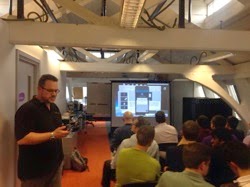
Unfortunately I missed the first one - this took place on 11th June while I was taking a few days holiday in San Francisco after the MVP Summit. The venue was Tquila’s offices in Smithfield and the subject was "Getting Up Close and Personal with Heroku”.  It doesn’t look like anyone has written this up in a blog post, but if I find one I’ll add it here. If you know of one, let me know in the comments. In the meantime, here’s a photo of Tod Nielsen, CEO of Heroku, presenting to the group:

Tqhr


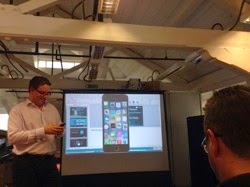
The second meetup, on “Integrating Clouds & Humans with Wearable Apps", took place on June 17th. This was a late breaking event, as it followed hot on the heels of the official announcement by Salesforce, and was in doubt for a while due to most of the organisers being on holiday or out of the country and no venue being available.  Luckily Joshua Hoskins and Appirio stepped in and saved the day. I’m pretty sure that none of us knew much about this topic prior to the event, so it was a good learning exercise for everyone - I didn’t realise that the wearable was tied to a smartphone for example.  One of the downsides to seeing this cutting edge technology is the realisation that it won’t be available in the UK for quite some time - Google Glass has only just gone on sale, for example, 2 years after it was available in the US.  Here’s Joshua introducing Developer Evangelist James Ward :

Wearable

The final event of the month was our regular 4th Wednesday meetup, which took place on June 25th at Make Positive’s offices.  The theme was Tooling and David Helmer of Mavens Consulting gave a talk on Mavens Mate:

Mm1

The numbers were excellent considering we were running at an event a week, even for the wearables event where the attendees only had a few days notice.

At times like these, those of us that are organisers of the group have to remind ourselves how lucky we are. It seems like every time an evangelist/product manager/executive is in the country they want to come and present to us - a lot of groups would kill for the calibre of guest that we get and we are always grateful that they take the time out of their busy schedules to fit us in.  The wearable tech, for example, was the first one in the world as far as I’m aware, and we just got asked if James could come and give a talk as he was in the country.  Three events in as many weeks is a lot of effort from everyone concerned, but they are first world problems for sure.

The next meetup is scheduled for July 23rd - whether this turns out the be the next one the way things are going is anyone’s guess. To keep up with the latest information, look out for the hash tag #LonDevSFDC on twitter.

Saturday, 21 June 2014

JavaScript in Salesforce Home Page Components

(alternatively Don't say I didn't warn you, or I've been expecting you, Mr Bond)

 
While poring over the Summer 14 release notes in preparation for the next BrightGen Salesforce Release Webinar, I came across a new feature that I've been expecting for some time - the new Rich Text Editor for HTML Home Page Components. While this may not sound like a big deal, the purpose of this editor is to stop unsupported markup (which we all know means JavaScript) being embedded in home page components, which will specifically impact sidebar components that manipulate the DOM of the main Salesforce page.  This technique has often been used in the past to inject additional behaviour in standard view or edit pages, removing buttons based on attributes of the record for example, or injecting additional logic into the standard save process.
 
So the deal is now sounding bigger, but there's still hope -  existing components will still be able to use the original editor and thus continue to maintain unsupported markup. However, the door is then slammed firmly shut with the statement "Existing HTML home page components with unsupported markup will continue to work until Summer ’15” (italics mine). The recommendation is to use the new Visualforce component, as this will allow markup that is not supported by the HTML editor (as you can use JavaScript quite happily in Visualforce pages). However, as Visualforce pages originate from a different server to regular Salesforce pages, they won't be able to access the standard page DOM due to the browser's same origin policy, so it appears the days of cheeky JavaScript in the sidebar to hack the main page are numbered.
 
Here's where I allow myself a smug moment - this mechanism has always seemed to me like a loophole that would be closed at some point time, so I've been a constant advocate of not using it. Whenever a customer has asked for this, I've asked them to confirm in writing they are happy for us to expend time and effort (and therefore their money) building something that may break at any time in the future and that we may not be able to fix, ever.  Unsurprisingly there has been no takeup of this.
 
Now I realise that this post is painting a picture of doom and gloom, but I don’t think its all bad news.  Given that the hacks will continue to work until the Summer '15 release suggests to me that there’s something to at least particually replace them coming in a future release.  Knowing Salesforce as I do, I’d expect it to allow enhancements/additions to the standard page without the total hijacking that is currently possible.
 

Sunday, 25 May 2014

Salesforce1 World Tour

The Salesforce1 World Tour reached London on 22nd May 2014.  In a change of format from previous Salesforce events, the Expo and Dev Zone was open from 8:15 until the keynote started at 10:30.  As BrightGen, were a Platinum Sponsor, this meant our stand had to be show ready by 8am.  The stars had aligned for us in terms of workloads, which allowed us to bring a fair few staff with us, including a few new joiners who had never been to a show before.  

We had a high level of interest in our offerings, so I spent most of the day on our stand aside from my Dev Zone talk at 2:30. Every year the Dev Zone gets bigger and better and this year was no different - standing room only for all of the talks and a very attentive audience.  My talk was on Responsive Design with Visualforce Pages and the slide deck is available below:

For my talk I created a simple blog site, containing a home and links page.  You can access the site at : 

http://bobbuzz.me.uk/SF1RD

and if you’d like to see the code behind it, that is available on Github at:

http://bobbuzz.me.uk/SF1GH

The Github repository has a link to an unmanaged package if you’d like to install the code into your own developer edition to play around with it.

Sunday, 18 May 2014

London SFDG May Meetup

Like our April meetup, the May event took place a couple of weeks early as once again we had a special guest - Salesforce Developer Evangelist Christophe Coenraets was in town and gave a talk on Angular, Ionic and Heroku Connect.  We also had a change of venue, as the event was kindly hosted by Appirio at their West End offices.

Some I found very interesting was that Christophe was running his presentation from Salesforce1 application using his Keypoint1 application:

Ccsfdg

After some slides on mobile application architecture, Christophe then live-built a simple Ionic application and walked us through how to integrate that presentation layer with AngularJS. Finally, he showed us Heroku Connect (this first time I’ve seen this, although I’ve read a lot about it) and a customer loyalty application built on all of these technologies.

After a break for beer and pizza, of which there was plenty:

Pizzasfdg

Next we had Florien Hoehn, one of our meetup members, speak about the new Remote Objects functionality available in Developer Preview in the Spring 14 release of Salesforce.

The next meetup is will be announced on the London Salesforce Develoeprs Meetup Group - if you are a Salesforce developer based in or around London, make sure to sign up as a member.

Saturday, 10 May 2014

Transient List Command Button Woes

Doug Grimwade, one of our tech leads at BrightGen, hit a strange problem this week around command buttons (or links) not executing the action method they were associated with, but simply refreshing the page.  Dwindling the page and controller down to their essentials we were left with:

Controller:

public with sharing class RepeatCtrl
{
  public transient List<Account> accounts {get; set;}
  public Integer counter {get; set;}
	
  public RepeatCtrl()
  {
    counter=3;
    setupAccounts();
  }

  private void setupAccounts()
  {
    accounts=[select id, Name from Account order by CreatedDate asc limit :counter];
  }
	
  public void incCounter()
  {
    System.debug('### Inc Counter Called');
    counter++;
    setupAccounts();
  }
}

Page:

<apex:page controller="RepeatCtrl">
  <apex:form >
    <apex:pageBlock title="Accounts">
      <apex:pageblocktable value="{!accounts}" var="acc">
        <apex:column value="{!acc.Name}" />
        <apex:column headerValue="Action">
          <apex:commandButton value="Inc Counter" action="{!incCounter}" />
        </apex:column>
      </apex:pageblocktable>
  
      <br/><apex:outputText value="Counter value = {!counter}" />
    </apex:pageBlock>
  </apex:form>
</apex:page>

 The basic premise of this page (remember this is reduced to reproduce the problem) is to display a list of accounts, with the size of the list dictated by the counter property.  Pressing any of the buttons should increment the counter and refresh the list with an additional element.  

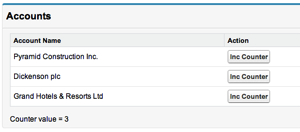
Opening the page displayed the initial list as expected:

Screen Shot 2014 05 10 at 15 35 14

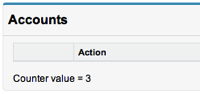
However, clicking a button didn’t work as expected:

Screen Shot 2014 05 10 at 15 36 21

the list has disappeared and the counter value hasn’t incremented.  Investigations in the log file showed that the action method wasn’t being called, as the debug information didn’t appear.  

Moving the post back to an action function, invoked by a click handler on the command button fixed things:

<apex:actionFunction action="{!incCounter}" name="incCounter"/>
...
<apex:commandButton value="Inc Counter" action="{!incCounter}"
        	onclick="incCounter(); return false;"/>


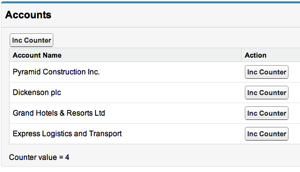
As did adding a command button outside the pageblocktable worked correctly - the counter was incremented and the list displayed four elements:

Screen Shot 2014 05 10 at 15 39 38

So it appeared that the issue, for some reason, was that the component carrying out the postback was nested inside the pageblocktable iterator element.  

While I dug around on the Developer Forums for a solution, Doug was trying various tweaks to the code and found the problem - the transient nature of the list of accounts.  Making this list non-transient and storing it in the Visualforce view state fixed the problem: 

public with sharing class RepeatCtrl
{
	public List<Account> accounts {get; set;}

...

Armed with this information I continued googling to see if this was documented behaviour, but this turned up no results.  Remembering that Visualforce is essentially built on JSF, I searched in that direction, and turned up a promising hit:

JSF2 Command Button Not Working

which states:

If command button is nested in a ui:repeat tag, command button or link will not work until the iterating bean/List is in view scope or bigger scope.

...

JSF iteration controls generally maintain a cursor to do their work, and the only way that the cursor can function properly is if the referenced datamodel is in a non-transient scope. For JSF1, that means Session Scope or higher. For JSF2, View Scope or higher.

View Scope in JSF equates to View State in Visualforce, so this matched our scenario.  Even though the command button didn’t use or rely on any element in the list being iterated, that fact that it was inside the iterator meant that the list had to be reconstructed server side before the command button would work correctly.  

A couple of lessons learned here then - transient has some side effects and if you can’t find behaviour documented in Visualforce, its always worth a look at the building blocks of the technology. We were quite pleased that it didn’t take us 6 hours to find the fix, even if we didn’t understand the solution correctly, unlike the poster with the JSF problem. Hopefully this blog will help the next developer to encounter this issue fix it even faster.

One last thing on an unrelated note - the @forcedotcom twitter handle has been replaced with @salesforcedevs 

Sunday, 4 May 2014

Salesforce1 Developer Week London

In case you weren’t aware, Salesforce1 Developer Week took place at the end of April 2014 - in fact it seems to have been more than a week judging by the events on the official blog page.

The London event took place on 30th April, kindly hosted by TQuila at their headquarters in Lindsay Street.  Registrations took a bit of a hit when strike on the underground was announced to coincide with this, but on the day more than 50 people attended - an excellent effort.

After pizza and beers, the evening was kicked off with a presentation on possibilities of the Salesforce1 mobile application, from a configuration and programmatic perspective from myself and Richard Clark, CTO of Make Positive:

S1dwrc

  S1dwkb


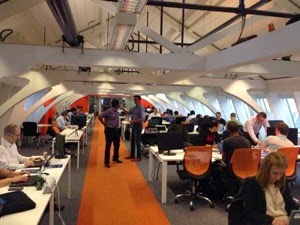
 The attendees then retired to the main "cabin" of the office to crack on with the workbooks, mini-hacks or simply to solve some real-world problems they had been struggling with:

S1dwwork

From time to time the best practice discussions became heated :)

S1dwblows

but we were all friends again after an hour or so of hacking, and it was back to the presentation area to demonstrate what had been built:

S1dwdemo

Something that really stood out for me was the contrast with the Elevate mobile workshop that took place in London in March.  There, a fair amount of time was spent setting up the environment, especially for android development involving the emulator, and most people had to push hard to get through the workbook in a whole day.  This time around, everyone was up and running without incident, and my time as a helper was spent advising how business problems could be solved using the application.

If you were unable to attend a Salesforce1 Developer Week event, you can still try the workbook and hacks yourself using the following links:

Our next event takes place on Wednesday 14th May at the Appirio offices near Bond Street station. Christophe Coenraets, Salesforce Developer Envangelist, will be joining us for a talk on Angular.js and Ionic.  I’ve followed a lot of Christophe’s community activity at both Adobe and Salesforce.com and he’s done some interesting work, so I’m really looking forward to this.  You can signup for this event on the meetup page.

Monday, 21 April 2014

London Calling - Salesforce1 Developer Week

Keep calm it s gonna be totally awesome 54

Salesforce1 Developer Week is series of events taking place around the world between 27th April and 3rd May 2014. The London Salesforce Developer Group are hosting an event on 30th April from 5:30pm:

Screen Shot 2014 04 19 at 17 06 21

Right Side of the Tracks

In a groundbreaking move, we’ll be running two tracks for this event, both with a hands-on focus:

  • Beginner Track
    If you’ve never developed against the Salesforce1 platform before, attend beginner track. This covers the basics of creating an application via drag and drop; adding process automation, all without writing a single line of code.
    Having run a few “Introduction to Force.com” workshops, the most common feedback from attendees is they are amazed how quickly you can build applications when most of the heavy lifting is done by the platform.

  • Intermediate Track
    The intermediate track will introduce use of Visualforce in Salesforce1, among other items. This is the track for the “clicks not code” developer who is interested in taking the next step, as well as experienced developers from outside the Salesforce ecosystem who have covered the basics through attending an introductory workshop or completed the Force.com Workbook. Experienced developers should prepare themselves to write much less code than they are used to when creating custom applications – in Salesforce1 code is written to extend the existing platform functionality rather than building from the ground up.

Salesforce1 Team, Assemble

We’ve put a crack team of presenters and helpers for this event, including MVPs and a couple of Salesforce Certified Technical Architects, so regardless of your level of experience with Force.com (if any) there will be someone on hand who can help if you get stuck. This also gives rise to some excellent networking opportunities during and after the event.

There’s no Such Thing as a Free Lunch

But there is such a thing as a free event - all you need to bring is yourself and your laptop. There are also exclusive event T-shirts (while stocks last) and Salesforce1 books (again while stocks last). 

Its Five O’Clock Somewhere

Its actually 5:30 at Tquila HQ - its an early start to allow as much development time as possible.  Register for this event here. I look forward to seeing you.

Update 25/04/2013: the time has been moved to 6pm.