Sunday, 27 July 2014

London Salesforce Developers July Meetup - Deployment

July saw the London Salesforce Developers in a new location - at the Google Campus in Shoreditch, just a 10 minute walk from Liverpool Street station, and more importantly for me a 15 minute walk from the BrightGen offices in Salesforce Tower. We had an excellent turnout this month - I’d estimate we had around 70-80% of those that signed up attend on the day, which is a fair bit more than usual.

Deploy

The theme this month was all things deployment.

This is an area that we haven’t covered before, so I volunteered a talk around the standard tools - the Force.com IDE (aka Eclipse plugin), Change Sets, the Force.com Migration Tool (aka Ant extension),Managed Packages and Unmanaged Packages - not just what the tools are and their capabilities, but also when it is appropriate to use each of them.

Bbdeploy

You can find the slide deck from my talk on slide share. In the first day that this deck was up it gather 250 hits and 6 downloads, so it appears there is plenty of interest in the basics of deployment tools.  Its always a juggling act to get the level of content right for these meetups, and sometimes wonder if we are a little neglectful of those members that are new to the platform.

Guy Keshet then gave a deeper dive talk on using the Force.com Migration tool for deploying a large code base in a controlled and automated fashion, with a few real-world case studies to show how the theory never quite matches up to the practice.

 
Gkdeploy

You can find Guy’s slide deck on dropbox.

If you are a Salesforce developer (or interested in becoming one) in the London area, you should join the meetup group if you haven’t already - you can sign up on our dedicated meetup site

Saturday, 19 July 2014

$Component vs Selectors

As most of us in the Salesforce ecosystem are aware, JavaScript is becoming more and more a key part of any solution.  Users now demand pages that react to user input, reflow when a device is rotated and above all are fast.  

JavaScript relies on access to the Document Object Model (DOM), to extract information entered by the user or update sections of the page based on user input. Support for locating elements in the DOM via their ID is provided by the $Component global variable. 

$Component requires the full path to the element, naming each parent element in the hierarchy, in order to resolve correctly, so given the following Visualforce markup:

<apex:page id="pg" >
 <apex:form id="frm">
  <apex:pageBlock id="pb1">
    <apex:pageBlockSection id="pbs1">
      <apex:pageBlockSectionItem id="pbsi1">
        <apex:outputLabel value="Price" />
        <apex:inputText id="val1" />
      </apex:pageBlockSectionItem>
    </apex:pageBlockSection>
    <apex:pageBlockSection id="pbs2">
      <apex:pageBlockSectionItem id="pbs2">
        <button type="button" onclick="alertPrice();">Go!</button>
      </apex:pageBlockSectionItem>
    </apex:pageBlockSection>
  </apex:pageBlock>
 </apex:form>
</apex:page>

To access the price element with the id of ‘val1’ in my onclick handler, alertPrice, I need to specify the parent pageblocksectionitem, pageblocksection, page block, form and page:

function alertPrice()
{
    var ele=document.getElementById('{!$Component.pg.frm.pb1.pbs1.pbsi1.val1}');
    alert('Price = ' + ele.value);
}

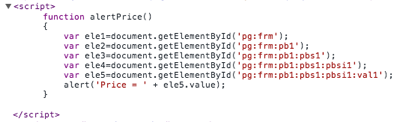
The first problem I always have is remembering to add all of the parent ids, so my JavaScript usually turns into something like:

function alertPrice()
{
    var ele1=document.getElementById('{!$Component.pg.frm}');
    var ele2=document.getElementById('{!$Component.pg.frm.pb1}');
    var ele3=document.getElementById('{!$Component.pg.frm.pb1.pbs1}');
    var ele4=document.getElementById('{!$Component.pg.frm.pb1.pbs1.pbsi1}');
    var ele5=document.getElementById('{!$Component.pg.frm.pb1.pbs1.pbsi1.val1}');
    alert('Price = ' + ele5.value);
}

Each time I add a parent, I load the page and view the source to check that the $Component global renders to a  real value:

Screen Shot 2014 07 19 at 12 09 16

The second problem is that the element is now tightly coupled to its current location, so if I decide to switch the input and the button:

<apex:page id="pg" >
 <apex:form id="frm">
  <apex:pageBlock id="pb1">
    <apex:pageBlockSection id="pbs1">
      <apex:pageBlockSectionItem id="pbsi1">
        <button type="button" onclick="alertPrice();">Go!</button>
      </apex:pageBlockSectionItem>
    </apex:pageBlockSection>
    <apex:pageBlockSection id="pbs2">
      <apex:pageBlockSectionItem id="pbs2">
        <apex:outputLabel value="Price" />
        <apex:inputText id="val1" />
      </apex:pageBlockSectionItem>
    </apex:pageBlockSection>
  </apex:pageBlock>
 </apex:form>
</page:page>

My onclick handler now throws an error, as the $Component doesn't evaluate to a valid element id:

Screen Shot 2014 07 19 at 12 15 39

To fix my JavaScript, I have to update the $Component reference to reflect the new location of the element, which always takes me a couple of attempts to get right, as mentioned earlier.

In my example, I have one simple function to fix up, but if I’ve moved a lot of business logic to the client, I could have any number of $Component references waiting to be broken when someone restructures the page markup.  One way to workaround this is to colocate the JavaScript with the element, but that doesn’t adhere to the principles of Unobtrusive JavaScript.

My preferred solution now is to use Selectors (sometimes referred to as CSS selectors, as the technique is borrowed from CSS3. This allows me to specify the a pattern to match against rather than the fully qualified path. As long as I stick to unique ids as I define each element (rather than relying on the full path for uniqueness), I can use a selector to match the element that ends with my specified id. Selectors have good support in modern browsers, but IE7 is a major hole and IE8 only allows CSS 2.1 selectors.  Here at BrightGen most of our customers are large enterprises that don’t update their desktop browsers that often, so we still have to support some of the older versions that don’t have built-in selector support.  For this reason, I use JQuery Selectors,  

After I’ve included JQuery from a CDN (as there’s a good chance a user will have accessed this from another page, possibly one of mine, and their browser has cached it), access the value of the input element whose id ends with ‘val1’ is simply: 

<apex:includeScript 
value="https://ajax.aspnetcdn.com/ajax/jQuery/jquery-1.9.1.min.js"/>
<script>
  function alertPrice()
  {
    var price=$("[id$='val1']").val();
    alert('Price = ' + price);
  }
</script>

The selector is:

$("[id$='val1']")

where $= equates to ends with, so id$=‘val1’ equates to the element whose id ends with the snippet ‘val1’.  Now I can relocate my element anywhere on the page, safe in the knowledge my JavaScript will still be able to access it. For the sake of completeness, the .val() at the end is a JQuery method to extract the value from an input element in the form.

Saturday, 12 July 2014

Taking Record Ownership in Salesforce1

At BrightGen, we are big fans of Salesforce1, especially for our Sales and Service Management functions - being able to work on leads, opportunities and cases while on the move is vital to ensure we provide the best possible experience to customers and prospects. New leads and cases are assigned to queues, and then picked up by the appropriate Account Executive or Service Management Consultant.

At the time of writing, one of the gaps in the Salesforce1 mobile application is the ability to take ownership of a record.  In the main UI, the lead view page has a Change link:
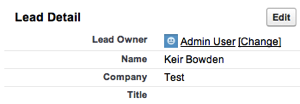
Screen Shot 2014 07 12 at 11 36 59

which opens the Change Owner page, allowing a new owner to be selected:
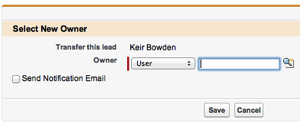
Screen Shot 2014 07 12 at 11 37 16

In the Salesforce1 application, the lead owner is a link to the underlying user record:

Screen Shot 2014 07 12 at 11 41 57

while when editing the record, the owner field is read-only:
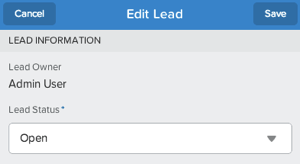
Screen Shot 2014 07 12 at 11 42 14

There are a number of ways to solve this problem - my colleague and fellow Salesforce Certified Technical Architect, Chris Eales came up with an admin-friendly solution involving an additional custom field, Update Record publisher action and small trigger.  However, when adding functionality to Salesforce1, especially for our internal use, I like to provide a slicker user experience than the configuration tools allow - it requires developer skills to maintain, but those aren’t skills that are in short supply at BrightGen!

My first cut of this (a tactical solution early one morning) was entirely focused on leads, and used an extension controller in conjunction with the standard lead controller, but replicating this across other objects involved cutting and pasting code and markup which is always an indicator that the solution is less than optimal.

My final version follows the principles of DRY, and makes use of a custom component for the heavy lifting.  A Visualforce page using the standard controller is still required to create a custom publisher action for the sobject type in question, but this is now reduced to a couple of lines.

The component controller instantiates an sobject based on its type name, using the Schema.SobjectType newSobject() method:

private static sObject createsObject(String typeName) {
  Schema.SObjectType targetType = Schema.getGlobalDescribe().get(typeName);
  return (null==targetType?null:targetType.newSObject());
}

 A Visualforce remoting method uses dynamic DML to set the owner id on the newly instantiated record:

Id uid=UserInfo.getUserId();
Sobject sobj=createSobject(typeName);
if (null!=sobj)
{
  sobj.put('id', recId);
  sobj.put('OwnerId', UserInfo.getUserId());
  upsert sobj;
}

On a side note - this wouldn’t have been possible a prior to API version 27, as the ability to set the id field didn’t exist. I could have set it in the createSObject() function call, but I wanted to make my utility method capable of creating an empty sobject.

The Visualforce component that is backed by this controller provides almost all of the markup, outside of the HTML element, to generate the custom publisher action, leaving the containing Visualforce page very little to do:

<apex:page standardController="Lead" applyHtmlTag="false" showheader="false" standardstylesheets="false">
  <html>
    <c:TakeOwnership typeName="{!$ObjectType.Lead.Name}" 
typeLabel="{!$ObjectType.Lead.label}" recordId="{!Lead.id}" /> </html> </apex:page>

 The component itself is a little more complex, as the custom publisher action can appear not only in the Salesforce1 application, but also in the chatter publisher in the standard UI. As the standard UI doesn’t provide the Submit/Cancel buttons, there’s some JavaScript to render buttons when not in Salesforce1 mode and tie them in to the Visualforce remoting method. There is also JavaScript to refresh the containing page in this scenario, as there is no way in the standard UI to refresh the publisher once an action is complete (not that I’m aware of anyway - if you know of a way to achieve this I’d love to hear about it).

Clicking on the publisher action puts up an Are You Sure page:
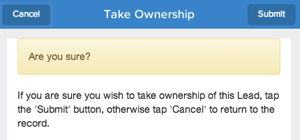
Screen Shot 2014 07 12 at 12 37 26


Tapping the submit button executes the remote method to change ownership to the current user, and displays an animated status message courtesy of the alertlfy JavaScript library:

Screen Shot 2014 07 12 at 12 37 48

The component relies on a few JavaScript libraries - Bootstrap for the UI, alertify as mentioned for the notifications and JQueryBlock to great out the page when a button is tapped.

You can view the source (including unit tests!) at the github repository:

http://bobbuzz.me.uk/1nhuUM2

Its also available as an unmanaged package - I’m intending to add more Salesforce1 features into this over time, so check back regularly.  The installation link is in the github readme file.

Saturday, 5 July 2014

Automatic Dashboard Refresh Revisited

Just over three (!) years ago I published a blog post showing a mechanism for automatically refreshing a dashboard after a timer expired.  This had a number of caveats around it, most importantly that the method I was calling to execute the refresh was undocumented and thus likely to be unsupported by Salesforce.  

With the advent of the Summer 14 release, there is now a supported way to refresh a dashboard programmatically, through the newly GA Dashboards API.  This REST based API not only allows dashboard metadata and data to be retrieved, but also contains a method to execute a dashboard refresh.

To refresh a dashboard, simply finds its ID and execute the following JavaScript (requires JQuery) from a Visualforce page:

$.ajax(
            {
              url: '/services/data/v31.0/analytics/dashboards/01ZB00000008oyd',
              type: 'PUT',
              beforeSend: function(xhr) {
                // Set the OAuth header from the session ID
                xhr.setRequestHeader('Authorization', 'Bearer {!$Api.Session_ID}');
              },
              success: function(response) {
                // do success stuff 
              error: function(jqXHR, textStatus, errorThrown) {
                // do failure stuff
              }
          }
        );

where ‘01ZB00000008oyd’ is the id of the dashboard. 

As I can now refresh directly from the page, my DashboardRefresher page no longer needs a controller and all the logic is written in JavaScript: 

<apex:page sidebar="false" showheader="false" standardstylesheets="false">
  <apex:includeScript value="https://ajax.aspnetcdn.com/ajax/jQuery/jquery-1.11.1.min.js"/>
  
  <div id="countDown"></div>

  <script>
    $(document).ready(function($) {
       startCountDown(59, 1000, doRefresh);
    });

    function startCountDown(i, p, f)
    {
        var pause = p;
        var fn = f;
                
        var countDownObj = document.getElementById("countDown");
        if (countDownObj == null)
        {
            alert("div not found, check your id");
            return;
        }
                
        countDownObj.count = function(i)
        {
            countDownObj.innerHTML = 'Refreshing in ' + i + ' seconds';
            if (i == 0)
            {
                fn();
                return;
            }
            setTimeout(function() {
                          countDownObj.count(i - 1);
                         },
                       pause
            );
        }
        
        countDownObj.count(i);
    }
                
    function doRefresh()
    {
        $.ajax(
            {
              url: '/services/data/v31.0/analytics/dashboards/01ZB00000008oyd',
              type: 'PUT',
              beforeSend: function(xhr) {
                // Set the OAuth header from the session ID
                xhr.setRequestHeader('Authorization', 'Bearer {!$Api.Session_ID}');
              },
              success: function(response) {
                window.top.location='/01ZB00000008oyd';
              },
              error: function(jqXHR, textStatus, errorThrown) {
                // Oops - what went wrong?
                alert(jqXHR.status + ': ' + errorThrown);
              }
          }
        );
    }
  </script>
  
</apex:page>

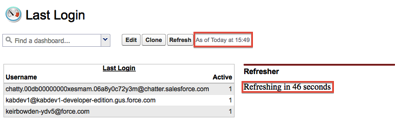
Dropping this page into a dashboard counts down the timer - note the ‘As of’ time:

Screen Shot 2014 07 05 at 15 49 58

once the timer expires, the dashboard is refreshed and the page is reloaded, showing the dashboard has been refreshed.  the ‘As of’ time updated and the counter restarted:

Screen Shot 2014 07 05 at 15 50 53

You can request up to 200 dashboard refreshes per hour, but bear in mind this is an organisation-level limit rather than per-user or per-dashboard.

Wednesday, 2 July 2014

10 Days of 10 Dollar Ebooks

10yr webbanner2

As regular visitors to this blog are no doubt sick of being reminded, I wrote a book for Packt last year called the Visualforce Development Cookbook - if you didn’t know this, how did you miss the link at the top right? What more do I need to do to get you to buy it?  Maybe some kind of special offer ...

From June 26th 2014 to July 5th 2014, to celebrate 10 years of Packt, you can buy my book in eBook form for a mere $10 - the price of a couple of small beers.  

This offer also applies to all ebooks (after you’ve bought mine, obviously) and videos (I don’t have one of these to pitch, so you are safe there).

You can find out more information at: http://bit.ly/VaVEba

Saturday, 28 June 2014

London Salesforce Developers - June Meetups

No, the title isn’t a typo - in June the London Salesforce Developers had no less than three events.

Unfortunately I missed the first one - this took place on 11th June while I was taking a few days holiday in San Francisco after the MVP Summit. The venue was Tquila’s offices in Smithfield and the subject was "Getting Up Close and Personal with Heroku”.  It doesn’t look like anyone has written this up in a blog post, but if I find one I’ll add it here. If you know of one, let me know in the comments. In the meantime, here’s a photo of Tod Nielsen, CEO of Heroku, presenting to the group:

Tqhr


The second meetup, on “Integrating Clouds & Humans with Wearable Apps", took place on June 17th. This was a late breaking event, as it followed hot on the heels of the official announcement by Salesforce, and was in doubt for a while due to most of the organisers being on holiday or out of the country and no venue being available.  Luckily Joshua Hoskins and Appirio stepped in and saved the day. I’m pretty sure that none of us knew much about this topic prior to the event, so it was a good learning exercise for everyone - I didn’t realise that the wearable was tied to a smartphone for example.  One of the downsides to seeing this cutting edge technology is the realisation that it won’t be available in the UK for quite some time - Google Glass has only just gone on sale, for example, 2 years after it was available in the US.  Here’s Joshua introducing Developer Evangelist James Ward :

Wearable

The final event of the month was our regular 4th Wednesday meetup, which took place on June 25th at Make Positive’s offices.  The theme was Tooling and David Helmer of Mavens Consulting gave a talk on Mavens Mate:

Mm1

The numbers were excellent considering we were running at an event a week, even for the wearables event where the attendees only had a few days notice.

At times like these, those of us that are organisers of the group have to remind ourselves how lucky we are. It seems like every time an evangelist/product manager/executive is in the country they want to come and present to us - a lot of groups would kill for the calibre of guest that we get and we are always grateful that they take the time out of their busy schedules to fit us in.  The wearable tech, for example, was the first one in the world as far as I’m aware, and we just got asked if James could come and give a talk as he was in the country.  Three events in as many weeks is a lot of effort from everyone concerned, but they are first world problems for sure.

The next meetup is scheduled for July 23rd - whether this turns out the be the next one the way things are going is anyone’s guess. To keep up with the latest information, look out for the hash tag #LonDevSFDC on twitter.

Saturday, 21 June 2014

JavaScript in Salesforce Home Page Components

(alternatively Don't say I didn't warn you, or I've been expecting you, Mr Bond)

 
While poring over the Summer 14 release notes in preparation for the next BrightGen Salesforce Release Webinar, I came across a new feature that I've been expecting for some time - the new Rich Text Editor for HTML Home Page Components. While this may not sound like a big deal, the purpose of this editor is to stop unsupported markup (which we all know means JavaScript) being embedded in home page components, which will specifically impact sidebar components that manipulate the DOM of the main Salesforce page.  This technique has often been used in the past to inject additional behaviour in standard view or edit pages, removing buttons based on attributes of the record for example, or injecting additional logic into the standard save process.
 
So the deal is now sounding bigger, but there's still hope -  existing components will still be able to use the original editor and thus continue to maintain unsupported markup. However, the door is then slammed firmly shut with the statement "Existing HTML home page components with unsupported markup will continue to work until Summer ’15” (italics mine). The recommendation is to use the new Visualforce component, as this will allow markup that is not supported by the HTML editor (as you can use JavaScript quite happily in Visualforce pages). However, as Visualforce pages originate from a different server to regular Salesforce pages, they won't be able to access the standard page DOM due to the browser's same origin policy, so it appears the days of cheeky JavaScript in the sidebar to hack the main page are numbered.
 
Here's where I allow myself a smug moment - this mechanism has always seemed to me like a loophole that would be closed at some point time, so I've been a constant advocate of not using it. Whenever a customer has asked for this, I've asked them to confirm in writing they are happy for us to expend time and effort (and therefore their money) building something that may break at any time in the future and that we may not be able to fix, ever.  Unsurprisingly there has been no takeup of this.
 
Now I realise that this post is painting a picture of doom and gloom, but I don’t think its all bad news.  Given that the hacks will continue to work until the Summer '15 release suggests to me that there’s something to at least particually replace them coming in a future release.  Knowing Salesforce as I do, I’d expect it to allow enhancements/additions to the standard page without the total hijacking that is currently possible.