Showing posts with label debugging. Show all posts

Saturday, 5 August 2017

Lightning experience utility bar - add an app for that

Lightning experience utility bar - add an app for that

Introduction

This week I’ve been working on adding utility bar functionality to our BrightMedia appcelerator. Typically when I build functionality of this nature I’ll start off with with the component markup using hardcoded values to get the basic styling right, then make it dynamic with the data coming from the JavaScript controller/helper, before finally wiring it up to an Apex controller that extract data from the Salesforce database, either through sobjects or custom settings.

For the purposes of this blog I’m going to say that it was presenting a list of Trailmixes, the new feature in Trailhead (it wasn’t, but this is a much simpler example and taps into the zeitgeist).

First incarnation

The version of the component that simply displayed a Trailmix with a button to open it:

<aura:component implements="flexipage:availableForAllPageTypes"
                access="global">
    
    <div class="slds-p-around--x-small slds-border--bottom slds-theme--shade">
        <div class="slds-grid slds-grid--align-spread slds-grid--vertical-align-center">
            <div>
                Blog Trailmix
            </div>
            <div>
            </div>
            <div>
                <lightning:buttonIcon iconName="utility:open"
                                      title="Open"
                                      alternativeText="Open" variant="border-filled"/>
            </div>
        </div>
    </div>
</aura:component>

and, not surprisingly, this worked fine:
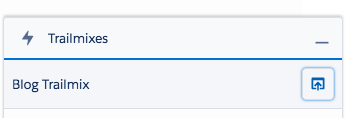
Screen Shot 2017 08 05 at 16 54 45

Second incarnation

The second version initialised a list of Trailmixes, still containing a single element, in the JavaScript controller, which the component then iterated. First the component:

<aura:component implements="flexipage:availableForAllPageTypes"
                access="global">
    
    <aura:attribute name="mixes" type="Object[]" />
    
    <aura:handler name="init" value="{!this}" action="{!c.doInit}"/>
    
    <aura:iteration items="{!v.mixes}" var="mix">
        <div class="slds-p-around--x-small slds-border--bottom slds-theme--shade">
            <div class="slds-grid slds-grid--align-spread slds-grid--vertical-align-center">
                <div>
                    {!mix.name}
                </div>
                <div>
                </div>
                <div data-record="{!mix.key}">
                    <lightning:buttonIcon onclick="{!c.OpenMix}"
                                          iconName="utility:open"
                                          title="Open"
                                          alternativeText="Open" variant="border-filled"/>
                </div>
            </div>
        </div>
    </aura:iteration>
</aura:component>

Next, the controller

({
	doInit : function(component, event, helper) {
        var mixes[];
        mixes.push({key:"BLOG",
                    name:"Blog Trailmix",
                    link:"https://trailhead.salesforce.com/users/0055000000617DXAAY/trailmixes/basics"});
		component.set('v.mixes', mixes);
    }
})

Here things started to go awry - clicking the utility bar item to open it did nothing and a few seconds later a toast message would appear, with a message along the lines of “we’re still working on your request”, but nothing further. Changing the component in the utility bar configuration to initialise in the background got a little further, but still no content, instead a perpetual spinner:

Screen Shot 2017 08 05 at 17 03 23


Viewing the JavaScript console showed nothing out of the ordinary. I’d been having a few problems with my internet connection soI assumed it was either that or Salesforce having an issue, and as it was fairly late at night I decided to leave it until the morning to see if things were resolved. No such luck.

Wrap it and app it

I then did what I usually do when I’m having issues with a lightning component - create an app with just the component in and see what happens then. The app couldn’t be simpler:

<aura:application >
    <c:Trailmixes />
</aura:application>

Previewing this showed that there was an error that was somehow being swallowed:
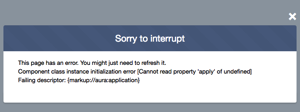
Screen Shot 2017 08 05 at 17 08 10

which I’m sure the eagle-eyed reader has spotted - the declaration of my mixes variable that eventually gets stored as an attribute was missing an ‘=‘ character:

var mixes[];

After correcting this and refreshing the page a couple of times, and I was back on track with my Trailmix component. 

In conclusion

Always try any troublesome component in an app of it’s own - while in most cases you won’t have the utility bar swallowing errors, it’s way easier to debug a component when there aren’t 50 others on the same page firing events and changing attributes. Also, sometimes a syntax type error was shown in the JavaScript console and sometimes not, so look there first.

Related posts


Saturday, 11 August 2012

The Importance of Page Messages

This week's blog is inspired by a lengthy thread that I was involved in on the Visualforce Discussion Board.  This concerned an action method tied to an onchange event not being called.  I was able to track down what the problem was thanks to the <apex:pageMessages/> component, which displays all error messages associated with the page.

Here's an example of how this component can help track down problems when rerendering parts of a page.  The following page simply presents a button to invoke an action method that increments the counter:

<apex:page controller="PageMessages">
  <apex:form >
    <apex:pageBlock title="Page Messages Test 1">
      <apex:pageBlockButtons >
         <apex:commandButton value="Click Me" action="{!click}" rerender="counter"/>
      </apex:pageBlockButtons>
      <apex:outputLabel value="Count  = " />
      <apex:outputText value="{!countVal}" id="counter"/>
    </apex:pageBlock>
  </apex:form>
</apex:page>

The controller contrives to produce an error rather than increment the counter:

public with sharing class PageMessages {
 public Integer countVal {get; set;}
 private Boolean fakeError=true;
 
 public PageMessages()
 {
  countVal=1;
 }
 
 public void click()
 {
  if (fakeError)
  {
   ApexPages.addMessage(new ApexPages.Message(ApexPages.Severity.ERROR, 'Fake Error'));
  }
  else
  {
   countVal++;
  }
 }
}

The page when rendered is as follows:


Opening the page in a browser window: and clicking the 'Click Me' button results in no change to the count value, and as the rerender attribute turns the command into an AJAX request, it looks like clicking the button has no effect whatsoever.  In this case I can turn on debug logging and see that an error message is being added to the page:

14:37:19.021 (21244000)|CODE_UNIT_STARTED|[EXTERNAL]|01p80000000cOqp|PageMessages invoke(click)
14:37:19.021 (21302000)|HEAP_ALLOCATE|[EXTERNAL]|Bytes:6
14:37:19.021 (21322000)|HEAP_ALLOCATE|[EXTERNAL]|Bytes:524
14:37:19.021 (21338000)|METHOD_ENTRY|[1]|01p80000000cOqp|PageMessages.PageMessages()
14:37:19.021 (21345000)|STATEMENT_EXECUTE|[1]
14:37:19.021 (21357000)|SYSTEM_MODE_ENTER|false
14:37:19.021 (21370000)|HEAP_ALLOCATE|[EXTERNAL]|Bytes:5
14:37:19.021 (21376000)|STATEMENT_EXECUTE|[1]
14:37:19.021 (21385000)|SYSTEM_MODE_EXIT|false
14:37:19.021 (21394000)|METHOD_EXIT|[1]|PageMessages
14:37:19.021 (21443000)|SYSTEM_MODE_ENTER|false
14:37:19.021 (21450000)|HEAP_ALLOCATE|[12]|Bytes:5
14:37:19.021 (21456000)|STATEMENT_EXECUTE|[11]
14:37:19.021 (21465000)|STATEMENT_EXECUTE|[13]
14:37:19.021 (21469000)|STATEMENT_EXECUTE|[14]
14:37:19.021 (21612000)|HEAP_ALLOCATE|[14]|Bytes:10
14:37:19.021 (21689000)|SYSTEM_METHOD_ENTRY|[14]|ApexPages.addMessage(ApexPages.Message)
14:37:19.021 (21697000)|ENTERING_MANAGED_PKG|
14:37:19.021 (21728000)|VF_PAGE_MESSAGE|Fake Error
14:37:19.021 (21738000)|SYSTEM_METHOD_EXIT|[14]|ApexPages.addMessage(ApexPages.Message)
14:37:19.021 (21746000)|SYSTEM_MODE_EXIT|false
14:37:19.021 (21775000)|CODE_UNIT_FINISHED|PageMessages invoke(click)

Its a lot easier just to add an <apex:pagemessages/> component to the page and rerender that as well:

<apex:page controller="PageMessages">
  <apex:pageMessages id="msgs"/>
  <apex:form >
    <apex:pageBlock title="Page Messages Test 1">
      <apex:pageBlockButtons >
         <apex:commandButton value="Click Me" action="{!click}" rerender="counter,msgs"/>
      </apex:pageBlockButtons>
      <apex:outputLabel value="Count  = " />
      <apex:outputText value="{!countVal}" id="counter"/>
    </apex:pageBlock>
  </apex:form>
</apex:page>

which displays the error upon clicking the button:


Another scenario where its pretty much impossible to locate the problem without an  <apex:pageMessages/> component is where there is a required field on the page:

<apex:page controller="PageMessages">
  <apex:pageMessages id="msgs"/>
  <apex:form >
    <apex:pageBlock title="Page Messages Test 1">
      <apex:pageBlockButtons >
         <apex:commandButton value="Click Me" action="{!click}" rerender="counter,msgs"/>
      </apex:pageBlockButtons>
      <apex:outputLabel value="Text1 = " />
      <apex:inputText value="{!text}" required="true"/>
      <br/>
      <apex:outputLabel value="Count = " />
      <apex:outputText value="{!countVal}" id="counter"/>
    </apex:pageBlock>
  </apex:form>
</apex:page>

This time the controller doesn't fake an error, the counter value is simply updated:

public with sharing class PageMessages {
 public Integer countVal {get; set;}
 public String text {get; set;}
 
 public PageMessages()
 {
  countVal=1;
 }
 
 public void click()
 {
  countVal++;
 }
}

As the required component isn't an <apex:inputField/>, there is no decoration of the element to indicate that it is required.  Clicking the 'Click Me' button once again appears to do nothing.


Checking the log this time reveals nothing that can help.  The click method simply isn't being called:

25.0 APEX_CODE,FINEST;APEX_PROFILING,INFO;CALLOUT,INFO;DB,INFO;SYSTEM,DEBUG;VALIDATION,INFO;VISUALFORCE,INFO;WORKFLOW,INFO
15:06:55.036 (36399000)|EXECUTION_STARTED
15:06:55.036 (36462000)|CODE_UNIT_STARTED|[EXTERNAL]|06680000000Tmbw|VF: /apex/kab_tutorial__PageMessage1
15:06:55.046 (46438000)|CODE_UNIT_STARTED|[EXTERNAL]|01p80000000cOqp|PageMessages <init>
15:06:55.046 (46470000)|SYSTEM_MODE_ENTER|true
15:06:55.047 (47466000)|HEAP_ALLOCATE|[EXTERNAL]|Bytes:8
15:06:55.047 (47490000)|HEAP_ALLOCATE|[EXTERNAL]|Bytes:552
15:06:55.047 (47513000)|METHOD_ENTRY|[1]|01p80000000cOqp|PageMessages.PageMessages()
15:06:55.047 (47539000)|STATEMENT_EXECUTE|[1]
15:06:55.047 (47659000)|SYSTEM_MODE_ENTER|false
15:06:55.047 (47678000)|HEAP_ALLOCATE|[EXTERNAL]|Bytes:5
15:06:55.047 (47694000)|STATEMENT_EXECUTE|[1]
15:06:55.047 (47707000)|SYSTEM_MODE_EXIT|false
15:06:55.047 (47720000)|METHOD_EXIT|[1]|PageMessages
15:06:55.047 (47763000)|VARIABLE_SCOPE_BEGIN|[5]|this|KAB_TUTORIAL.PageMessages|true|false
15:06:55.047 (47808000)|HEAP_ALLOCATE|[EXTERNAL]|Bytes:12
15:06:55.047 (47845000)|HEAP_ALLOCATE|[EXTERNAL]|Bytes:12
15:06:55.047 (47889000)|VARIABLE_ASSIGNMENT|[5]|this|{}|0x549e58c6
15:06:55.047 (47910000)|SYSTEM_MODE_ENTER|false
15:06:55.047 (47921000)|HEAP_ALLOCATE|[2]|Bytes:5
15:06:55.047 (47935000)|STATEMENT_EXECUTE|[1]
15:06:55.047 (47944000)|HEAP_ALLOCATE|[2]|Bytes:5
15:06:55.047 (47956000)|STATEMENT_EXECUTE|[2]
15:06:55.047 (47974000)|STATEMENT_EXECUTE|[3]
15:06:55.047 (47991000)|STATEMENT_EXECUTE|[6]
15:06:55.048 (48000000)|STATEMENT_EXECUTE|[7]
15:06:55.048 (48042000)|METHOD_ENTRY|[7]|01p80000000cOqp|KAB_TUTORIAL.PageMessages.__sfdc_countVal(Integer)
15:06:55.048 (48098000)|HEAP_ALLOCATE|[2]|Bytes:12
15:06:55.048 (48122000)|HEAP_ALLOCATE|[2]|Bytes:12
15:06:55.048 (48142000)|VARIABLE_ASSIGNMENT|[-1]|this|{}|0x549e58c6
15:06:55.048 (48155000)|HEAP_ALLOCATE|[2]|Bytes:8
15:06:55.048 (48190000)|VARIABLE_ASSIGNMENT|[-1]|value|1
15:06:55.048 (48205000)|HEAP_ALLOCATE|[2]|Bytes:8
15:06:55.048 (48231000)|VARIABLE_ASSIGNMENT|[2]|this.countVal|1|0x549e58c6
15:06:55.048 (48260000)|METHOD_EXIT|[7]|01p80000000cOqp|KAB_TUTORIAL.PageMessages.__sfdc_countVal(Integer)
15:06:55.048 (48275000)|SYSTEM_MODE_EXIT|false
15:06:55.048 (48292000)|CODE_UNIT_FINISHED|PageMessages <init>
15:06:55.048 (48814000)|VF_SERIALIZE_VIEWSTATE_BEGIN|06680000000Tmbw
15:06:55.050 (50548000)|VF_SERIALIZE_VIEWSTATE_END
15:06:55.440 (54027000)|CUMULATIVE_LIMIT_USAGE
15:06:55.440|LIMIT_USAGE_FOR_NS|KAB_TUTORIAL|
  Number of SOQL queries: 0 out of 100
  Number of query rows: 0 out of 50000
  Number of SOSL queries: 0 out of 20
  Number of DML statements: 0 out of 150
  Number of DML rows: 0 out of 10000
  Number of script statements: 3 out of 200000
  Maximum heap size: 0 out of 6000000
  Number of callouts: 0 out of 10
  Number of Email Invocations: 0 out of 10
  Number of fields describes: 0 out of 100
  Number of record type describes: 0 out of 100
  Number of child relationships describes: 0 out of 100
  Number of picklist describes: 0 out of 100
  Number of future calls: 0 out of 10

15:06:55.440|CUMULATIVE_LIMIT_USAGE_END

15:06:55.054 (54063000)|CODE_UNIT_FINISHED|VF: /apex/kab_tutorial__PageMessage1
15:06:55.054 (54077000)|EXECUTION_FINISHED

In fact what has happened is the client side validation has failed and the page is simply redrawn. However, at this point its very easy to start doubting your code and rewriting it randomly - especially if its more complex than my simple example.  Simply adding an <apex:pageMessages/> component that is rerendered avoids all this:

<apex:page controller="PageMessages">
  <apex:pageMessages id="msgs"/>
  <apex:form >
    <apex:pageBlock title="Page Messages Test 1">
      <apex:pageBlockButtons >
         <apex:commandButton value="Click Me" action="{!click}" rerender="counter,msgs"/>
      </apex:pageBlockButtons>
      <apex:outputLabel value="Text1 = " />
      <apex:inputText value="{!text}" required="true"/>
      <br/>
      <apex:outputLabel value="Count = " />
      <apex:outputText value="{!countVal}" id="counter"/>
    </apex:pageBlock>
  </apex:form>
</apex:page>

Clicking the button this time shows the validation error.


As an aside,  due to the required element not being an <apex:inputField/>, the error message is not particularly helpful.  For details on how to improve this, take a look at one of my older posts.