Monday, 31 August 2015

Dreamforce 15

Badge2

Brace Yourselves - Dreamforce is Coming

Dreamforce 15 is now just over two weeks away (or has already taken place if you are reading this after September 18th 2015).

A Different Experience #1

This year Dreamforce will be a rather different experience - my company, BrightGen, has a booth (#45) in the Customer Success Zone where we’ll be showcasing our BrightMedia appcelerator for Media Ad Sales. This is the first time since 2010 that I’ve had to man a stand at Dreamforce, which means that I can’t hang out in the Dev Zone as much as I usually would.

A Different Experience #2

I’m speaking, but not in the Dev Zone. Instead I’m giving a more business focused talk on how we are using Lightning Components in the BrightMedia mobile front end - Mobilize Your Media Ad Sales with Lightning Components. This is a 9am start on Wednesday 16th and takes place in the San Francisco Marriott Marquis Hotel, Foothill E. While this is a business focused talk, I’ll be able happy to go into detail on the technical side either after the talk or at the booth. Hopefully I’ll see a few of my regular readers there.

A Different Experience #3

The Dev Zone this year is getting a hefty dose of Trailhead. I’ve had a hand in a Quick Start or two which will hopefully make the cut, so if you are working through those see if you can spot any written in my inimitable style. 

Some Things Don’t Change

The Developer Keynote starts at 10:30 on Thursday 17th in Moscone Centre West and there’s no way I’d miss it, so I’ll be leaving the booth to the tender mercies of the Sales team for the duration. I can’t wait to hear the announcements, although they’ll have to go some to top the performance of Trailhead from last year.


Sunday, 23 August 2015

Certified Salesforce Platform Developer

Certified Salesforce Platform Developer

Screen Shot 2015 08 23 at 16 04 36

(As always with Certification blog posts, please don’t ask for answers or post actual questions in comments etc. Doing so breaches the test taker agreement and devalues the exam for everyone)

Introduction

As a Certified Salesforce Advanced Developer, I was offered the chance to participate in the Platform Developer II Certification in July 2015. Anyone who knows me knows I can’t resist a cert, so I jumped at the chance. 

As is the case for every beta I’ve taken part in, the beta is double the length of the regular exam both in terms of questions (120) and duration (4 hours). The basic premise is that you get more time so that you can give feedback on every question, although the fact that there are twice as many questions means that you have to be keep a close eye on the clock. Personally I take the view that its only worth providing feedback for questions that stand out, for both positive and negative reasons - saying that a question is fine doesn’t really add much or help the certification team.

Preparation

The Study Guides from the Salesforce Certification site give chapter and verse on what you need to skill up on for the exam. I focused on the Visualforce, Apex and Lightning Developer’s Guides, plus a refresher on the latest versions of the metadata and SOAP API. I made sure that I knew the order of execution like the back of my hand and the usual Apex best practice suspects of bulkification, the various aspects of unit tests and asynchronous mechanisms. I also paid special attention to oauth and the mobile SDK. 

The Exam

As always, the exam is proctored, either in person on on-line - I chose the on-line variant as I prefer to do exams from home. For the first time, I had the proctor interrupt the exam to ask me to reposition my camera, which took a few attempts and consumed some time, taking me past the four hours in the end.

What struck me about this exam compared to the original Advanced Developer certification was that it felt like I was reading  less code and evaluating more scenarios based on descriptions. That said, I wouldn’t read too much into this as it could be that the questions I received in the original exam were not overly representative but just happened to skew towards code.

Four hours is a long time to maintain focus, and the bonus of a beta exam is that you don’t receive the results immediately. Instead you have to wait a month or so until all the results and feedback have been assessed and collated. Its also difficult to call, as you don’t know which questions will make the final cut, so questions you found easy to get right might not count, whereas those that you struggled with may count against you.

Results

Obviously I passed or I wouldn’t be drawing attention to the experience with this post! As an existing Advanced Developer, passing Platform Developer II also confers Platform Developer I, so my certs count increases by two. Unfortunately, having achieved the new certs means I have to relinquish my Advanced Developer credential, so the net effect is a increase of one, taking me up to 9 x certified. As the number of certs increases its getting harder to catch them all, especially with the new Marketer credentials.

Final Thoughts

Four hours and 120 questions requires a considerable amount of effort, and wonder how useful the final hour or so actually is to the Salesforce Certification team, both in terms of the feedback (most questions will feel tough by then, due to fatigue if nothing else) and performance (I’d expect more incorrect answers towards the end, again due to fatigue). A better way to run these betas might be to break them up into two exams of two hours/60 questions. Beta candidates would still be required to answer all 120 questions, but not in one solid block. I suggested this as part of my exam feedback, so maybe something will come of this. 

Related Posts

Saturday, 8 August 2015

Trailhead - Bigger, Better, Badgier

Trailhead - Bigger, Better, Badgier

Screen Shot 2015 08 08 at 08 06 29

Introduction

Trailhead has received a major injection of new content in the run up to Dreamforce, and now boasts 30 projects, 7 trails and 6 projects.

If you haven’t used Trailhead yet (Seriously? What have you been doing with your free time?), take a look at my intro blog post to cover the basics.

New Trails

A number of trails have received additional content, but there are also two brand new trails to get tackle:

  • Admin Trail - CRM
    Up until now the trails tended to be focused on customisation or development of the platform side of Salesforce, but that’s no longer the case. This trail introduces the concepts of Accounts, Contacts, Leads and Opportunities, and takes you through configuring sobjects, creating records, setting up a sales process and assigning and converting leads. These are all key skills for administering a Sales Cloud implementation, so if you are thinking of taking your career in that direction its an excellent starting point
  • Dreamforce Trail
    A short trail, comprised of a single module with 3 steps. If you are going to Dreamforce for the first time this year, get the heads up on the general experience and specifics for admins and developers. I’ll be there again this year, but in a change of pace I’ll be manning a stand in the customer success zone so I won’t be able to spend the whole week in the dev zone as I usually do.

New Badges

There are 5 new badges available - 4 across the two new trails covered above, and one for the new Event Monitoring module.

Event Monitoring

Screen Shot 2015 08 08 at 08 11 00


This is a new module on the Intermediate Developer Trail, this is an example of why you should check back with Trailhead regularly - just because you completed a trail a couple of months ago doesn’t mean that’s still the case!

The Event Monitoring module is a shining example of another Trailhead benefit - it gets you working on aspects of the platform you might otherwise miss out on. The event log is something I’ve read about and answered questions on when maintaining certifications, but its not something that I’ve had reason to use up to now. This module not only gets into the details, but also has you working with the event log in your developer edition via the workbench.

Quick Starts and Projects

These aren’t new, but are something that I’ve only just picked up on. The quick starts are ideal if you want to get a rapid, hands on introduction to a particular area of the platform but you only have half an hour or so to spare. The projects require a more significant investment of time, and consist of a number of modules that layer on each other to build a full blown application.

Don’t Delay

There’s a lot of content on Trailhead already. and its only going to get bigger (and badgier!), so the sooner you get started the sooner you’ll have a plethora of badges to brag about on your social media channel of choice.

Screen Shot 2015 08 08 at 08 26 03

Related Posts


Sunday, 26 July 2015

Lightning Components and Custom Apex Classes

Lightning Components and Custom Apex Classes

Overview

This week I’ve been generating summary information in an Apex controller and surfacing this through a Lightning Component. When designing the solution, my initial thoughts were that I’d either:

  • have the component call multiple methods on the controller - not as inefficient as it sounds thanks to ‘boxcarring’, described in detail in Peter Chittum’s blog post.
  • return the results as a JSON string and parse this client side to access the details

However, after looking through the Lightning Components Developer’s Guide, a third way presented itself - the framework allows the Apex controller to return a instance of a custom Apex class, which is then automatically converted into a JavaScript object for use client-side.

Scenario

For the purposes of this blog post I have a simple use-case of returning the total number of Accounts, Contacts and Opportunities in the system. 

Code

The summary information is encapsulated in the RecordCounts custom Apex class, which also doubles as the Apex controller for the component, providing the GetRecordCounts method to retrieve the information. Note that the methods and attributes for use client-side have the AuraEnabled annotation:

public class RecordCounts {
    @AuraEnabled
    public Integer numAccounts {get; set;}
    
    @AuraEnabled
    public Integer numContacts {get; set;}
    
    @AuraEnabled
    public Integer numOpportunities {get; set;}
    
    @AuraEnabled
    public static RecordCounts GetRecordCounts()
    {
        RecordCounts result=new RecordCounts();
        result.numAccounts=[select count() from Account];
        result.numContacts=[select count() from Contact];
        result.numOpportunities=[select count() from Opportunity];
        
        return result;
    }
}

The lightning component is very straightforward - it defines that the Apex controller is ‘RecordCounts’, provides an attribute to store the retrieved record count instance in and has markup to output the value.  The information is retrieved from the server via the doInit event handler, which will be invoked when the component is initialised but before it is rendered. 

<aura:component controller="RecordCounts">
    <aura:handler name="init" value="{!this}" action="{!c.doInit}"/>
    <aura:attribute type="RecordCounts" name="counts" />
    Number of accounts = {!v.counts.numAccounts}<br/>
    Number of contacts = {!v.counts.numContacts}<br/>
    Number of opportunities = {!v.counts.numOpportunities}<br/>
</aura:component>

Note that the type of the ‘counts’  attribute is defined as the name of the custom apex class - RecordCounts. Note also that I can simply access properties from the Apex class using the JavaScript object dot notation, as the record instance has been converted to a Javascript object representation.

In accordance with Lightning Components best practice, the component controller simply delegates to a helper for the init event callback handler:

({
	doInit : function(component, event, helper) {
		helper.doInit(component, event);
	}
})

while the helper executes the server side method and sets the Javascript object representation of the Apex class instance into the ‘counts’ attribute upon success without any intervention from me to process the result or translate it to something that the component can use directly, as this is all handled by the framework:

({
	doInit : function(cmp, ev) {
        var action = cmp.get("c.GetRecordCounts");

        action.setCallback(this, function(response) {
            var state = response.getState();
            if (state === "SUCCESS") {
                cmp.set('v.counts', response.getReturnValue());
            }
            else if (state === "ERROR") {
                alert('Error : ' + JSON.stringify(errors));
            }
        });
        $A.enqueueAction(action);
    }
})

Adding this component to a Lightning application and executing it generates the following output:

Screen Shot 2015 07 26 at 14 19 21

Related Posts


Tuesday, 9 June 2015

Lightning Components and Unobtrusive JavaScript

Lightning Components and Unobtrusive JavaScript

Overview

Recently I’ve been experimenting with wrapping some of my existing HTML components as Lightning Components - you might have spotted my tweet around the multi-date picker :

Screen Shot 2015 06 09 at 07 57 17

When writing JavaScript I try to adhere to the principles of Unobtrusive JavaScript, specifically around the separation of behaviour from markup. This means that rather than using inline JavaScript of the form:

<button id=“clickme” onclick=“clicked();">Click Me</button>

I just provide the markup in HTML:

<button id=“clickme”>Click Me</button>

and then bind the click handler as part of JavaScript initialisation (usually via jQuery):

<script type="text/javascript">
  $(document).ready(function(){
    $(‘#clickme').click(clicked);
  });
</script>

The Code

Component

The component makes use of the jQuery JavaScript library:

<aura:component controller="UnobtrusiveController">
    <ltng:require scripts="/resource/jQuery_2_1_0"
                  afterScriptsLoaded="{!c.doInit}" />
    <button id="clickme">Click Me</button>
    <div id="results"></div>
</aura:component>

Controller

The controller contains a single method invoked after the jQuery library is loaded, which delegates to the helper:

({
	doInit : function(component, event, helper) {
		helper.doInit(component);
	}
})

Helper

The helper carries out the heavy lifting (such as it is in this noddy example), binding the click handler to the button and defining the function that will be executed in response to a click event, which executes a server side method in the Apex controller.

({
	doInit : function(cmp) {
		var self=this;
		$('#clickme').click(function (ev) {self.clicked(cmp, ev);});
	},
	clicked: function(cmp, ev) {
		var action = cmp.get("c.Method1");

		action.setCallback(this, function(response) {
			if (response.getState() === "SUCCESS") {
				$('#results').html(response.getReturnValue());
			} else if (a.getState() === "ERROR") {
				console.log("Errors", response.getError());
			}
		});
		$A.enqueueAction(action);
	}
})

Apex Controller

The Apex controller contains a single method that returns a string showing that it was executed.

public class UnobtrusiveController {
	@AuraEnabled
	public static String Method1()
	{
		return 'Method 1 called';
	}
}

Application

A minimal lightning application is used to surface the component.

<aura:application >
    <bblightning:Unobtrusive />
</aura:application>

The Challenge

Adopting this approach with Lightning Components brings an additional challenge, in that when I click on my button, nothing appears to happen.  As I’m not using Lightning all day every day, my initial assumption whenever this happens (and its usually correct) is that I’ve got something wrong about my action or response handler, but the error is being swallowed.  Usually a few lines of debug logging to the console will show this, so I update my helper accordingly:

clicked: function(cmp, ev) {
	var action = cmp.get("c.Method1");
	console.log('Action = ' + JSON.stringify(action));
	action.setCallback(this, function(response) {
		console.log('In callback response = ' + JSON.stringify(response));
		if (response.getState() === "SUCCESS") {
			console.log('Return value = ' + response.getReturnValue());
			$('#results').html(response.getReturnValue());
		} else if (a.getState() === "ERROR") {
			console.log("Errors", response.getError());
		}
		console.log('Updated results');
	});
	console.log('Enqueuing action');
	$A.enqueueAction(action);
	console.log('Action enqueued');
}

Note that I’m using JSON.stringify() to output the action - this is an excellent utility, although if there are any circular references it will fail. Clicking the button now shows the following output in the console:

"Action = {"id":"6;a","descriptor":"apex://bblightning.UnobtrusiveController/ACTION$Method1","params":{}}" app.js:35:0
"Enqueuing action" app.js:36:131
"Action enqueued"

so no errors, the code proceeded as expected, but no sign of the callback being executed.  Turning on debug logging on the server also showed no sign of the Apex controller.  

As this was happening the day after my Salesforce org had been upgraded to Summer 15, I started to wonder if something had gone awry there, but trying out some of my other lightning components in the same instance showed that this wasn’t the case. My next though was the jQuery library namespace interfering with the lightning framework, but enabling no conflict mode didn’t help either. I then executed the clicked() function upon initialisation:

doInit : function(cmp) {
	var self=this;
	$('#clickme').click(function (ev) {self.clicked(cmp, ev);});
	this.clicked(cmp);
}

This time everything worked as expected, and the page contents were updated when the action completed, and all expected debug appeared.

The Solution

The issue was something to do with the way that the action was created and queued. The obvious candidate was the fact that the event handler function was bound to the element via unobtrusive JavaScript, rather than binding a component controller method via markup. After some digging around in the Lightning Developer's Guide, it became apparent that by doing this I'd stepped outside of the normal component lifecycle, so there was nothing in place to execute the queued action once my method completed. In a situation where I didn’t need immediate feedback to an event this would be fine, as it would get ‘boxcar’-d with the next action(s) that the framework sent. However, in this case I wanted it to fire immediately.

Luckily the architects of Lightning have thought about this, step up “Modifying Components Outside the Framework Lifecycle” and specifically the $A.run() method, which ensures the framework processes any queued actions - kind of like Test.stopTest() processes all queued asynchronous methods when unit testing.  Changing my code to execute this after queuing the action meant that my action executed as expect:

console.log('Enqueuing action');
$A.enqueueAction(action);
console.log('Action enqueued');
$A.run();

Related Posts


Saturday, 23 May 2015

Lightning Component Events

Introduction

One of the common challenges in Visualforce involved communication between pages and components, or components and components.  Solutions typically involved passing controller instances as attributes, preferably wrapped up in an interface to avoid directly coupling presentation items to specific Apex classes.  This allowed a component to execute a callback in the related component/page controller, but only in response to a postback, as JavaScript remoting or Rest API is stateless and wouldn’t have access to the controller passed in as an attribute. 

Lightning Application Events

Lightning components simplify this enormously via the application events functionality. This allows components/applications to fire events that are consumed by other components that subscribe to them - publish and subscribe in all its glory.

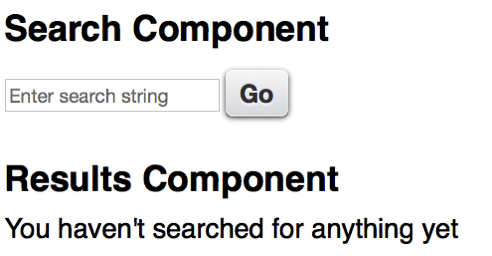
To give a simple and useless example, I have an application that allows a user to enter a search term:

Screen Shot 2015 05 23 at 17 34 39

and when the search term is entered, display an unhelpful message about it;

Screen Shot 2015 05 23 at 17 37 13

The Event

The markup for the event is pretty simple:

<aura:event type="APPLICATION" description="Search Event">
    <aura:attribute name="term" type="String" />
</aura:event>

this event takes a single attribute - the string that has been searched for.

Search Component

The search component declares that it fires the event:

<aura:registerEvent name="SearchEvent" type="bblightning:SearchEvent" />

while the event is constructed and fired from the helper, via a controller method, when the user clicks the search button:

var searchTerm=component.get("v.term");
    $A.get("e.bblightning:SearchEvent").
	 setParams({term: searchTerm}).fire();

“v.term” here refers to a component attribute, which backs the search term input field.

Results Component

The results component declares that it handles the event via the searched controller function:

<aura:handler event="bblightning:SearchEvent" action="{!c.searched}"/>

the searched function simply delegates handling of the event to a helper method, which generates the message to let the user know that their efforts haven’t been in vain:

searched : function(component, event) {
    var searchedTerm=event.getParam("term");
    component.set('v.msg',
                  'You searched for the term [' + searchedTerm +
                  '] - if I had an Apex controller, ' +
                  ' I might find some matching records');
}


Putting It All Together

The actual functionality here is pretty immaterial, hence my being so dismissive of it.  The important aspect is revealed when viewing the application markup:

<aura:application >
    <div class="padded">
	<c:SearchForm />
    	<c:SearchResults />
    </div>
</aura:application>

The first component produces the form, while the second component displays the results. Note that there is nothing wiring the two components together in the markup, so I could just as easily assemble this application using the Lightning App Builder. What isn’t apparent through the markup is that all of this takes place client side and is very fast. Any future components that want to capture the search term, for logging/audit purposes for example, simply need to handle the event and be added to the application.

The full source for this marvellous application, related components and event is available in my Lighting Examples GitHub repository - look for the src/aura/Search* elements.

Related Posts


Wednesday, 6 May 2015

International Day against DRM

2015 Banner

If you’ve ever visited this blog before, you’ll know that I wrote a bestseller called the Visualforce Development Cookbook, and that each page of this blog contains a link to allow a smooth and easy purchase.  If you’ve been holding off adding to your cart waiting for a better price, wait no longer. For today only (6th May 2015) you can have your very own copy for just $10.

That’s right, $10. Packt Publishing are celebrating International Day against DRM by offering all e-books and videos for just $10 for one day only. Here’s the official word:


Packt celebrates International Day Against DRM, May 6th 2015 


Packt Publishing firmly believes that you should be able to read and interact with your content when you want, where you want, and how you want – to that end they have been advocates of DRM-free content since their very first eBook was published  back in 2004. 


This year, to demonstrate their continuing support for Day Against DRM, Packt is offering all its DRM-free content at $10 for 24 hours only on May 6th – with more than 3000 eBooks and 100 Videos available across the publisher’s website www.packtpub.com, there’s plenty to discover, whatever you’re interested in.

“Our top priority at Packt has always been to meet the evolving needs of developers in the most practical way possible, while at the same time protecting the hard work of our authors. DRM-free content continues to be instrumental in making that happen, providing the flexibility and freedom that is essential for an efficient and enhanced learning experience. That’s why we’ve been DRM-free from the beginning – we’ll never put limits on the innovation of our users.” 

– Dave Maclean, CEO


Advocates of Day Against DRM are invited to spread the word and celebrate on May 6th by exploring the full range of DRM-free content at www.packtpub.com - all eBooks and Videos will be $10 for 24 hours, including the latest hot titles.


You can find out more information at: http://bit.ly/1AEPeiW