Showing posts with label Service Cloud. Show all posts

Saturday, 22 July 2023

Salesforce GPT - It's Alive!

Image generated by Stable Diffusion 2.1 in response to a prompt by Bob Buzzard

Introduction

This week (19th July) the first of the Salesforce AI Cloud/Einstein GPT applications became generally available. You can read the full announcement on the Salesforce news site, but it's great to see something tangible in the hands of customers after the wave of marketing over the last few months. Its a relatively limited amount of functionality to start with, but I prefer that to waiting another 9 months for everything to be fully built out. GA is better than finished in this case!

What we know so far

We know that it's only available to Unlimited Edition, which already includes the existing Einstein AI features. This seems to be becoming the standard approach for Salesforce - Meetings, for example, was originally Performance and Unlimited Edition only, but is now available for all editions with Sales Cloud. It's a good way of keeping the numbers down without having to evaluate every application, and it's likely to include those customers that are running a lot of their business on Salesforce and thus will get the most value. 

We know that it's (initially) a limited set of features that look to be mostly relying on external generative AI systems rather than LLMs trained on your data. The features called out in the announcement include:

  • Service replies - personalised responses grounded in relevant, real time data sources. To be fair, this could be a model trained on your data, but the term grounded implies that it's an external request to something like Open AI GPT with additional context pulled from Salesforce.
  • Work Summaries - wrap ups of service cases and customer engagements. The kind of thing that Claude from Anthropic is very good at. These can then be turned into Knowledge Articles, assuming there was anything that could be re-used or repurposed for future customer calls.
  • Sales Emails - personalised and data-informed emails created for you, again sounding very much like a grounded response from something like OpenAI.
This looks like a smart move by Salesforce, as they can make generative AI available to customers without having to build out the infrastructure to host their own models - something that might present a challenge, given the demand for GPUs across the industry.

We know it will include the Einstein GPT Trust Layer. This is probably the biggest benefit - you could create your own integration with any of these external services, but you'd have to build all the protections in yourself, and the UI that allow admins to configure them.

We don't know what pricing to expect when it becomes available outside of Unlimited Edition, but given that it's included with Einstein there, it may well be included in that SKU for Enterprise Edition, which is $50/user/month for each of Sales and Service Cloud Einstein.

We know it includes "a limited number of credits', which I'm pretty sure was defined as 8,000 in one of the webinars I watched. This sounds like a lot, but we don't know what a credit is, so it might not be. If it's requests, that is quite a few. If it's tokens, not so much - testing my Salesforce CLI integration with OpenAI used around 6,000 tokens for not very many requests. Still, if you built your own integration with any of these tools you'd have to pay for usage, so there's no reason to expect it to be included when going via Salesforce, especially as I'm sure different customers will have wildly different usage. Those 6,000 tokens also cost me around 12 cents, so hopefully purchasing extra credits won't break the bank!

We also know, based on the Service Cloud GPT webinar on 19th July, that we'll be able to add our own rules around PII/sensitive data detection in prompts. It seemed highly likely that would be the case, but good to have it confirmed.

Finally, we know this is just the beginning of the GPT GAs. Dreamforce is less than 2 months away and there will be some big AInnouncements for sure.]

More Information


Saturday, 4 January 2014

Syntax Highlighting in Knowledge Articles

Here at BrightGen we use Salesforce Knowledge for our knowledge base.  The majority of the time the knowledge articles are paragraphs of text with images images, but every now and then we need to include code snippets.

For the purposes of this post I’m using the FAQ article type that is automatically available when knowledge is enabled, and I’ve added a Body custom field that is a rich text area. I’ve created a simple Visualforce page to display the FAQ:

<apex:page standardController="FAQ__kav" showheader="false">
  <p style=“font-size:16px; font-weight: bold;">
<apex:outputField value="{!FAQ__kav.Title}" />
  </p>
  <apex:outputField value="{!FAQ__kav.Body__c}" />
</apex:page>

and then configured this as the channel display for the article type when accessed through the internal app:

Screen Shot 2014 01 03 at 09 06 47

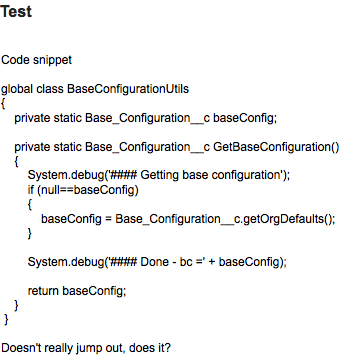
Simply dropping some code into the rich text area doesn’t make it stand out particularly well from the enclosing text:
 Screen Shot 2014 01 03 at 09 24 01

The HTML pre formatted tag <pre> displays the markup in a fixed-width mode, preserving spaces and line breaks to ensure the indentation looks good.  I can add this to my markup by editing the article and clicking the ‘Source’ button:

Screen Shot 2014 01 03 at 09 28 45

this allows me to edit the underlying article HTML and surround my markup with the opening and closing <pre> tags - note that if you simply try to edit the markup dropped in earlier, you’ll see a bunch of &nbsp; and other tags that are preserving the indentation - for that reason I paste the code out of my editor/IDE afresh into the source editor:

Screen Shot 2014 01 03 at 09 35 09

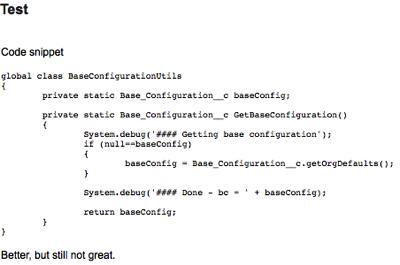
The code now stands out a little more in the article, but still doesn’t look fantastic:
Screen Shot 2014 01 03 at 09 36 46

In order to add syntax highlighting, its clear that I’ll have to look outside of the standard knowledge functionality - I could spend time writing the HTML to highlight each code snippet individually, but that won’t scale and will quickly get boring.

For syntax highlighting on this blog, I use the excellent Syntax Highlighter from Alex Gorbatchev, so this seemed like a good place to start.  Its pretty unobtrusive and relies on adding a style class to the <pre> tag that I’m already using.

First the code needs to be installed - navigate to the Syntax Highlighter home page (http://alexgorbatchev.com/SyntaxHighlighter/) and click the download link near the top right:

Screen Shot 2014 01 03 at 16 23 58

The resulting file can then be uploaded straight into Salesforce as a static resource - I’ve named mine SyntaxHighlighter as I have a great imagination!

My Visualforce page then needs to be updated to pull in the required JavaScript and CSS.  Here I’m including the core highlighter functionality, then the brush that I’m going to use to highlight my code - I like the Java brush so I’m using that, but there are plenty available in the zip file.  This is followed by a couple of CSS files to pull in the core styles and a theme: 

<apex:includeScript value="{!URLFOR($Resource.SyntaxHighlighter,
        'syntaxhighlighter_3.0.83/scripts/shCore.js')}" />
<apex:includeScript value="{!URLFOR($Resource.SyntaxHighlighter,
        'syntaxhighlighter_3.0.83/scripts/shBrushJava.js')}" />
<apex:styleSheet value="{!URLFOR($Resource.SyntaxHighlighter,
       'syntaxhighlighter_3.0.83/styles/shCore.css')}" />
<apex:styleSheet value="{!URLFOR($Resource.SyntaxHighlighter,
       'syntaxhighlighter_3.0.83/styles/shThemeDefault.css')}" />

Next, I have some JavaScript to turn off the toolbar that appears above the code by default and execute the static function to process all elements on the page and highlight as appropriate - it doesn’t matter where this is executed from as it won’t fire until the page has finished rendering:

<script type="text/javascript">
  SyntaxHighlighter.defaults['toolbar'] = false;
  SyntaxHighlighter.all();
</script>

I can then return to my knowledge article and add the java brush class to my <pre> tag by editing the source as described above:

Screen Shot 2014 01 03 at 16 51 39

and now when I access my page my code is highlighted with line numbers:

Screen Shot 2014 01 03 at 16 46 23

One important point to note - if you are using this to format Visualforce or HTML markup, you’ll need to HTML encode the markup first, or it will cause problems when the HTML is processed by the rich text editor.  I use the HTMLEncoder from opinionatedgeek.com - simply paste your markup in, click the encode button, copy the encoded output and drop this into the rich text editor using the source button as described above.


Tuesday, 18 September 2012

Guest Post - Dreamforce '12 Delivers Real-Life Socialized Service Model

In another first for the Bob Buzzard Blog, it's Guest Post time.  Ashley Furness is a CRM Market Analyst at Software Advice.  A couple of weeks ago I tweeted out a link to a story that Ashley wrote and we thought it would be cool for her to write a version specific to this blog and its audience.  Take it away Ashley ...

Dreamforce '12 Delivers Real-Life Socialized Service Model

Dreamforce - the cloud computing event that draws more than 50,000 to San Francisco every year - kicked off this week with more than 750 sessions for developers, media and other industry power players.

In addition to the planned events, organizers will again feature the "Salesforce Service Cloud Call Center,"  but this year it's all about social. This live customer service response hub will provide onlookers a chance to see expert social response in action. Why social for customer support? 

“I don’t think there’s any company out there that doesn’t need to be thinking about [customer service through social]. I guarantee your customers are already using the channel, and they’re probably already talking about your brand,” says Fergus Griffin, senior vice president of solutions marketing for Salesforce.com.

"Salesforce Service Cloud Call Center" observers should be able to glean some tips by watching, but here's a few best practices you should take home from the event.

Hashtag Common Queries

Griffin told me that last year during Dreamforce most interactions across all service channels involved questions about where things were located, recommendations for events, and tips for getting around the conference. Hashtags allow customer service managers to instantly create a knowledge base for topics such as these.

During this year’s event, Salesforce Service Cloud Call Center agents might hashtag common queries with things like #Dreamforcemaps, #Dreamforcefood or a more general tag like #Dreamforcehelp.

Then, if a Dreamforce visitor tweets, “Where’s the closest restaurant?” the agent could respond “@UserName check out everyone’s food recommendations by searching #Dreamforcefood!” When they search that hashtag, the visitor could scan through everyone’s suggestions. This saves the agent time, while still providing a helpful personal response.

Depending on what hashtags emerge, you're company may also choose to add these to the self-service knowledge base on the website. 

Post Publicly First

John Rote, Vice President of Customer Experience at Bonobos, compared support through social media like troubleshooting in a coffee shop or bar.

“It’s likely more people will hear about it and pull friends from across the room to listen. This can mean a bad experience is shared further, faster,” says Rote, who will sit on a social customer service panel at Dreamforce called “How Small Businesses Keep Up with the Velocity of Customer Service."

To mitigate this risk, Rote suggests companies always acknowledge the comment in social before taking the interaction to another channel. This approach publicly demonstrates that the company is listening and responds to everyone. If the interaction was taken straight to email, no one would know customer service addressed the problem.

This is also useful for companies that stream their Twitter feed in the infrastructure of the website. Again, it adds a personal face to the company and shows website visitors you're listening. 

Prioritize Thoughtfully

One of the biggest challenges with providing customer service through social is dealing with the sheer volume of requests. Griffin said companies should have a well-defined strategy for prioritizing responses.

This should include ranking factors from social–a Klout score, for example–and customer history. A company might choose to respond first to longtime customers or those with a history of high-value purchases.

“Companies should strike a balance between who [the customer] is in the community, but also who they are to you,” Griffin says.

Engage Customers You Might Never Have Known

Customer service through social media is not just about providing another interaction channel in addition to phone, email or live chat. Bonobos found out through customer surveys that social media support engaged customers who might never have sent their question otherwise.

“The thing that was really amazing to us was 3-4 months after [implementing our social customer service strategy], we found out that most of those customers identified never would have reached out to us if they weren’t able to do it over Facebook or Twitter,” Rote says.

So, take a minute to check out the Salesforce Service Cloud Call Center this year and learn other strategies for elevating your social customer service strategy. 

Research for this article was provided by Help Desk Software Advice.

Video: http://www.youtube.com/watch?v=rO5tdE9mtnE