Thursday, 30 May 2013

Book Reviewers Wanted

NewImage

Earlier this year I acted as a Technical Reviewer for the CRM Admin Cookbook.  This means its a little tricky for me to review in this blog, as I obviously ensured everything was perfect and there was no way to improve it :)

Packt Publishing are offering free copies of Salesforce CRM Admin Cookbook : http://www.packtpub.com/salesforce-crm-admin-cookbook/book in exchange for a review either on your blog or on the title’s Amazon page.

The book covers the following areas:

  • Building home page components and creating custom links to provide additional functionality and improve the Home Tab layout
  • Advanced user interface techniques to improve the look and feel of Salesforce CRM with the presentation of graphical elements
  • Exposing hacks and hidden features to enhance and override native aspects of Salesforce CRM
  • Automatic data capture and improving data quality in Salesforce CRM
  • Implementing an approval process to control the way approvals are managed for records in Salesforce CRM
  • Increasing productivity using tools and features to provide advanced administration
  • Configuring and installing Salesforce for Microsoft Outlook email integration
  • Integrating Salesforce CRM with external online tools to provide enhanced functionality and extend the power of Salesforce CRM 

If you’re a Salesforce CRM user or interested in getting to grips with it, this is a good way to bag yourself a free guide (current retail price £28).

Free review copies are available until Monday 5th June 2013

If you’re interested, email Harleen Kaur Bagga at: harleenb@packtpub.com


Sunday, 26 May 2013

Mobile Web Apps with HTML5 and JQuery Mobile

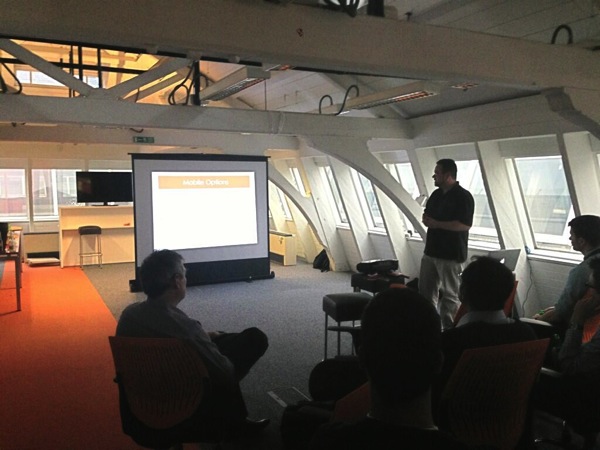
At the Salesforce Customer Company Tour in London on 2nd May I presented a session in the Developer Theatre on Building Mobile Web Apps with HTML5 and JQuery Mobile, using a Todo list application as the example.

Yes, We've Got a Video

The session wasn't recorded, but since then I've recorded a replay of it which is available on youtube:

Get the Source

I've made this application available as an unmanaged package at: https://login.salesforce.com/packaging/installPackage.apexp?p0=04ti0000000VGqW

The main contents of this package are:

  • Custom Todo app
  • Custom objects for Group and Task, with tabs
  • Visualforce TodoJQM page and tab, also called TodoJQM
  • A few static resources for JQuery Mobile
  • Visualforce components for the custom CSS and JavaScript for the Todo pages - obviously in a  production system these would be in static resources and the JavaScript would be minified.  However, in this case I've put them into custom components so that they can be viewed without downloading and easily changed.

Feel free to post any questions you might have in the comments section below.


Tuesday, 30 April 2013

Community Service

This has been a busy few weeks in the Salesforce developer community; mobile dev week arrived at short notice and a week later it's the Salesforce Customer Company Tour with the attendant Dev Zone, which is the main attraction of the event if you are a developer.  As I've been or am getting involved in a number of these events, I thought I'd write a short blog about them.

Intro to Force.com

This took place on 11th April at the Salesforce offices in Tower 42.  Lead by Frances Pindar (@radnip) with assistance from myself, it was a couple of hours or so session to introduce the next wave of Force.com developers to the platform, working through the exercises in the Developerforce Force.com workbook in a group environment. The advantage to using the workbook is that the attendees are then able to continue with the exercises once the session is finished, given that it isn't feasible to get through the whole thing in the time allowed.

Here's a picture of everyone hard at work:

Intro

I'm planning on running another one of these sessions in the next few months, so if you're near London and are interested in learning more about the Force.com platform, stay tuned.

Mobile Developer Week Meetup

As part of Salesforce Mobile Developer week, the London Salesforce Developer's Group had a meetup at the new T'Quila offices above Smithfields.

Rob Woodward of Salesforce gave us an overview of the new Mobile Packs and demonstrated a todo list application based on the Angular JavaScript framework.

I was up next, and demonstrated a couple of applications that I'd built using the Salesforce mobile SDK and Apache Cordova under the heading of "Ticket to Ride".  These consist of a ticketing application, that allows users to pull down tickets that they have purchased onto their mobile device, stores them in the Salesforce smart store and allows offline access to the ticket details and a QR code.  The companion application is a driver app that scans the ticket, confirms it is being presented for the correct service and updates the ticket with a used indicator and timestamp.  Force.com provides the object storage and the applications access this via the Rest API.

The powerpoint presentation for this talk can be downloaded here. If you'd like to see it in action, come to the BrightGen stand at the Salesforce Customer Company Tour and I'll be happy to show you.

Just to prove I'm not making it up, here's a photo from the event courtesy of @Anup:

Mobile dug

Salesforce Customer Company Tour

On 2nd May the Salesforce Customer Company Tour comes to London. My company, BrightGen are a Platinum Sponsor this year, so we'll have a big stand and plenty of people to man it.  This event incorporates a Dev Zone and I'll be giving a Developer Theatre session on Building a mobile web app with HTML5 and JQueryMobile, from 4:15 to 4:45 - hopefully I'll see some of you there. If you haven't signed up yet, you can do so here.

Saturday, 23 March 2013

Book Review - Force.com Tips and Tricks

Disclaimer - I haven't purchased this book - I was sent a copy to review by the publisher.


4743EN Cover

Force.com Tips and Tricks is written by a couple of my fellow Force.com MVPs, Abhinav Gupta and Ankit Arora. It is aimed at both developers and administrators and packs a lot of information into the 200+ pages.

For Administrators

Administrators get a whole chapter dedicated to tools to make their lives easier, including those that come with the platform as standard (e.g. data loader) and a long list of code share and app exchange packages. There is also a deep dive on Salesforce analytics, covering topics such as custom report types, adding formulae to a report and setting up analytic snapshots - all of which are important for administrators wanting to get the most of the platform.  

For Developers

The book starts off with an introduction to the Force.com platform, covering key concepts for anyone starting out with Force.com development such as multi-tenancy, the metadata driven development model and governor limits. Later chapters take you through setting up development environments and migrating changes between those environments, useful tools for developers from both Salesforce and the wider community, and concludes with a couple of chapters that give great advice on writing flexible and scalable Apex and Visualforce code, as well as tips for troubleshooting when code isn't performing as expected.

For Both

For administrators wanting to understand more about maintaining and extending Force.com applications, the developer specific sections will prove very useful.  By the same token, development in Force.com starts with clicks rather than code, so the administrator-centric chapters are something that every developer should read.


This book isn't a training manual for Force.com development - where I think it would have been really useful in the past was as I was starting to carry out serious development with the platform.  I understood enough about the basics to start being productive, but when I was trying something new, I'd be searching the discussion boards and reading blogs to get more information.  With a book like this to hand I'd either have the information that I required right there, or be pointed in the right direction to find out more with minimal effort.  

 I always hope to learn something I didn't know from these books, and this time it was a number of the tools available, particularly to enforce CRUD and FLS when running in the system context.  Its certainly a useful addition to my Salesforce library and one I'm sure I'll be coming back to regularly.

Saturday, 2 March 2013

London Salesforce Developers February Meetup

Feb meetup 1 jpg large 

The February London Salesforce Developers Meetup took place this week, with 30+ people (Kingmakers!) attending. While the usual suspects were in attendance, there were quite a few new faces, which bodes well for the group.

John Stevenson gave an update on the events that are being run for the community - I can definitely say that the Git and Github Kickstarter Workshops are popular, as every time I receive a notification that one is available, by the time I click through to the details its full!

John Mahoney gave a demonstration of the steroid component library - I didn't get to see as much of this as I'd have liked to, as I was advising someone on customer portal setup in the corridor!

And in a startling development, which nobody could have predicted, I gave a short talk on Salesforce Certification!  As I served as a judge on the EMEA Technical Architect Review Board in January, I'm in a tricky position when talking about this certification. I've spent the last year trying to spread the word of how to pass the board, but that's clearly no longer appropriate. I was therefore fortunate to be joined by my colleague, and newly Certified Technical Architect, Chris Eales (@theEalesie), who talked about his experience and gave advice on how to prepare for the board, plus details of the mechanics of the process.  

The slide deck for this talk can be accessed here. (On a related note, I've added a Salesforce Certfication page to this site that contains links to all my certification related posts - you can access this from the right hand sidebar).

The meetups take place every month and include beer, pizza and plenty of time for networking.  If you haven't made one yet, we'd love to see you. Make sure to join the Meetup group to get notified of all upcoming events.
 

Sunday, 3 February 2013

Improved Force.com Discussion Boards

This week saw a welcome revamp of the Force.com discussion boards.  There's been quite a bit of debate recently about the relative merits of the discussion boards versus the Salesforce Stack Exchange beta site.  Personally, I think there's room for both as they serve different purposes.  I also think that the more channels for the community to work together the better - for one to succeed there's no reason that others have to fail.  I realise that this is an area of religious wars for some people, so bear in mind that this post represents my opinions on this - if you disagree, there's nothing stopping you writing up your own post!

My thoughts of some of the strengths and weaknesses of these sites are as follows:

  • Gamification.  
    This is an area where Stack Exchange is very strong.  There's a plethora of badges that can be earned, each user has a reputation score based on up or down votes for questions and answers, answers marked as accepted etc.  Another interesting ranking is a user's acceptance rate.  This indicates how often a user is accepting answers, and a low score indicates they are asking for a lot of help but not marking answers solved for the benefits of others.  The Force.com boards, by contrast, have previously ranked users by the number of posts that they have made - e.g. 150 for Trusted Contributor and topping out at 500 for Super Contributor.  Where this is lacking is rating the quality of posts - I've seen at least one instance in the past where a user has earned Trusted Contributor by making 150 'please write my test case' style posts.  This is an area where the revamp has improved matters through the introduction of kudos - you can read about how this works in detail at the developer relations blog post.  What matters though, is the leader board is now focused on kudos rather than tags, which should lead to a lot less meaningless tags on messages.
     
  • Participation.
    This is an area where the Force.com boards win hands down - the number of users and volume of posts far exceeds the Stack Exchange site.  Of course boards have the advantage that they've been around longer, but I feel there is more to it than this, as I'll cover in my next point.  The quality of the posts on the boards is hugely variable though, whereas the up/down voting system on Stack Exchange tends to ensure that the quality of posts is high - users can also vote for questions to be closed if they feel they are asking for help with homework, could be answered by a simple search etc.
     
  • Support for Newbies.
    This is likely to be my most contentious point.  I don't think that Stack Exchange is a good place to go for help if you are starting out with Force.com.  Its good for advanced users who have hit a roadblock, researched the problem and been unable to find a solution. Its also reasonably good for intermediates who know there is a specific problem with their code but can't figure out exactly where its going wrong.  Where it really falls down is for those who don't know where to start.  Post up a question asking for basic, generic help and you'll be down voted and closed very quickly. There's also a touch of mob mentality or swarming about this - questions can be quickly hammered down, but the voting up doesn't seem to happen with the same pace.  The boards are much more tolerant of beginner questions - sometimes there are pages of responses attempting to get to the bottom of what the problem actually is before even attempting to solve it.  In case you think I'm being too hard on Stack Exchange, the format doesn't really support this kind of question discovery, so I can understand why some questions are treated in this way.  I often describe the boards as the place to ask bad questions, or a home for those who don't know what they don't know.
     
  • Existing answers.
    This is another area where Stack Exchange cannot hope to compete, due to the amount of time that the boards have been around.  You'll probably have to work a little harder to find answers to esoteric questions on the boards, due to the variable quality of the posts, but there are tens of thousands of solutions in there.  In fact, I'd lay money that before posting on Stack Exchange most, if not all, users will have searched the discussion boards. And to be fair and equitable, if they've done that research before posting on Stack Exchange their question will be upvoted and answered.

Reading the above, you might think that I'm not a fan of Stack Exchange - in fact, nothing could be further from the truth, I'm on it most days and I'm in the top 5 for reputation.  There's a place for both sites and, while there is some overlap, they generally serve different purposes.  That said, I do prefer the discussion boards - partly as I have four years history with them, but mainly because I'm interested in getting people started on the platform and improving beginners. 

But enough about how the boards fit into the wider landscape, the important point is that they are getting some love, having been left to fend for themselves for a while  Its great that the board owners are doing this, but there are plenty of things that we participants can do to improve things.  To that end, here's some of my thoughts on board etiquette:

  • If you post a question and you get a solution, mark it.  
    It can be disheartening to put hours of effort into drilling down to find the actual problem and coming up with a solution, only to find the original poster then moves on to their next question without a backward glance.  It also means that another user researching a similar problem doesn't know that there's a solution somewhere in the thread.

  • Don't beg for marks in your signature.
    Having said that you should always mark solutions, I can see why some people don't.  If I posted a question and every response, even a 'tell me more', demanded that it be marked as the solution, I'd start to tune out the whole solution side of it.

  • Don't just post up requirements.
    Its fair enough to post up a question asking how to get started with a particular piece of functionality (e.g. how can I submit a form via javascript), but if you are copying and pasting your requirements/homework, (e.g. 'I have to build a system that manages projects') , your post is likely to remain alone with zero responses. My response to these is often 'good luck' or 'thanks for keeping us in the loop'!

  • Have a go first.
    If you have any idea where to start, have a stab.  Nobody gets flamed for posting bad or incomplete code.  It shows that you are trying to help yourself and, certainly in my case, is likely to make people want to help you.

  • Don't post pages of code.
    If you do this, really what you are saying is 'figure out my code and tell me what is wrong with it', which is a big ask.  Try to narrow down where you think the problem is and post discrete section.

  • Post some code!
    You have to give us a chance!  If you post up that you are getting a null pointer exception with no context and no code, its highly unlikely you'll get a solution.  If an error points to a particular line of code, there's no excuse for not posting it.

  • Don't contact helpful people directly
    If someone is knowledgeable and solves a few problems for you, don't ask for direct contact details.  Essentially what you are saying there is you'd like free, private support from them when it suits you.  Most of us on the boards have day jobs where we charge people for our skills and experience, so you have the option to pay for an engagement if you need a personal service.  Receiving message after message asking for "a way to get hold of you so we don't have to wait" can quickly become irritating,

  • Don't send questions in private messages.
    Think about what you are doing here - you've taken advantage of the community to find someone knowledgeable, but then you don't want the discussion to be public to help others.  I don't even respond to these messages any more I'm afraid, as I get so many of them.
     
  • Don't use it as your blog.
    Every now and then we'll get some blog posts under the guise of discussion posts.  I can see why people do this, as it gives a blog a huge, unearned audience.  The home for these is Developerforce, which accepts blog posts and code recipes from the community. 

  • Be polite.
    If you think a question or response is bad, there's no reason to be rude.  This is, thankfully, very rare on the boards.  Its always worth restating though, as the negative effects can be significant - I've been involved with some communities  where its felt like there was active effort to discourage anyone apart from experts from posting, and to do this in a particularly unpleasant manner.  If you think the question is bad, try to find out what the user is trying to ask.  If you think an answer contains bad advice, frame your criticism with the correct solution - remember, you might be wrong and they might be right!

  • Get (more) involved.
    Most of the above are about what not to do.  If none of those apply, keep doing what you are doing, but do more of it.  If you are relatively new to the platform but starting to get the hang of it, start posting answers - nobody will jump on you if you make a mistake.

We have a great community, so lets do all we can to grow and improve it for everyone.


Saturday, 12 January 2013

Send SMS Messages from Force.com

One of the app exchange offerings of my company, BrightGen, is BrightSMS. This is a free app that allows the sending of single or bulk SMS messages to UK or international numbers - you only pay for the messages that you send.

Earlier versions of BrightSMS provided functionality to send SMS messages from Visualforce pages, based on the user typing the message in and selecting a mobile number/contact/lead as the message recipient.   Version 3.0 introduces support for sending SMS from @future methods, which means that messages can be sent from triggers when record details change.

Getting Started

Installation and setup is covered in the Installation Guide.  Once you have installed the package, follow the User Guide to register an account.  The first account you register in your Salesforce org gets 10 free messages.  Note that the account is tied to a mobile phone number and you can only register a number once - so the 10 free messages is a single shot deal.  Once I've been through the installation I usually send myself an SMS through the packaged pages to confirm its all working.

The Code

My example trigger is on the case sobject, and sends an SMS to the contact associated with the case when the status changes, as long as the contact has supplied a mobile phone number. 

trigger Case_au on Case (after update)
{
	List<Id> caseIdsToSMS=new List<Id>();

	// get the contact ids
	Set<Id> contactIds=new Set<Id>();
	for (Case cs : trigger.new)
	{
		if (null!=cs.contactId)
		{
			contactIds.add(cs.contactId);
		}
	}
	
	Map<Id, Contact> contsById=new Map<Id, Contact>();
	contsById.putAll([select id, MobilePhone from Contact where id in:contactIds]);

	// pull back the contact and check the mobile number is supplied
	
	for (Case cs : trigger.new)
	{
		if (null!=cs.ContactId)
		{
			Contact cnt=contsById.get(cs.ContactId);
			if ( (cs.Status != trigger.oldMap.get(cs.id).Status) &&
		    	 ( (null!=cnt.MobilePhone) && (cnt.MobilePhone.length()>0) )
		   	)
			{
				caseIdsToSMS.add(cs.id);
			}
		}
	}
	
        // delegate to a future method, as callouts aren't allowed in triggers
	CaseUtils.SendCaseUpdatedSMS(caseIdsToSMS);
}

and the future method that sends the SMS:

public with sharing class CaseUtils
{
    @Future(callout=true)
    public static void SendCaseUpdatedSMS(list<Id> csIds)
    {
	for (Case cs : [Select CaseNumber, Contact.MobilePhone, Contact.FirstName, Contact.LastName, Status from Case where Id IN : csIds] )
	{
	BG_SMS.BrightSMSSubmitSMSMessage bsms = new BG_SMS.BrightSMSSubmitSMSMessage();
		bsms.brightSmsAccountId = 'AccountIdGoesHere';
		bsms.rateCode = '1';
		bsms.senderID = 'BrightGen';
		bsms.mobileNumber = cs.Contact.MobilePhone.trim();
		bsms.smsMessage = 'Hi ' + cs.Contact.FirstName +
				  ', Just to let you know the status of your case {' +
				  cs.CaseNumber +
				  '} has been changed to ' +
				  cs.Status;
		bsms.submitSMSMessage();
   	}
    }
}

Replace AccountIdGoesHere with the id of the SMS account that you registered in the Getting Started session.  The senderId will be displayed as the sender of the SMS, so replace this with something specific to you or your company.  Finally, the smsMessage contains the message text that will be sent.  BrightSMS allows you to send up to a maximum of 459 characters, but these will be sent as 3 individual SMS messages, as the maximum individual SMS message size is 153 characters.

Note that as there are a limit of 10 callouts per transaction, if there are more than 10 case updates to be sent, this code will produce an error.  If you have a large amount of messages to send on a regular basis, its better to use Batch Apex and split the processing up into multiple transactions.

Sending Messages

First up, I create a contact in my org and supply a mobile number (note, this is not my real mobile number):


Screen Shot 2013 01 12 at 11 14 16


I then create a case and associate my contact record with it:

Screen Shot 2013 01 12 at 11 18 23


If the status of the case is then changed from New to Working, I automatically receive an SMS informing me of the change:

IMG 0705