Showing posts with label Spring 16. Show all posts

Saturday, 27 February 2016

Lightning Component Events - Change Types with Care

Lightning Component Events - Change Types with Care

Events

Introduction

After the Spring 16 release of Salesforce went live, one of the components from my BrightMedia mobile booking application started throwing errors when sending a booking and its line items back to the Salesforce server. After some investigation, it turned out that the JavaScript version of the Order sObject had gained a ‘serId’ attribute somewhere along the line, which broke the deserialisation on the server.

One aspect of the application is that the order information is passed around between a number of components using Lighting Events - mainly application events, but there is the odd component event in there, so I set out to see if I could reproduce the error with a noddy application that fired and consumed a few events. I wasn’t able to reproduce the error, but along the way I did manage cause an interesting and unexpected error at deployment time.

Lightning Event Types

There are two types of events in the Lightning Components framework:

Application Events

Application Events follow the Publish-Subscribe pattern. Publisher Components fire events without any knowledge of which other components may consume them, while Subscribe Components receive and process events without any knowledge of which, or how many, components have fired them.

An application event specifies its type as ‘APPLICATION’ in the event bundle:

<aura:event type="APPLICATION" 
      description=“Event fired when something happens" />

A publisher component declares that it will fire the application event via the register event component:

<aura:registerEvent name="MyEvent" type="c:MyAppEvt"/>

A subscriber component declares that it wishes to handle events of this type via the handle event component, which also specifies the controller method to execute when an event of this type is to be removed:

<aura:handler event="c:MyAppEvt" action="{!c.handleMyAppEvt}" />

Component Events

Component Events are a bit more like JavaScript events fired in response to a user action - they can be handled by the component that fires the event (although the last time I tried this I couldn’t get it working) or it can bubble up through the component hierarchy, so being handled by the parent component that contains the publisher component, or its parent, and so on.

A component event specifies its type as ‘COMPONENT’ in the event bundle:

<aura:event type="COMPONENT"
	  description="Another event"/>

 A publisher component declares that it will fire the component event via the register event component, specifying 

<aura:registerEvent name="MyCompEvent" type="c:MyAppEvt"/>

A consumer component declares that it wishes to handle events of this type via the handle event component - this specifies the name attribute, which must match the name attribute of the register event declaration in the publisher component:

<aura:handler name=“MyCompEvent” event="c:MyCompEvt" action="{!c.handleMyCompEvt}" />

The Problem

When I wrote my noddy application, I defined my event has being of type APPLICATION, but not matter how many times I sent the custom object between components, I couldn’t get the bonus attribute. I then decided to change the type of the event to COMPONENT and update my components to handle the event through the bubbling mechanism. Unfortunately I didn’t carry out the latter task, as one of my many other duties took precedence, and I quickly forgot about it. Obviously this was in a developer edition and for a disposable application, in a real-world customer environment I’d create a new event rather than changing the behaviour of an existing one.

The next time that I tried to deploy an (unrelated) aura component via the metadata API, around a week later, I got the following error:

Screen Shot 2016 02 27 at 07 11 25

which rather confused me, as I didn’t have any event handlers in the component. After retrieving all of my lightning components via the Force CLI, I was able to search for component events, a synapse fired, and I remembered half changing my test component.

So it appears that when you deploy an aura component via the metadata API, a validation type check is carried out on all existing components to make sure that everything is coherent. This may happen with other deployment methods, I haven’t tested with any others. It doesn’t happen in the Developer Console, as that was the tool that I used to update the component. This makes sense, as otherwise it would be impossible to change anything that briefly invalidated another component.

By the way, if you are wondering what I did about the bonus attributes, I came up with a couple of workarounds:

  • Turn it into a JSON string an remove the attribute during the conversion
  • Delete the attribute using the JavaScript delete keyword
Both of these are dealing with the symptom rather than curing the problem, but reproducing this in a simple application has thus far defeated me. If any of the Lightning Components development team read this I’d love to know where this attribute might come from.

Related Content


Sunday, 14 February 2016

Custom Transaction Security Policies in Spring 16

Custom Transaction Security Policies in Spring 16

Introduction

Towards the end of the Spring 16 release notes, in the Security and Identity section, is a particularly interesting new feature - Custom Transaction Security Policies. Transaction Security intercepts Salesforce events and can take action, including blocking the requested event. Custom Transaction Security Policies allow you to create your own policies that are evaluated when an event occurs. Essentially what this means is that you can have a lot more granularity around security than with the regular setup tools. 

Note that there is an additional cost associated with this functionality - from the help :

Requires purchasing Salesforce Shield or Salesforce Shield Event Monitoring add-on subscriptions.

Enabling Custom Policies

Before you can create a custom policy, you need to enable the custom policies functionality by navigating to Setup -> Administration Setup -> Security Controls -> Transaction Security :

Screen Shot 2016 02 14 at 07 52 27

The Policy

The use case for this post is a request I’ve hit more than once in my world - restricting the users that can run reports from external IP addresses. Using the standard setup tools, all I can really do is restrict the IP addresses that users with a particular profile can login from, which stops them from carrying out any activities from an external address. Using a custom policy allows me to intercept a user’s attempt to execute a report or dashboard, and check that they are either from an approved IP address or they are a user that I have specifically allowed to do this.

The first step is to configure the custom policy: 

Screen Shot 2016 02 12 at 17 32 38

Stepping through the parameter values :

  • Enable - is the policy enabled (active)
  • Name/API Name - the friendly and internal names for the policy, pretty much everything in Salesforce has these!
  • Event Type - AccessResource - intercept when the selected resource is accessed
  • Resource Name - the selected resource - in this case, any Report or Dashboard access will trigger the evaluation of the policy
  • Notifications - how I want to be notified if the policy is breached
  • Real-Time Actions - what I want to do when the policy is breached - in this case I’m going to block access, but I could choose to just get notified and take no action, or mandate that two-factor authentication is required.
  • Apex Policy - this is the Apex class that contains the policy. I can either choose an existing policy or, as in this case, get the platform to generate me the basic class. Note that classes must implement the TxnSecurity.PolicyCondition interface.
  • Execute policy as - the context user to execute the Apex policy class, must have the System Administrator profile.
  • Create condition for - I need to check the source IP of the request. Obviously 1.1.1.1 is not a valid internal IP address, but for the purposes of this post assume it is.

This generates the following Apex code:

global class BlockIPAddressReportsPolicyCondition
       implements TxnSecurity.PolicyCondition
{
  public boolean evaluate(TxnSecurity.Event e)
  {
    if(e.data.get('SourceIp') == '1.1.1.1')
    {
       return true;
    }

    return false;
   }
}

Extending the Generated Policy

As it stands, this stops anyone from accessing reports unless it is from the IP address 1.1.1.1, which while an improvement on stopping users from doing anything from that IP address, isn’t all I’m hoping for.

The next step is to determine the user that made the request - luckily the Event class exposes the UserId property which I can use to retrieve the user record:

     User u=[select id, FirstName, LastName from User where id=:e.UserId];

 and I can then check that if I am not the user, the request is blocked:

 if ( (U.FirstName!='Keir') || (U.LastName!='Bowden') )
 {
     // Prohibited user - only Keir Bowden can access reports from external IP addresses!
     return true;
 }

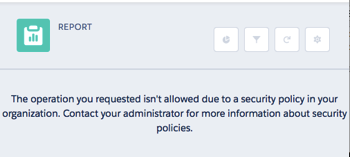
Now if I try to access a report from any IP address, I’ll have full access, but if another user tries to access a report and their IP address isn’t 1.1.1.1, the request is blocked:

Screen Shot 2016 02 14 at 08 00 58

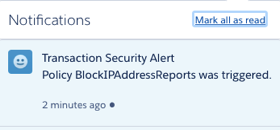
and as I specified myself as the recipient, I receive an in app notification:

Screen Shot 2016 02 14 at 08 03 05

and an email:

Screen Shot 2016 02 14 at 08 04 45

Conclusion

As I mentioned earlier, this feature requires an additional paid subscription. However, if you are working in a regulated industry, or for a customer with specific and nuanced requirements around application security, its well worth a look. Also, as its part of the Salesforce platform, there are no browser plugins or the like to be installed.

Related Posts