|
|
Just over three (!) years ago I published a blog post showing a mechanism for automatically refreshing a dashboard after a timer expired. This had a number of caveats around it, most importantly that the method I was calling to execute the refresh was undocumented and thus likely to be unsupported by Salesforce.
With the advent of the Summer 14 release, there is now a supported way to refresh a dashboard programmatically, through the newly GA Dashboards API. This REST based API not only allows dashboard metadata and data to be retrieved, but also contains a method to execute a dashboard refresh.
To refresh a dashboard, simply finds its ID and execute the following JavaScript (requires JQuery) from a Visualforce page:
$.ajax(
            {
              url: '/services/data/v31.0/analytics/dashboards/01ZB00000008oyd',
              type: 'PUT',
              beforeSend: function(xhr) {
                // Set the OAuth header from the session ID
                xhr.setRequestHeader('Authorization', 'Bearer {!$Api.Session_ID}');
              },
              success: function(response) {
                // do success stuff
              error: function(jqXHR, textStatus, errorThrown) {
                // do failure stuff
              }
          }
        );
where ‘01ZB00000008oyd’ is the id of the dashboard.
As I can now refresh directly from the page, my DashboardRefresher page no longer needs a controller and all the logic is written in JavaScript:
<apex:page sidebar="false" showheader="false" standardstylesheets="false">
  <apex:includeScript value="https://ajax.aspnetcdn.com/ajax/jQuery/jquery-1.11.1.min.js"/>

  <div id="countDown"></div>

  <script>
    $(document).ready(function($) {
       startCountDown(59, 1000, doRefresh);
    });

    function startCountDown(i, p, f)
    {
        var pause = p;
        var fn = f;

        var countDownObj = document.getElementById("countDown");
        if (countDownObj == null)
        {
            alert("div not found, check your id");
            return;
        }

        countDownObj.count = function(i)
        {
            countDownObj.innerHTML = 'Refreshing in ' + i + ' seconds';
            if (i == 0)
            {
                fn();
                return;
            }
            setTimeout(function() {
                          countDownObj.count(i - 1);
                         },
                       pause
            );
        }

        countDownObj.count(i);
    }

    function doRefresh()
    {
        $.ajax(
            {
              url: '/services/data/v31.0/analytics/dashboards/01ZB00000008oyd',
              type: 'PUT',
              beforeSend: function(xhr) {
                // Set the OAuth header from the session ID
                xhr.setRequestHeader('Authorization', 'Bearer {!$Api.Session_ID}');
              },
              success: function(response) {
                window.top.location='/01ZB00000008oyd';
              },
              error: function(jqXHR, textStatus, errorThrown) {
                // Oops - what went wrong?
                alert(jqXHR.status + ': ' + errorThrown);
              }
          }
        );
    }
  </script>

</apex:page>
Dropping this page into a dashboard counts down the timer - note the ‘As of’ time:
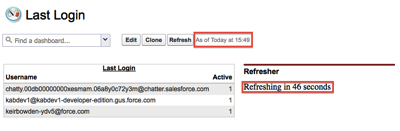
once the timer expires, the dashboard is refreshed and the page is reloaded, showing the dashboard has been refreshed. the ‘As of’ time updated and the counter restarted:

You can request up to 200 dashboard refreshes per hour, but bear in mind this is an organisation-level limit rather than per-user or per-dashboard.
