Saturday, 19 March 2016

Deploying Lightning Components - Go Big or Go Missing

Deploying Lightning Components - Go Big or Go Missing

Gobig

Introduction

Another week, another discovery around Lightning Components. This week its around deployment of components via the Salesforce Metadata API. I currently use the Force CLI wherever possible, as it uses OAuth to access the target org rather than requiring credentials to be stored on disk where they are potentially at risk. The tool itself doesn’t affect the behaviour, but its the one that I’ll be using for the examples.

After a recent deployment, we found that we were missing a JavaScript element from the bundle which broke a component. I can’t take the credit for identifying the underlying issue - that was Justin Baidoo-Hackman, one of my colleagues on the BrightMedia team.

Example Component

The sample component for this post is actually an application. Its very simple, and just asks the user to press a button which outputs an alert:

Screen Shot 2016 03 19 at 15 28 36

The bundle contents are as simple as you would expect. The application markup:

<aura:application >
    <h1>Deployment Test Application</h1>
    <p>Click the button below to execute a controller method</p>
    <button onclick="{!c.clicked}">Click Me!!</button>
</aura:application>

the controller:

({
    clicked : function(component, event, helper) {
        helper.clicked();
    }
})

and finally the helper

({
    clicked : function(component, event) {
        alert('You just clicked!');
    }
})

Deployment Process

I’m currently writing my Lightning Component code via the Developer Console (I know - I’m as surprised as you are!), which means that I have to retrieve them from the developer org and then deploy them to the target (usually customer) org. This is pretty easy with the Force CLI. First I login via the ‘force login’ command, which opens a browser window for me to login and authorise access to my org:

Screen Shot 2016 03 19 at 12 41 23

Once I have completed the login process, I can retrieve the Lightning Components metadata via the ‘force fetch’ command, specifying Aura as the metadata type to fetch:

Screen Shot 2016 03 19 at 12 43 52

This retrieves all of my Lightning Components and stores them in a metadata/aura subdirectory under my current directory.

To deploy the Lightning Components to my target org, I copy the components in question to a src/aura subdirectory and create a package.xml file describing what I want to deploy:

<?xml version="1.0" encoding="UTF-8"?>
<Package xmlns="http://soap.sforce.com/2006/04/metadata">
  <types>
    <members>*</members>
    <name>AuraDefinitionBundle</name>
  </types>
  <version>35.0</version>
</Package>

and finally I deploy the components using the ‘force import’ command, specifying the src directory :

Screen Shot 2016 03 19 at 16 25 25

which all works fine.

Deploying Part of the Bundle

Obviously the deployment process that I use for real applications isn’t quite this simple, and I have a number of scripts to automate things. One feature that the scripts support is to deploy only those files that have been changed since the last deployment - when there are three or four thousand elements, you don’t want to deploy the whole lot each time - and it turns out that this was the cause of the broken component. The markup and controller had changed, but the helper hadn’t, and when only the changed files were deployed, the rest of the bundle disappeared.

To demonstrate this I copy just the application and controller, but not the helper, to a new subdirectory - srcgap (source with a gap - I’m so creative!) and execute the deployment again. Note that there are no issues and the number of successes is the same:

Screen Shot 2016 03 19 at 16 33 58

however if I execute my application again and click the button, I get a different result:

Screen Shot 2016 03 19 at 16 35 20

Looking in the developer console confirms that the bundle no longer contains a JavaScript helper.

A Bundle is a Single Metadata Component

I always find this type of behaviour unexpected when deploying, as these deployments are additive unless you specify a destructive changes file. The explanation, though, is simple -  an AuraDefinitionBundle is a single metadata component, even though it encloses multiple files. So whatever I deploy replaces the existing bundle with that name, rather than merging the contents of the new component (the changed application and controller) with the contents of the existing component (the application, controller and helper).

At the risk of sounding like a UK politician, let’s be clear that this isn’t a bug - the metadata API is working in the intended way. The upshot of this, as the title of this post states, is that if you don’t go big and deploy the whole component, some of your code goes missing. 

Related Posts


Thursday, 10 March 2016

Lightning Components - It's Inheritance, Jim, But Not As We Know It

Lightning Components - It's Inheritance, Jim, But Not As We Know It

Override

Introduction

Continuing the saga of developing Lightning Components for our BrightMedia product, I’ve been trying to make use of inheritance in order to be able to change the layout and styling of a bunch of components solving similar problems through a single super-component. The Lightning Components Developer’s Guide states that:

"A sub component's helper inherits the methods from the helper of its super component. A sub component can override a super component's helper method by defining a method with the same name as an inherited method." 

which all sounded very straightforward, but actually wasn’t.

The components in question were pretty complex, but to investigate what was actually happening I created some very simple components, initially just a super and sub component. And I was supposed to be on leave for the day.

Is it a bird? is it a plane? No its Super Component

The super component defined the markup and had the extensible attribute set to true to allow inheritance: 

<aura:component extensible="true">
    <aura:attribute type="Integer" name="clicks" default="0"/>
    
    <p>Hi, I'm supercomponent. Click the button below to execute a
    helper method</p>
    <button onclick="{!c.updateClicks}">Click Me</button>
    <p>This button has been clicked {!v.clicks} times.</p>
</aura:component>

The super component controller has a single method - updateClicks - that is called when the button is pressed: 

({
    updateClicks : function(component, event, helper) {
        helper.updateClicks(component, event);
    }
})

and the helper has a single method - updateClicks - which increments the 'clicks' attribute

({
    updateClicks : function(cmp, ev) {
        var clicks=cmp.get('v.clicks');
        clicks++;
        cmp.set('v.clicks', clicks);
    }
})

Using this component inside an application works as expected and every click of the button updates the number of clicks messages:

Screen Shot 2016 03 10 at 15 26 56

Not very exciting, but stick with me as it will get more interesting.

On a Sub Mission

I then create a sub component, which extends the super component by specifying the extends attribute: 

<aura:component extends="c:SuperComponent">
</aura:component>

This component doesn't have a controller, just a helper that overrides the updateClicks method, to add 10 to the clicks count

({
    updateClicks : function(cmp, ev) {
        var clicks=cmp.get('v.clicks');
        clicks+=10;
        cmp.set('v.clicks', clicks);
    }
})

and as far as I was concerned, job done. Updating my application and using the sub component rather than the super component, I clicked the button and the behaviour was exactly the same as before - the counter incremented by 1.

(In fact what actually happened was that I forgot to update my application, but that spoils the image of infallibility that I carefully cultivate in these posts!).

After reconfirming that my syntax, attributes etc were correct, I set about trying to understand what was happening. 

You’re Not My Real Helper, You Can’t Tell Me What To Do!

After a few blind alleys, I added the following line to my controller method:

console.log('Component = ' + JSON.stringify(component));
console.log('Helper method =' + helper.updateClicks);

and got the following output:

Component = "{\"descriptor\":\"markup://bblightning:SuperComponent\",\"globalId\” …}" 

Helper method =function (cmp, ev) {
        var clicks=cmp.get('v.clicks');
        clicks++;
        cmp.set('v.clicks', clicks);
    }

Which showed that the component being used by the framework wasn’t the subcomponent at all, but the super component! This sort of makes sense when you consider that there is only one controller, and that lives in the super component.It isn’t the way that inheritance works in an OO language such as Java, where the controller would be available as part of the sub component, but it is the way that Lightning Components work so I had to accept that and move on.

O Helper, Helper! Wherefore Art Thou, Helper?

Digging through the Lightning JavaScript reference documentation, I came across the following method on the component object:

getConcreteComponent ()

Gets the concrete implementation of a component. If the component is concrete, the method returns the component itself. For example, call this method to get the concrete component of a super component. 

So it appeared that it was up to me to sort out the correct component in the controller, which could be handled by a one line change:

var cc=component.getConcreteComponent();

and this worked exactly as expected - logging the value of cc to the JavaScript console showed that the concrete component was indeed an instance of SubComponent. All I needed now was to get the concrete component’s helper, and I could invoke the appropriate subcomponent helper method. Once again, it all sounded simple.

Sadly, reading through the documentation showed no getHelper() method on the component object, nor anything that obviously would allow me to derive the helper. The reference documentation is okay if you know what you are looking for, but searching for method names doesn’t return any results, and I wasn’t looking forward to scouring every page. Then I remembered that aura is an open source framework and the source is available on github, which has pretty good repository search tools. 

Executing a search for getHelper, not only showed that there was a method available, it also returned a couple of results that were perfect examples of how to use it:

helper = component.getConcreteComponent().getDef().getHelper();

the getDef() returns the ComponentDef object for the component, which exposes a getHelper() method, which gives me access to the helper. My controller method could now determine the correct helper and execute the method:

updateClicks : function(component, event, helper) {
    console.log('Component = ' + JSON.stringify(component));
    console.log('Helper method =' + helper.updateClicks);
        
    var cc=component.getConcreteComponent();
    var cchelper=cc.getDef().getHelper();
    cchelper.updateClicks(component, event);
}

back to my application, and things now worked as expected, adding 10 to the clicks count every time I clicked the link. Finally some good news!

Subbing the Sub

Something I needed in my real-world application was the ability to have a SubSub component, that extended a Sub component that in turn extended a Super component. The Lightning Components Developer’s Guide was a little ambivalent about this, saying that a component can extend one extensible component. This can be read that:

  • multiple inheritance is not supported
  • once a single level of extension had taken place, no further extension is possible

After my inheritance fun and games, I wasn’t taking any chances, so enter SubSub Component, which was much the same as SubComponent, but added 100 to the clicks count. Updating my application to use the SubSub Component and clicking the button added 100, so the good news continued, which is most unusual in my experience.

Ever Decreasing Circles

The other scenario I was keen to understand, not because I needed to but because I was curious, was what happened if I called a super component method from the sub component, and that then called a method that was present in the super component but overridden in the sub component. So in my super component I have:

super : function(cmp, ev) {
    this.delegate(cmp, ev);
},
delegate : function(cmp, ev) {
    alert('In SuperComponent Delegate');
}

and in my sub component I have:

doStuff : function(cmp, ev) {
    this.super(cmp, ev);
},
delegate : function(cmp, ev) {
    alert('In SubComponent Delegate');
}

When I execute doStuff() in my sub helper, it will call the super() method in the super helper. What I wasn’t clear about was which delegate() method would then be called - the one from the super helper or the overridden one in the sub helper. What I hoped would happen is that the overridden method in the sub helper would be invoked, as that is how I expect inheritance to work - I shouldn’t end up in an instance of the super helper just because I execute a method that I’ve inherited. The good news is that’s exactly how it works! More good news - this was turning into a great day.

In Conclusion

Simply put, inheritance works as expected as long as you start your processing from the sub component.

Where its not intuitive is when you start the processing from the super component. The controller only knows about its own helper, rather than that of any others that may have inherited from it, so it can only execute methods on its own helper. If you want use inheritance techniques from the super component controller, you need to help it out and find the correct helper.

Simply put (again), if you have any helper methods that can be overridden, and you execute any of these from the super controller, you need to make sure that your super controller finds the correct helper and uses that.

Just One More Thing

Don’t use controller inheritance, tempting though it is. It works now, but may not in the future, and it will take you ages to realise that and figure out why your funky inheritance model no longer works. From the Developer’s Guide:

We don't recommend using inheritance of client-side controllers as this feature may be deprecated in the future to preserve better component encapsulation. 

(Just one more one more thing : the title of this post is a play on the “It’s life, Jim, but not as we know it” that Mr Spock said to Captain Kirk in Star Trek, which never happened!)

Related Posts


Saturday, 5 March 2016

Lightning Components,Visualforce and SObject Parameters

Lightning Components,Visualforce and SObject Parameters

Introduction

This week’s post concerns the original issue that I mentioned in last week’s post, Lightning Component Events - Change Types with Care. First a bit of background - I first saw this issue manifest itself in our BrightMedia demonstration community. The community home page lists items of premium inventory that are still available:

Screen Shot 2016 03 05 at 11 43 02

and users can click the ‘Book’ button to place an advert in that space. Clicking the button opens the community booking page, which is composed of a number of Lightning Components (each of which is composed of Lightning Components, and so on, a bit like Russian dolls). These are the same components that are used in our mobile application, except that there they appear individually as part of a booking wizard. As we weren’t using the community builder, but Visualforce pages and custom objects, the components are surfaced via Visualforce as detailed in LDS Activity Timeline, Lightning Components and Visualforce :

Screen Shot 2016 03 05 at 11 45 34

The user then chooses the date on which they would like to place the ad, and clicks the ‘Pay and Confirm’ button to make an online payment and commit the booking.

The Problem

All this has been working fine for some time, since at least Dreamforce 2015 which is where we first demonstrated it, but as of the Spring 16 release we started seeing the following error:

Screen Shot 2016 03 05 at 11 57 53

The Solution (altogether now : Oh No It Isn’t)

After spending some time debugging this, I came to the (erroneous, it turned out) conclusion that the issue was caused by a bonus $serId attribute that appeared on one of the sobject instances that is being sent back to the server. Stripping this attribute via a JSON stringify replacer fixed it in this specific case. However, we then started seeing it when building new functionality, where there were no bonus attributes, just those that matched the sobject fields.

Reproduce It and You Can Fix It

The difficulty I had tracking down what was going on in the community booking page was the sheer number of components and amount of JavaScript to wade through - while booking an ad might sound simple, there’s several thousand lines of code behind it to handle all the edge cases. What I needed was to be able to reproduce the problem in a simple test case, especially if I wanted to raise a case with Salesforce support. To achieve this I built a simple example component that retrieved an Account when the user clicked a button and stored it as an attribute in the component. Then when the user clicked another button, retrieved the Account and sent it back to the server. This of course worked perfectly so it was back to the drawing board. 

The component:

 <aura:component controller="bg_SObjectTestCtrl">
    <aura:attribute name="acc" type="Account" />

    <button onclick="{!c.getFromServer}">Get the Account</button><br/>
    Account Name : {!v.acc.Name}<br/>
    <button onclick="{!c.sendToServer}">Send the Account</button>
</aura:component>

The component controller:

({
    getFromServer : function(component, event, helper) {
        helper.getFromServer(component, event);
    },
    sendToServer : function(component, event, helper) {
        helper.sendToServer(component, event);
    }
})

(I know I could have put all the logic into the controller, but I delegated to the helper as that is how my real application that exhibited the error worked, and you never know).

The component helper:

({
    getFromServer : function(cmp, ev) {
        var action=cmp.get('c.GetAccount');
        var self=this;
        action.setCallback(this, function(response) {
                self.actionResponseHandler(response, cmp, self, self.gotAccount);
        });
        $A.enqueueAction(action);
    },
    gotAccount : function(cmp, helper, acc) {
        cmp.set('v.acc', acc);
    },
    sendToServer : function(cmp, ev) {
        var action=cmp.get('c.SendAccount');
        var acc=cmp.get('v.acc');
        action.setParams({'acc' : acc});
        var self=this;
        action.setCallback(this, function(response) {
                self.actionResponseHandler(response, cmp, self, self.sentAccount);
        });
        $A.enqueueAction(action);
    },
    sentAccount : function(cmp, helper, acc) {
        alert('Sent account to server');
    },
    actionResponseHandler : function (response, component, helper, cb, cbData) {
        try {
            var state = response.getState();
            if (state === "SUCCESS") {
                var retVal=response.getReturnValue();
                cb(component, helper, retVal, cbData);
            }
            else if (state === "ERROR") {
                var errors = response.getError();
                if (errors) {
                    if (errors[0] && errors[0].message) {
                        alert("Error message: " + errors[0].message);
                    }
                }
                else {
                    alert("Unknown error");
                }
            }
        }
        catch (e) {
            alert('Exception in actionResponseHandler: ' + e);
        }
    }
})

and finally the Apex controller:

public class bg_SObjectTestCtrl {
    @AuraEnabled
    public static Account GetAccount()
    {
        Account acc=new Account(Name='Test Account');

        return acc;
    }

    @AuraEnabled
    public static void SendAccount(Account acc)
    {
        System.debug('Account = ' + acc);
    }
}

On the community booking page, the booking is passed around many of the components via event attributes, so I decided this was the likely candidate, and added another component and associated event to my attempt to reproduce, sending the Account between the components via events. Aside from breaking my deployment when I changed the component type without changing the rest of the markup, this attempt fared no better.

Its In the Visualforce

After further digging around and discussions, I realised that the common denominator was that the components were embedded in a Visualforce page, so I had another avenue to explore.

The Visualforce page:

<apex:page sidebar="false" showHeader="false" standardStylesheets="false">
    <apex:includeLightning />
    <div id="lightning"/>

    <script>
        $Lightning.use("c:SObjectTestApp", function() {
            $Lightning.createComponent("c:SObjectTest",
                  {},
                  "lightning",
                  function(cmp) {
                    // any additional processing goes here
              });
        });
    </script>
</apex:page>

The lightning application that makes the component accessible via Visualforce:

<aura:application access="GLOBAL" extends="ltng:outApp">
    <aura:dependency resource="c:SObjectTest" />
</aura:application>

Sadly this gave the same results - everything worked fine and there were no errors.

What’s In An SObject

In what was starting to feel like a final roll of the dice, I examined the sobjects that were causing the issue on the booking page. One characteristic that they had that my sample component Account didn’t was one or more populated relationship fields (lookup or master-detail) fields.

I changed my Apex controller to populate the ParentId on the Account :

public static Account GetAccount()
{
    List<Account> accounts=[select id from Account limit 1];
    Account acc=new Account(Name='Test Account',
                             ParentId=accounts[0].id);

    return acc;
}

This did the trick and started throwing the error. So now I had a simple example that exhibited the same issues as my complex page.

The Solution (altogether now: Oh Yes It Is!)

After verifying that there was nothing untoward going on with my account, no bonus attributes, I set about trying to find a way to get the Account recognised as an sobject by the framework. I had a vague recollection of reading something from Doug Chasman around how some components needed a helping hand to identify the type of sobject they were dealing with, and a default instance containing the sobjectType attribute was the recognised way to achieve this. Checking my sobjects, I could see that this attribute wasn’t set when the Account was sent through, so I changed my sample component helper method that sends the account to the server accordingly:

sendToServer : function(cmp, ev) {
    var action=cmp.get('c.SendAccount');
    var acc=cmp.get('v.acc');

    // set the sobjectType!
    acc.sobjectType='Account';

    action.setParams({'acc' : acc});
    var self=this;
    action.setCallback(this, function(response) {
            self.actionResponseHandler(response, cmp, self, self.sentAccount);
    });
    $A.enqueueAction(action);
}

and this fixed the problem. I then applied the same fix to my community booking page and that also started working. Quite why the Lighting platform can’t recognise an Account when there is a lookup field populated, but can with only the Id and Name to work with is anyone’s guess, but there you have it!

My booking page sobjects still had the $serId bonus attribute by the way, so that turned out to be a total red herring!

Related Posts


Saturday, 27 February 2016

Lightning Component Events - Change Types with Care

Lightning Component Events - Change Types with Care

Events

Introduction

After the Spring 16 release of Salesforce went live, one of the components from my BrightMedia mobile booking application started throwing errors when sending a booking and its line items back to the Salesforce server. After some investigation, it turned out that the JavaScript version of the Order sObject had gained a ‘serId’ attribute somewhere along the line, which broke the deserialisation on the server.

One aspect of the application is that the order information is passed around between a number of components using Lighting Events - mainly application events, but there is the odd component event in there, so I set out to see if I could reproduce the error with a noddy application that fired and consumed a few events. I wasn’t able to reproduce the error, but along the way I did manage cause an interesting and unexpected error at deployment time.

Lightning Event Types

There are two types of events in the Lightning Components framework:

Application Events

Application Events follow the Publish-Subscribe pattern. Publisher Components fire events without any knowledge of which other components may consume them, while Subscribe Components receive and process events without any knowledge of which, or how many, components have fired them.

An application event specifies its type as ‘APPLICATION’ in the event bundle:

<aura:event type="APPLICATION" 
      description=“Event fired when something happens" />

A publisher component declares that it will fire the application event via the register event component:

<aura:registerEvent name="MyEvent" type="c:MyAppEvt"/>

A subscriber component declares that it wishes to handle events of this type via the handle event component, which also specifies the controller method to execute when an event of this type is to be removed:

<aura:handler event="c:MyAppEvt" action="{!c.handleMyAppEvt}" />

Component Events

Component Events are a bit more like JavaScript events fired in response to a user action - they can be handled by the component that fires the event (although the last time I tried this I couldn’t get it working) or it can bubble up through the component hierarchy, so being handled by the parent component that contains the publisher component, or its parent, and so on.

A component event specifies its type as ‘COMPONENT’ in the event bundle:

<aura:event type="COMPONENT"
	  description="Another event"/>

 A publisher component declares that it will fire the component event via the register event component, specifying 

<aura:registerEvent name="MyCompEvent" type="c:MyAppEvt"/>

A consumer component declares that it wishes to handle events of this type via the handle event component - this specifies the name attribute, which must match the name attribute of the register event declaration in the publisher component:

<aura:handler name=“MyCompEvent” event="c:MyCompEvt" action="{!c.handleMyCompEvt}" />

The Problem

When I wrote my noddy application, I defined my event has being of type APPLICATION, but not matter how many times I sent the custom object between components, I couldn’t get the bonus attribute. I then decided to change the type of the event to COMPONENT and update my components to handle the event through the bubbling mechanism. Unfortunately I didn’t carry out the latter task, as one of my many other duties took precedence, and I quickly forgot about it. Obviously this was in a developer edition and for a disposable application, in a real-world customer environment I’d create a new event rather than changing the behaviour of an existing one.

The next time that I tried to deploy an (unrelated) aura component via the metadata API, around a week later, I got the following error:

Screen Shot 2016 02 27 at 07 11 25

which rather confused me, as I didn’t have any event handlers in the component. After retrieving all of my lightning components via the Force CLI, I was able to search for component events, a synapse fired, and I remembered half changing my test component.

So it appears that when you deploy an aura component via the metadata API, a validation type check is carried out on all existing components to make sure that everything is coherent. This may happen with other deployment methods, I haven’t tested with any others. It doesn’t happen in the Developer Console, as that was the tool that I used to update the component. This makes sense, as otherwise it would be impossible to change anything that briefly invalidated another component.

By the way, if you are wondering what I did about the bonus attributes, I came up with a couple of workarounds:

  • Turn it into a JSON string an remove the attribute during the conversion
  • Delete the attribute using the JavaScript delete keyword
Both of these are dealing with the symptom rather than curing the problem, but reproducing this in a simple application has thus far defeated me. If any of the Lightning Components development team read this I’d love to know where this attribute might come from.

Related Content


Saturday, 20 February 2016

Learn to Lead with Trailhead

Learn to Lead with Trailhead

Screen Shot 2016 02 20 at 15 40 50

Introduction

In what seems like an ever reducing timescale, a set of seven new Trailhead badges are with us. Continuing the theme from the last round, some of these go outside the comfort zone of developer/administrator, covering leadership topics. Which I think is awesome. Its also a testament to the versatility of the Trailhead system, although obviously there is no automated challenge checking on those badges as there isn’t a developer edition that allows you to try out leading a team of people. That would be beyond awesome. And prohibitively expensive.

The Badges

  • Coaching and Feedback

    The basics on motivating and coaching members of your team. Useful for both new team leaders, and those who have got into the habit of only talking to their team when mistakes have been made or they want something. Don’t assume your people know how much you value their contribution - make sure to tell them.
     
  • Great Management

    Learn how Salesforce managers manage. This module also covers understanding your strengths and weaknesses as a leader. Assuming you have any weaknesses, which many people think they don’t. They are wrong and this module will help them to realise that.
     
  • Microsoft Integration Basics

    Getting to grips with the options for integration with Microsoft Outlook. To App for Outlook or not to App for Outlook, that is the question.
     
  • Microsoft Integration Benefits

    A high level overview of why you should integrate Microsoft products with Salesforce, and which product is most appropriate for your organisation. I’m a Mac users, so this doesn’t affect me directly, but I’m also a consultant so I need to know it. 
     
  • ISV App Strategy

    Choosing the right license model, supporting multiple editions, and what you should think about before you start building an app. An excellent primer.
     
  • Asynchronous Apex

    A more old-school trailhead module - hard core Apex with challenges to test you can apply what you have learned. 
     
  • Spring 16 Release

    Another new area for Trailhead training - key release features. I’m a big fan of anything that helps get the word out about whats in new Salesforce releases, as the BrightGen youtube channel webinars playlist will attest. The Trailhead format is a good fit for this, and I’d expect the gamification around the challenge questions will get people to dig into things in a bit more detail.

Ever Increasing Topics

One thing is clear from each update to the Trailhead content - as its popularity increases the scope widens. I’d imagine there’s a long queue of Product Managers outside the office of Chris Duarte in Salesforce HQ, all desperate to get a module or two published in the next release. Make ‘em work for it I say - require implementation of ideas from the success community to get access to the Trailhead community. My ideas, for example, would be an excellent start.

Everyone’s a Critic

While its great to see Trailhead branch out from its Salesforce config/development roots, there’s always room for improvement.

  • Org-Specific Trails - I’ve mentioned this before and I’m going to keep banging on about it until I get what I want. I’d love to be able to build trails specific to my own orgs, to train up users for whom I’ve built a custom application for example. All I want is a small piece of the traction and take-up that Trailhead has had.
     
  • MegaBadges - I wrote this post with Mega Shark versus Giant Octopus playing in the background, and Giant Badges didn’t have the same ring to it. The trick is obviously to decide what differentiates a MegaBadge from a regular badge, as some of the project badges already require quite a bit of effort. Maybe they are badges that are only unlocked once you have earned a bunch of qualification badges. I’m just the ideas man really.

Related Posts


Sunday, 14 February 2016

Custom Transaction Security Policies in Spring 16

Custom Transaction Security Policies in Spring 16

Introduction

Towards the end of the Spring 16 release notes, in the Security and Identity section, is a particularly interesting new feature - Custom Transaction Security Policies. Transaction Security intercepts Salesforce events and can take action, including blocking the requested event. Custom Transaction Security Policies allow you to create your own policies that are evaluated when an event occurs. Essentially what this means is that you can have a lot more granularity around security than with the regular setup tools. 

Note that there is an additional cost associated with this functionality - from the help :

Requires purchasing Salesforce Shield or Salesforce Shield Event Monitoring add-on subscriptions.

Enabling Custom Policies

Before you can create a custom policy, you need to enable the custom policies functionality by navigating to Setup -> Administration Setup -> Security Controls -> Transaction Security :

Screen Shot 2016 02 14 at 07 52 27

The Policy

The use case for this post is a request I’ve hit more than once in my world - restricting the users that can run reports from external IP addresses. Using the standard setup tools, all I can really do is restrict the IP addresses that users with a particular profile can login from, which stops them from carrying out any activities from an external address. Using a custom policy allows me to intercept a user’s attempt to execute a report or dashboard, and check that they are either from an approved IP address or they are a user that I have specifically allowed to do this.

The first step is to configure the custom policy: 

Screen Shot 2016 02 12 at 17 32 38

Stepping through the parameter values :

  • Enable - is the policy enabled (active)
  • Name/API Name - the friendly and internal names for the policy, pretty much everything in Salesforce has these!
  • Event Type - AccessResource - intercept when the selected resource is accessed
  • Resource Name - the selected resource - in this case, any Report or Dashboard access will trigger the evaluation of the policy
  • Notifications - how I want to be notified if the policy is breached
  • Real-Time Actions - what I want to do when the policy is breached - in this case I’m going to block access, but I could choose to just get notified and take no action, or mandate that two-factor authentication is required.
  • Apex Policy - this is the Apex class that contains the policy. I can either choose an existing policy or, as in this case, get the platform to generate me the basic class. Note that classes must implement the TxnSecurity.PolicyCondition interface.
  • Execute policy as - the context user to execute the Apex policy class, must have the System Administrator profile.
  • Create condition for - I need to check the source IP of the request. Obviously 1.1.1.1 is not a valid internal IP address, but for the purposes of this post assume it is.

This generates the following Apex code:

global class BlockIPAddressReportsPolicyCondition
       implements TxnSecurity.PolicyCondition
{
  public boolean evaluate(TxnSecurity.Event e)
  {
    if(e.data.get('SourceIp') == '1.1.1.1')
    {
       return true;
    }

    return false;
   }
}

Extending the Generated Policy

As it stands, this stops anyone from accessing reports unless it is from the IP address 1.1.1.1, which while an improvement on stopping users from doing anything from that IP address, isn’t all I’m hoping for.

The next step is to determine the user that made the request - luckily the Event class exposes the UserId property which I can use to retrieve the user record:

     User u=[select id, FirstName, LastName from User where id=:e.UserId];

 and I can then check that if I am not the user, the request is blocked:

 if ( (U.FirstName!='Keir') || (U.LastName!='Bowden') )
 {
     // Prohibited user - only Keir Bowden can access reports from external IP addresses!
     return true;
 }

Now if I try to access a report from any IP address, I’ll have full access, but if another user tries to access a report and their IP address isn’t 1.1.1.1, the request is blocked:

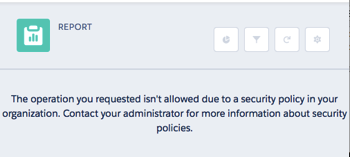
Screen Shot 2016 02 14 at 08 00 58

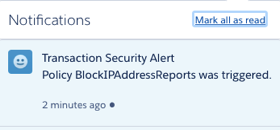
and as I specified myself as the recipient, I receive an in app notification:

Screen Shot 2016 02 14 at 08 03 05

and an email:

Screen Shot 2016 02 14 at 08 04 45

Conclusion

As I mentioned earlier, this feature requires an additional paid subscription. However, if you are working in a regulated industry, or for a customer with specific and nuanced requirements around application security, its well worth a look. Also, as its part of the Salesforce platform, there are no browser plugins or the like to be installed.

Related Posts


Saturday, 6 February 2016

London Called and the Community Answered

London Called and the Community Answered

Londonscalling

On 5th February 2016 the London’s Calling Salesforce community event took place in, no prizes for guessing, London. The first event of its kind here and the largest Salesforce community event to be held in EMEA. An event by the community for the community.

Not One but Two Keynotes

The day was bookended by keynotes from two Salesforce heavyweights. The day started with a talk by Erica Kuhl, Vice President, Community:

IMG 1535

and finished with one by Peter Coffee, VP for Strategic Research:

IMG 1538

These were different to talks I’ve attended from these speakers in the past - I’ve always seen them at events run by Salesforce, so the focus is very much on Salesforce. This time everybody in the audience was familiar with Salesforce to some degree, so there was no need to keep banging that particular drum. Erica’s talk was on the general aspects of building a community, while Peter’s covered a number of areas, but mainly with the theme that disruption is always coming so you need to be vigilant to keep ahead of the competition.

28 Community Led Sessions

Outside of the keynotes, the majority of sessions where community led training sessions, introducing new technology and techniques or refining existing best practice. There were a couple of things I really liked about the sessions.

  • it wasn’t the same old faces that we see at World Tour and Dreamforce events. While there were plenty of old stagers (like me, for example!) there were a number of people taking their first steps into the world of public speaking, and from what I saw and heard everyone did a great job.
  •  large number of speakers were presenting in their second language. Given how nervous most of us are when we start presenting in our native language, I can’t imagine what this feels like, but its certainly impressive.

As I said before the big day:

Screen Shot 2016 02 06 at 10 28 36

The good news is that all of the sessions were recorded, so we’ll all have access to everything once the editing is done in a couple of weeks. The slide decks will also be published on slide share, so make sure to keep an eye on social media for the latest information.

A Word from Our Sponsors

I was pleased to see people making good use of the Expo and a packed out keynote room for the demo jam - these kind of events are only possible with the support of sponsors.

Sold Out

Tickets sold out at such a pace, you could say that they were selling like hot cakes. The numbers were increased a couple of times, and each time they sold straight out again. Impressive, given that this was a paid event.

Awesome Organizers

The whole thing was put together by four sleep-deprived people who probably had no idea what was involved when they floated the idea at Dreamforce 15:

IMG 1541

So take a bow, Kerry Townsend, Simon Goodyear, Jodi Wagner and Francis Pindar. Hopefully it hasn’t put you off, as we’re looking forward to next year already!