Sunday, 11 August 2013

Swipe Navigation

I've written a few blog posts in the past around using JQuery Mobile to give a native (well, iOS) feel to web applications. In each of these cases, I've used buttons in the header or footer to navigate around the site and open panels.  These days, users expect to be able to swipe to navigate, even when running web applications through the built-in device browser.

Luckily, JQuery Mobile has a solution to this - if the user touches the screen and moves their finger left or right more than a certain number of pixels while maintaing contact, a swipeleft or swipe right event will be generated. These events can then be handled in custom JavaScript functions to navigate the user to another page.

To demonstrate this, I've created a sample application containing three pages that each displays a picture from my Customer Company Tour Developer Theatre session in May 2013. The header contains the buttons to open a panel and navigate between pages, as shown below:

Page1Page2

This is a single page application, where a single physical HTML page contains a number of logical application pages coded as stacked <div> elements with a data-role of page. The markup for the first page is as follows:

<div data-role="page" id="page1">
  <div data-role="panel" id="aboutpanel" data-theme="b">
    <h3>About</h3>
    <p>Welcome to the Bob Buzzard swipe demo web application.</p>
    <a href="#page1" data-role="button" data-rel="close">Close</a>
  </div> <!-- /panel -->
      
  <div data-role="header" class="header-large">
    <h3>Swipe Demo</h3>
	<a href="#aboutpanel" data-role="button" data-icon="info" data-iconpos="notext">About</a>
    <a href="#page2" class="ui-btn-right" data-icon="arrow-r" data-iconpos="notext">Page 2</a>
  </div><!-- /header -->
    	
  <div data-role="content" style="text-align:center">
    <h1>Getting Ready</h1>
    <div style="margin:auto"><apex:image styleclass="image" value="{!URLFOR($Resource.CCT, 'CCT1.jpg')}"/></div>
    <p><caption>A quick chat with Nick Tran before taking the stage</caption></p>
  </div> <!-- /content -->
    	
</div> <!-- /page -->

To allow swipe navigation from the logical page with the id of page1 to the logical page with the id of page2, I need to handle the swipeleft event when it takes place in page1. The JavaScript for this is straightforward, thanks to the event handling capabilities of JQuery:

$j('#page1').on( "swipeleft", function() {
    $j.mobile.changePage('#page2');
});

An added benefit is that the swipe behaviour works on the desktop too, as the following video attempts to show.  the first part shows navigation using the buttons, while in the second part I simply click, hold and drag the mouse/trackpad left or right.

If you'd like to try this application yourself, its available on my dev org site at the following short link:

http://bobbuzz.me.uk/18lXNSx

or you can scan the following QR code on your mobile device:

Swipe qrcode

The Visualforce page containing the application is available at this gist - note that this page relies on a static resource containing the images, so if you clone it you'll need to replace this with images of your own.


Saturday, 20 July 2013

Publisher Actions - Not Just Creating Records

The Summer 13 Salesforce release introduced Publisher Actions - these allow additional chatter actions to be added to the publisher, over and above the standard Post, File, Link and Poll actions.   Some setup is required before you can use Publisher Actions - this is detailed in the Salesforce help here.

There are four types of Publisher Actions - Create and Custom for a specific object, and Global Create and Global Custom.  The Create actions allow a new record to be created directly from the chatter feed.  Create for a specific object allows a new record to be created that is related to the object the feed appears on - for example, to create a new Opportunity from an Account chatter feed where the Opportunity account id is set to the id of the Account the feed appears on. Global Create allows a new record to be created from a feed, but with no relationship to any existing object.  One very useful aspect of the Create actions is that you can specify default values for fields, which goes some way to removing the need for URL-hacking.

The Custom actions allow a Visualforce page to be displayed in a chatter feed - the specific object variant of this means that the standard controller must be used, as the id of the record the chatter feed appears on will be passed to the page, while the Global variant uses a custom controller. An example of a Custom action is to display the location of an account on a map - while you can also achieve this via an embedded Visualforce page on the standard record view, making it a Publisher Action means it is displayed on demand, so those users that aren't interested in that information don't have to wait for the map to render.

Custom actions can also create information. In this post I'll demonstrate how to create a Publisher action to post summary information to a feed.

Here at BrightGen, we have a Service Management offering for Salesforce. Rather than waiting until the end of the month to find out how we are doing for a particular customer, its useful to push information out on a regular basis. In this post I'll demonstrate how to create a Custom action that posts a snapshot of case information to an account record.

The snapshot will contain details of cases created this month, cases closed this month and the current number of open cases for the account.

As this is an object specific action, the page uses the account standard controller and the additional functionality is provided by a controller extension. This executes a number of queries to get the case information required.  The snippet below determines the number of cases closed this month:

Date startDate=System.today().toStartOfMonth();
Date endDate=System.today().addMonths(1).toStartOfMonth();
List<AggregateResult> ars=[select COUNT(Id) closedCount
		 	   from Case
		 	   where Status='Closed'
		 	   and AccountId=:accId
			   and ClosedDate>=:startDate
		   	   and ClosedDate<:endDate];

Integer result=0;
if (ars.size()>0)
{
	AggregateResult ar=ars[0];
	result=(Integer) ar.get('closedCount');
}

Once all the information is gathered, this is posted to the feed programmatically:

FeedItem item=new FeedItem();
item.ParentId=accId;
item.body='Service snapshot\n' +
          'As of ' + System.now().format('dd/MM/yyyy')  +
          '\nNew Cases : ' + getNewCases() +
          '\nClosed Cases : ' + getClosedCases() +
          '\nOpen Cases : ' + getOpenCases();
		
insert item;
		
ApexPages.addMessage(new
ApexPages.Message(ApexPages.Severity.INFO, 'Snapshot Posted'));
posted=true;

Note the final line of this snippet, which sets the boolean property posted to true - this property is used in to automatically refresh the page, otherwise the post does not get displayed to the user.

The page simply displays the details and provides a button for the user to post the details to the feed:

  <apex:pageBlock title="Service Snapshot">
    <apex:pageBlockButtons location="bottom">
      <apex:commandButton value="Post to Feed" action="{!post}" />
    </apex:pageBlockButtons>
    <apex:pageBlockSection columns="1">
      <apex:pageBlockSectionItem >
        <apex:outputLabel value="Closed Cases" />
        <apex:outputText value="{!closedCases}" />
      </apex:pageBlockSectionItem>
      <apex:pageBlockSectionItem >
        <apex:outputLabel value="New Cases" />
        <apex:outputText value="{!newCases}" />
      </apex:pageBlockSectionItem>
      <apex:pageBlockSectionItem >
        <apex:outputLabel value="Open Cases" />
        <apex:outputText value="{!openCases}" />
      </apex:pageBlockSectionItem>
    </apex:pageBlockSection>
  </apex:pageBlock>

The automatic refresh (which is based on the technique described in this blog post) is provided by the following, conditionally rendered, JavaScript:

  <apex:outputPanel rendered="{!posted}">
   <script>
      window.top.location='/{!Account.id}';
   </script>
 </apex:outputPanel>

The code for the controller extension can be found in this gist, and the Visualforce page in this gist. You'll need to save these into your Salesforce edition to complete the next steps.

Next, create a publisher action for this page - navigate to Setup -> Customize -> Accounts -> Buttons, Links, and Actions and click the New Action button.

Scroll down to the Chatter Feed section and fill out the details as shown in the screenshot below and click the Save button.

Screen Shot 2013 07 20 at 13 14 52

(note that this assumes you have saved the Visualforce page with the name ChatterAccountSnapshot - if that is not the case, pick the name that you saved the page under from the Visualforce Page pick list).

To add the Publisher Action to the chatter feed, edit the page layout for the Account record.  Scroll down to the Chatter Feed section - if you see the following text, click the 'overidde the global layout' to make the actions editable for that layout:

Screen Shot 2013 07 20 at 13 21 34

The Chatter Feed section will then contain the following standard actions:

Screen Shot 2013 07 20 at 13 23 19

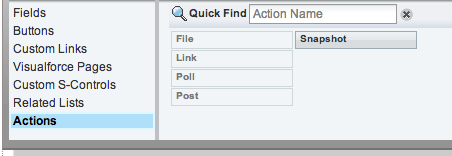
Next, select the Actions entry from the menu at the top left of the page layout editor:
Screen Shot 2013 07 20 at 13 24 50

Drag the Snapshot entry from the right hand side to the Chatter Feed section - note that this can be placed anywhere in the list of actions:
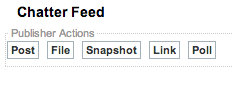
Screen Shot 2013 07 20 at 13 25 40

and finally save the page layout.


Now lets take a look at the Publisher Action in action:

Navigating to an account view page shows the new Snapshot action in the Chatter Publisher. Clicking the Snapshot button displays the Visualforce page with the case detais:

Screen Shot 2013 07 20 at 13 27 01

Clicking the Post to Feed button posts the information to the chatter feed and then refreshes the page to display the post to the user:

Screen Shot 2013 07 20 at 13 29 17


Saturday, 29 June 2013

Meetups and More

Meetup with Apex Product Managers

On 20th June the London Salesforce Developers welcomed Apex Product Managers Andrew Waite and Josh Kaplan to our Meetup at SkillsMatter. There was a real buzz of anticipation for this event and it didn't disappoint.  After a short run through of some of the Apex specific enhancements for the Summer 13 release, and a sneak peek at a pre-release version of the chatter mobile app, we then entered a no-holds barred Q&A session.  One issue with this sort of informal session is that it can descend into a forum to air grievances and bad experiences - although we flirted with this, in general we managed to maintain the positive vibe that we all had at the start of the meeting. Something I always enjoy when I have a chance to speak to the product managers is finding out which enhancements that I view as simple and can't understand why they aren't complete already are actually incredibly hard to do and require a complete overhaul of a section of the platform. 

After the event Andrew and Josh joined us for our traditional post-meetup drinks, where we were able to continue pitching our ideas, as well as shooting the breeze about Apex, Force.com and Salesforce in particular.

The session was recorded by the good folks at SkillsMatter and is available to watch here.

If you aren't already a member of the Salesforce London Developers Meetup group, you can join via the meetup site.

Second Introduction to Force.com Workshop

After the success of the first Introduction to Force.com workshop in April, we ran another one of these on 25th June, led by myself with hosting and assistance from John Stevenson (@jr0cket), one of the Salesforce Developer Evangelists here in the UK.

The format was broadly the same as before - get a group of people keen to learn about Force.com together at Salesforce offices and go through the Force.com workbook as a group, with hopefully useful tips and advice from the hosts as the evening progresses.  April Nassi, Developer Program Manager at Salesforce, sent us through a pack of hardcopy workbooks and cheat sheets which were a useful addition - not only does it give the attendees something to take away, it meant that those who were struggling a little could catch up at their own pace by following the instructions in the book when we took a break at the end of each chapter. April also sent through some schwag so some of the attendees went away with new Force.com wear.

We'll be running more of these workshops in the future, so keep an eye on the meetup group for the next one - if you'd like to help out or host one, let us know.


Thursday, 30 May 2013

Book Reviewers Wanted

NewImage

Earlier this year I acted as a Technical Reviewer for the CRM Admin Cookbook.  This means its a little tricky for me to review in this blog, as I obviously ensured everything was perfect and there was no way to improve it :)

Packt Publishing are offering free copies of Salesforce CRM Admin Cookbook : http://www.packtpub.com/salesforce-crm-admin-cookbook/book in exchange for a review either on your blog or on the title’s Amazon page.

The book covers the following areas:

  • Building home page components and creating custom links to provide additional functionality and improve the Home Tab layout
  • Advanced user interface techniques to improve the look and feel of Salesforce CRM with the presentation of graphical elements
  • Exposing hacks and hidden features to enhance and override native aspects of Salesforce CRM
  • Automatic data capture and improving data quality in Salesforce CRM
  • Implementing an approval process to control the way approvals are managed for records in Salesforce CRM
  • Increasing productivity using tools and features to provide advanced administration
  • Configuring and installing Salesforce for Microsoft Outlook email integration
  • Integrating Salesforce CRM with external online tools to provide enhanced functionality and extend the power of Salesforce CRM 

If you’re a Salesforce CRM user or interested in getting to grips with it, this is a good way to bag yourself a free guide (current retail price £28).

Free review copies are available until Monday 5th June 2013

If you’re interested, email Harleen Kaur Bagga at: harleenb@packtpub.com


Sunday, 26 May 2013

Mobile Web Apps with HTML5 and JQuery Mobile

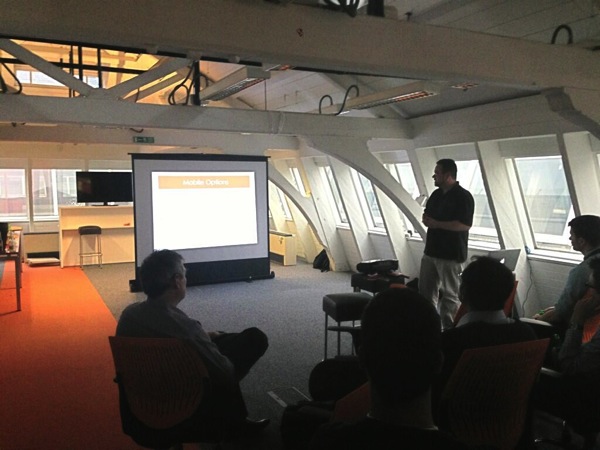
At the Salesforce Customer Company Tour in London on 2nd May I presented a session in the Developer Theatre on Building Mobile Web Apps with HTML5 and JQuery Mobile, using a Todo list application as the example.

Yes, We've Got a Video

The session wasn't recorded, but since then I've recorded a replay of it which is available on youtube:

Get the Source

I've made this application available as an unmanaged package at: https://login.salesforce.com/packaging/installPackage.apexp?p0=04ti0000000VGqW

The main contents of this package are:

  • Custom Todo app
  • Custom objects for Group and Task, with tabs
  • Visualforce TodoJQM page and tab, also called TodoJQM
  • A few static resources for JQuery Mobile
  • Visualforce components for the custom CSS and JavaScript for the Todo pages - obviously in a  production system these would be in static resources and the JavaScript would be minified.  However, in this case I've put them into custom components so that they can be viewed without downloading and easily changed.

Feel free to post any questions you might have in the comments section below.


Tuesday, 30 April 2013

Community Service

This has been a busy few weeks in the Salesforce developer community; mobile dev week arrived at short notice and a week later it's the Salesforce Customer Company Tour with the attendant Dev Zone, which is the main attraction of the event if you are a developer.  As I've been or am getting involved in a number of these events, I thought I'd write a short blog about them.

Intro to Force.com

This took place on 11th April at the Salesforce offices in Tower 42.  Lead by Frances Pindar (@radnip) with assistance from myself, it was a couple of hours or so session to introduce the next wave of Force.com developers to the platform, working through the exercises in the Developerforce Force.com workbook in a group environment. The advantage to using the workbook is that the attendees are then able to continue with the exercises once the session is finished, given that it isn't feasible to get through the whole thing in the time allowed.

Here's a picture of everyone hard at work:

Intro

I'm planning on running another one of these sessions in the next few months, so if you're near London and are interested in learning more about the Force.com platform, stay tuned.

Mobile Developer Week Meetup

As part of Salesforce Mobile Developer week, the London Salesforce Developer's Group had a meetup at the new T'Quila offices above Smithfields.

Rob Woodward of Salesforce gave us an overview of the new Mobile Packs and demonstrated a todo list application based on the Angular JavaScript framework.

I was up next, and demonstrated a couple of applications that I'd built using the Salesforce mobile SDK and Apache Cordova under the heading of "Ticket to Ride".  These consist of a ticketing application, that allows users to pull down tickets that they have purchased onto their mobile device, stores them in the Salesforce smart store and allows offline access to the ticket details and a QR code.  The companion application is a driver app that scans the ticket, confirms it is being presented for the correct service and updates the ticket with a used indicator and timestamp.  Force.com provides the object storage and the applications access this via the Rest API.

The powerpoint presentation for this talk can be downloaded here. If you'd like to see it in action, come to the BrightGen stand at the Salesforce Customer Company Tour and I'll be happy to show you.

Just to prove I'm not making it up, here's a photo from the event courtesy of @Anup:

Mobile dug

Salesforce Customer Company Tour

On 2nd May the Salesforce Customer Company Tour comes to London. My company, BrightGen are a Platinum Sponsor this year, so we'll have a big stand and plenty of people to man it.  This event incorporates a Dev Zone and I'll be giving a Developer Theatre session on Building a mobile web app with HTML5 and JQueryMobile, from 4:15 to 4:45 - hopefully I'll see some of you there. If you haven't signed up yet, you can do so here.

Saturday, 23 March 2013

Book Review - Force.com Tips and Tricks

Disclaimer - I haven't purchased this book - I was sent a copy to review by the publisher.


4743EN Cover

Force.com Tips and Tricks is written by a couple of my fellow Force.com MVPs, Abhinav Gupta and Ankit Arora. It is aimed at both developers and administrators and packs a lot of information into the 200+ pages.

For Administrators

Administrators get a whole chapter dedicated to tools to make their lives easier, including those that come with the platform as standard (e.g. data loader) and a long list of code share and app exchange packages. There is also a deep dive on Salesforce analytics, covering topics such as custom report types, adding formulae to a report and setting up analytic snapshots - all of which are important for administrators wanting to get the most of the platform.  

For Developers

The book starts off with an introduction to the Force.com platform, covering key concepts for anyone starting out with Force.com development such as multi-tenancy, the metadata driven development model and governor limits. Later chapters take you through setting up development environments and migrating changes between those environments, useful tools for developers from both Salesforce and the wider community, and concludes with a couple of chapters that give great advice on writing flexible and scalable Apex and Visualforce code, as well as tips for troubleshooting when code isn't performing as expected.

For Both

For administrators wanting to understand more about maintaining and extending Force.com applications, the developer specific sections will prove very useful.  By the same token, development in Force.com starts with clicks rather than code, so the administrator-centric chapters are something that every developer should read.


This book isn't a training manual for Force.com development - where I think it would have been really useful in the past was as I was starting to carry out serious development with the platform.  I understood enough about the basics to start being productive, but when I was trying something new, I'd be searching the discussion boards and reading blogs to get more information.  With a book like this to hand I'd either have the information that I required right there, or be pointed in the right direction to find out more with minimal effort.  

 I always hope to learn something I didn't know from these books, and this time it was a number of the tools available, particularly to enforce CRUD and FLS when running in the system context.  Its certainly a useful addition to my Salesforce library and one I'm sure I'll be coming back to regularly.