Saturday, 16 January 2016

Board Anything with SLDS and Lightning Components

Board Anything with SLDS and Lightning Components

Ba meme

Introduction

One of the features I really like in the Lightning Experience is the Opportunity Board (or Opportunity Kanban as it will be known in Spring 16). Not so much the ability to drag and drop to change the stage of an individual opportunity, although that’s very useful for the BrightGen Sales team, but more the visualisation of which state a number of records are in.

This seemed to me something that would useful for a wide range of records - anything with a status-like field really, which lead me to create Board Anything - a Lightning component that retrieves records for a particular SObject type, groups them by the value in a configurable status field and displays them as a table of Salesforce Lighting Design System board tiles - Leads for example:
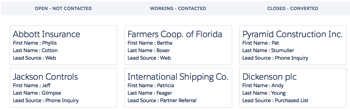
Screen Shot 2016 01 16 at 17 10 36

Whatever, Where’s The Code

The Board Lightning Component

The board contents are displayed via a Lightning Component. In order for this component to be able to handle any type of sobject, there are a few attributes to configure its behaviour:

<aura:attribute name="SObjectType" type="String" default="Case" />
<aura:attribute name="StageValueField" type="String" default="Status" />
<aura:attribute name="StageConfigField" type="String" />
<aura:attribute name="FieldNames" type="String" default="CaseNumber,Subject" />
<aura:attribute name="ExcludeValues" type="String" default="Closed" />

These attributes influence the component as follows:

  • SObjectType - the type of SObject to display on the board
  • StageValueField - the field containing the stage (or status) values
  • StageConfigField - a picklist field containing the values to display on the board - use this if your StageValueField is a free text field to limit the stages that are displayed on the board
  • FieldNames - comma separated list of fields to display in each tile - the first is used as the title field for the tile
  • ExcludeValues - stage values that should be excluded from the board

Note that the defaults will result in a board of open cases being displayed as follows:

Screen Shot 2016 01 16 at 17 24 05

The component also defines design attributes for each of these attributes, so that you can configure a board via the Lightning Builder.

The component does most of its work on a list of wrapper classes. First it iterates the list  to output the stage headings, which will be in the order returned by the Schema Describe methods for the stage value field or stage config field, depending on which is defined:

 
<aura:iteration items="{!v.Stages}" var="stage">
  <th style="{!'width:' + v.ColumnWidth + '%'}">
     <h3 class="slds-section-title--divider slds-text-align--center">{!stage.stageName}</h3>
  </th>
</aura:iteration>

and then iterates the list again, displaying the tiles for each record in each stage:

<aura:iteration items="{!v.Stages}" var="stage">
  <td style="{!'width:' + v.ColumnWidth + '%; vertical-align:top'}">
    <aura:iteration items="{!stage.sobjects}" var="sobject">
      <ul class="slds-list--vertical slds-has-cards--space has-selections">
        <li class="slds-list__item slds-m-around--x-small">
          <div class="slds-tile slds-tile--board">
            <p class="slds-tile__title slds-truncate slds-text-heading--medium">{!sobject.titleField.fieldValue}</p>
            <div class="slds-tile__detail">
              <aura:iteration items="{!sobject.fields}" var="field">
                <p class="slds-truncate">{!field.fieldName} : {!field.fieldValue}</p>
              </aura:iteration>
            </div>
          </div>
        </li>
      </ul>
    </aura:iteration>
  </td>
</aura:iteration>

The Apex Controller

Most of the heavy lifting is done by the Apex controller, which gets the available stage values for the stage value field or stage config field:

if ( (null==stageConfigField))
{
  stageConfigField=stageValueField;
}
            
Map<String, String> excludeValuesMap=new Map<String, String>();
if (null!=excludeValues)
{
  for (String excludeValue : excludeValues.split(','))
  {
    excludeValuesMap.put(excludeValue, excludeValue);
  }
}
Map<String, BB_LTG_BoardStage> stagesByName=new Map<String, BB_LTG_BoardStage>();

Map<String, Schema.SObjectField> fieldMap =
             Schema.getGlobalDescribe().get(sobjectType).
		getDescribe().fields.getMap();
Schema.DescribeFieldResult fieldRes=
             fieldMap.get(stageConfigField).getDescribe();
            
List<Schema.PicklistEntry> ples = fieldRes.getPicklistValues();
for (Schema.PicklistEntry ple : ples)
{
  String stageName=ple.GetLabel();
  if (null==excludeValuesMap.get(stageName))
  {
    BB_LTG_BoardStage stg=new BB_LTG_BoardStage();
    stg.stageName=ple.GetLabel();
    stagesByName.put(stg.stageName, stg);
    stages.add(stg);
  }
}

Note that BB_LTG_BoardStage wrapper classes are created here - later these will be fleshed out with the records and their details.

It then generates a dynamic SOQL query to retrieve the named fields:

String queryStr='select Id,' + String.escapeSingleQuotes(stageValueField) + ', ' +
String.escapeSingleQuotes(fieldNames) +
                ' from ' + String.escapeSingleQuotes(sobjectType);
List<SObject> sobjects=Database.query(queryStr);

 and finally iterates the results of the query, grouping the records by stage and using dynamic DML to retrieve the field values: 

List<String> fieldNamesList=fieldNames.split(',');
for (SObject sobj : sobjects)
{
  String value=String.valueOf(sobj.get(stageValueField));
  BB_LTG_BoardStage stg=stagesByName.get(value);
  if (null!=stg)
  {
    BB_LTG_BoardStage.StageSObject sso=new
    BB_LTG_BoardStage.StageSObject();
    Integer idx=0;
    for (String fieldName : fieldNamesList)
    {
      fieldName=fieldName.trim();
      fieldRes= fieldMap.get(fieldName).getDescribe();
      BB_LTG_BoardStage.StageSObjectField ssoField=
                      new BB_LTG_BoardStage.StageSObjectField(fieldRes.getLabel(),
             sobj.get(fieldName));
      if (0==idx)
      {
        sso.titleField=ssoField;
      }
      else
      {
        sso.fields.add(ssoField);
      }
      idx++;
    }
    stg.sobjects.add(sso);
  }
}

What About the Example Leads Board?

The example Leads board is built using Lighting Out for Visualforce. As you may remember from my previous blog post on this, first I need to create an app that references the component, in this case BBSObjectBoardOutApp:

<aura:application access="GLOBAL" extends="ltng:outApp">
    <aura:dependency resource="c:BBSObjectBoard" />
</aura:application>

And then I have a Visualforce page (BBLeadBoard) that uses the app to instantiate the component and sets up the attributes to configure the board for leads:

<apex:page sidebar="false" showHeader="false" standardStylesheets="false">
    <apex:includeScript value="/lightning/lightning.out.js" />
    <div id="lightning"/>
 
    <script>
        $Lightning.use("c:BBSObjectBoardOutApp", function() {
            $Lightning.createComponent("c:BBSObjectBoard",
                                       {
					'SObjectType': 'Lead',
					'StageValueField' : 'Status',
					'FieldNames' : 'Company, FirstName, LastName, LeadSource',
					'ExcludeValues': 'Converted',
					},
                  "lightning",
                  function(cmp) {
                    // no further setup required - yet!
              });
        });
    </script>
</apex:page>

That’s All There Is?

No, there’s the wrapper class, a JavaScript controller and helper, but there’s nothing particularly exciting about those so they are available from my BBLDS samples repository at:

https://github.com/keirbowden/BBLDS

This also contains an unmanaged package so you can just install this into your dev org and try out the Visualforce page - check out the README for more information.

Anything Else I Need to Know

Yes.

  • As this is an unmanaged package there are test classes - you’re welcome.
  • The styling of the headings could be improved
  • Errors are written to the debug log and swallowed server side - I did this as otherwise the Lightning Builder displays exceptions all over the place when you try to update the attributes. Its not ideal, so feel free to change it!
  • No drag and drop support to change the stage/status value - while this makes sense for opportunities, it doesn’t for things like cases, so I used that as justification not to do it.

Related Posts


Sunday, 3 January 2016

Salesforce Spring 16 Release - CreatedDate and Apex Unit Tests

Createddate

(Note that this blog post refers to functionality that is intended to be made available in the Spring 16 release of Salesforce, but features may be removed prior to the Spring 16 go-live date, so you may never see this in the wild!)

Introduction

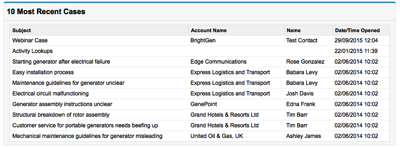
Anyone who has written a reasonable amount of Apex unit tests is likely to have butted up against the shortcoming that the CreatedDate is set when a record is inserted into the Salesforce database. While at first glance this may not seem to be such a huge issue, consider the scenario of a custom Visualforce page, maybe for use in a dashboard, that displays the 10 most recent cases:

Screen Shot 2016 01 03 at 14 58 50

The controller is about as straightforward as it can be - simply querying back the records from the Salesforce database:

public class RecentCasesController
{
    public List<Case> getRecentCases()
    {
        return [select id, CaseNumber, Subject, Account.Name, Contact.Name,
                CreatedDate
                from Case
                order by CreatedDate desc
                limit 10];
    }
}

while the page is equally straightforward, simply iterating the records in a pageblocktable:

<apex:page controller="RecentCasesController">
	<apex:pageBlock title="10 Most Recent Cases">
        <apex:pageBlockTable value="{!recentCases}" var="cs">
            <apex:column value="{!cs.subject}"/>
            <apex:column value="{!cs.Account.Name}" />
            <apex:column value="{!cs.Contact.Name}" />
            <apex:column value="{!cs.CreatedDate}" />
        </apex:pageBlockTable>
    </apex:pageBlock>
</apex:page>

A Testing Problem

Testing this in the Winter 16 release (and earlier), testing this functionality meant a compromise, such as:

  • Inserting a number of records and ensuring that only 10 of them were returned, but being unable to predict which 10 this would be. This is because the CreatedDate field has second granularity, and if there are a number of records inserted in the same second, there is no guarantee of the order they will be returned in when the query is ordered by the CreatedDate. The Salesforce database will do the least amount of work to execute the query, and there’s nothing you can do to affect it. From a unit testing perspective, unless you can 100% guarantee the order of the results, asserting for a particular order makes a test fragile.
  • Adding an autonumber field to the case sobject so that you can rely on that to guarantee the ordering. This is a classic example of changing your implementation to satisfy your unit tests, which if nothing else is annoying to have to resort to.
  • Trying to kill some time to allow the second to tick over in between record inserts, by looping a lot and generating debug statements for example. There are a couple of problems with this approach. First, it is fragile, as you have no control over how much time would be burned this way. All you can do is hope that the performance you have seen in the past continues, which can’t give much confidence. More importantly, it is evil, as you are consuming shared resources for no good reason.
  • Provide some form of dependency injection, probably via a @TestVisible private property, to allow your test to inject the list of cases that should be returned as a result. This mechanism means that all you are really testing is that the controller returns the list of cases you asked it to, bypassing the query that will be executed in production. Writing code that solely allows your tests to complete successfully is usually an indication that something is awry.

One DOES Simply Set the CreatedDate

In the Spring 16 release this is all set to change (although it may not - see the note at the top of this blog). The new Test.setCreatedDate(Id, DateTime) method allows you to change the CreatedDate once a record is inserted.

For my recent cases page, I can now write a test case to verify that only the 10 most recent cases are returned, by setting the CreatedDate for each case record after I’ve inserted them in the database:

@isTest
private class RecentCasesController_Test
{
    @isTest
    static void TestGetRecentCases()
    {
        /* setup */
        Account acc=new Account(Name='Unit Test');
        insert acc;
        
        Contact cont=new Contact(FirstName='Unit',
                                 LastName='Tester');
        insert cont;
        
        List<Case> cases=new List<Case>();
        for (Integer idx=1; idx<=20; idx++)
        {
            Case cs=new Case(Subject='Test Case ' + idx,
                             AccountId=acc.Id,
                             ContactId=cont.Id);
            cases.add(cs);
        }
                             
        insert cases;
        
        // now set the created date for each case - the first case
        // in the list will be the most recent, the second case the
        // second most recent, and so on
        for (Integer idx=1; idx<=20; idx++)
        {
            DateTime created=System.now().addDays(-(idx*10));
            Test.setCreatedDate(cases[idx-1].Id, created);
        }
	
        /* execute */
        RecentCasesController ctrl=new RecentCasesController();
        List<Case> recentCases=ctrl.getRecentCases();

        /* verify */
 
        // should be 10 cases
        System.assertEquals(10, recentCases.size());
        
        // should be the first 10 inserted, in that order
        for (Integer idx=0; idx<10; idx++)
        {
            System.assertEquals(recentCases[idx].Id, cases[idx].Id);
        }
    }
}

Final Thoughts

The ability to set the created date is a much needed addition to the Salesforce platform testing framework, and one that will allow production code to be properly tested, and allow some workarounds/terrible hacks to be retired. 

It would be cool to be able to set the CreatedDate when constructing the sObject, prior to insertion, but I’d imagine this would require a ton of changes to the Salesforce database layer and isn’t going to happen. I foresee thousands of test fixture classes that insert a record and then change its CreatedDate!

Its a shame that at the moment you can only set the CreatedDate of a single record per call, but hopefully we’ll get some bulk capability in the future. The Salesforce platform approach is typically to make things doably difficult, then add the bells and whistles.

Finally, the documentation doesn’t mention any effects on limits and my testing with the code above bears this out, which is always good.

Related Posts

Wednesday, 30 December 2015

New Year, New Trailhead Badges

Badges

Overview

The Trailhead juggernaut keeps rolling, with a new trail and 6 (count ‘em) new badges, taking the totals up to 13 trails and 70 badges (not counting the community badges which you get for earning a new badge on a particular date, such as halloween, which is always tricky for those of us who already have all the badges, but these are the first world problems I am cursed with).

So What’s New?

  • Advanced Formulas
    This strikes me as an excellent fit for Trailhead, as the challenges will be tightly focused on a single formula field which satisfies a well-defined set of requirements. I’d imagine there was some competition in the team that writes the code that checks the challenges for this one.
     
  • Apex Integration Services
    If you haven’t done much of this before, get cracking. Its a good grounding in the topic and gets you writing code that carries out real integrations, but in a much safer environment than a customer org! 
     
  • Lighting Experience Chatter Basics
    One aimed more at the newbies than the experienced administrator or developer, which is a good thing as we want new people using the platform.

  • Lightning Data Management
    Getting data in and out. Useful information if you are considering a career with a Salesforce partner, as I guarantee that any project you work on will have some form of data migration, and it always takes longer than you expect!

  • Application Lifecycle Management
    Okay, so this is a rewrite rather than a new module. If you’ve taken this in the past you won’t be able to retake it, but if you held off waiting for some different words your masterful inactivity has paid dividends.

    and saving the best until last
     
  •  Build a Battle Station App
    A themed project to coincide with a film that you might have heard about. This kind of thing is what makes Trailhead fun and keeps it interesting. This is one of the few badges that I have remembered to add to my LinkedIn profile, which shows how valuable it is

So What’s Next?

I wish I knew. Or maybe I do and those pesky NDAs stop me from telling you. Unfortunately I don’t. But is that what the NDA forces me to say. Its all so uncertain.

One prediction I will make is that the number of badges will break 100 in 2016, and I’d expect this to happen around July/August time.

New Year, New You

As I mentioned above, there are now 70 badges available, so if you haven’t made a dent in them by the start of 2016 you’ll struggle to catch up and be forever chasing those last x badges.

Make a New Year’s resolution that will have real impact (on your career, your reputation, your battle station building capabilities) and resolve to earn more badges!

Related Posts


Saturday, 12 December 2015

Lightning Component Wrapper Classes

Lightning Component Wrapper Classes

Wrapper

Introduction

Wrapper classes are a common feature of applications built on the Salesforce platform. The class wraps an sObject and some additional data, hence the name wrapper. Typically wrapper classes are used to temporarily associate prpoerties with an sObject that are specific to the current scenario, and that do not make sense to add as fields to the sObject and persist to the database.

In this post I’ll show how you can use wrapper classes in a Lightning component, to wrap an account and a boolean property. This wrapper class allows a user to select one or more account names to view more details of the accounts.


Showmecode

The Apex Controller

My Apex controller makes a couple of methods available to the Lightning component. The first is invoked when the component initialises, and returns a collection of up to 10 accounts, with only the name and Id fields populated:

@AuraEnabled
public static List<Account> GetAccountNames()
{
	return [select id, Name from Account limit 10];
}

 the second method receives a JSON string representing a list of account ids (the accounts that the user has selected) and retrieves more details for those accounts:

@AuraEnabled
public static List<Account> GetAccountDetails(String idListJSONStr)
{
	Type idArrType=Type.forName('List<Id>');
	List<Id> ids=(List<Id>) JSON.deserialize(idListJSONStr, idArrType);
		
	return [select id, Name, Industry, Website from Account where id in :ids];
}

 Ideally I’d pass the Ids through as an array to this method, but attempting to pass arrays as parameter to Apex controller methods from a Lightning component results in an internal server error. At the time of writing (December 2015) this has been acknowledged as a bug for over a year, so its clearly one that is taking a bit of fixing! For a collection of primitives, the JSON string version works well, but when I need to send an array of complex objects (or sObjects) I usually place these inside a containing Apex class.

The Wrapper Class

I want my wrapper class to be available for use in both my component and in Apex, so that I can use the same one for Lightning and Visualforce. As I’ve written about before, custom apex classes are automatically converted to JavaScript objects for use client side, so to achieve this all I have to do is make the class properties available to the Lightning component via the AuraEnabled annotation:

public with sharing class AccountWrapper
{
	@AuraEnabled
	public Account acc {get; set;}
	
	@AuraEnabled
	public Boolean selected {get; set;}
}

(If I didn’t need to make use of this server-side, I’d just use JavaScript objects, which would make this post considerably shorter!)

The Lightning Component

The Lightning component has two sections - the first displays a list of account names and checkboxes for the user to choose accounts, and the second to display details of the chosen accounts:

<aura:component controller="AccountController">
    <aura:handler name="init" value="{!this}" action="{!c.doInit}" />
    <aura:attribute name="wrappers" type="AccountWrapper" />
    <aura:attribute name="accounts" type="Account" />
    <span class="big">Choose Accounts</span>
    <table>
        <tr>
            <th class="head">Name</th>
            <th class="head">View?</th>
        </tr>
	<aura:iteration items="{!v.wrappers}" var="wrap">
            <tr>
                <td class="cell">
		    <ui:outputText value="{!wrap.acc.Name}" />
                </td>
                <td class="cell">
		    <ui:inputCheckbox value="{!wrap.selected}" />
                </td>
            </tr>
	</aura:iteration>
    </table>
    <button onclick="{!c.getAccounts}">Get Accounts</button>
    <br/>
    <br/>
    <br/>
    <span class="big">Selected Accounts</span>
    <table>
        <tr>
            <th class="head">Name</th>
            <th class="head">Industry</th>
            <th class="head">Website</th>
        </tr>
        <aura:iteration items="{!v.accounts}" var="acc">
            <tr>
                <td class="cell">
	    	    <ui:outputText value="{!acc.Name}" />
                </td>
                <td class="cell">
	    	    <ui:outputText value="{!acc.Industry}" />
                </td>
                <td class="cell">
	    	    <ui:outputText value="{!acc.Website}" />
                </td>
            </tr>
	</aura:iteration>
    </table>
</aura:component>

Note that the AccountWrapper custom class is defined as the type of the wrappers attribute that is used to display the accounts and their checkboxes. This allows me to supply the wrapper classes from the server in the future if for some reason I decide to go that route.

The Lightning Component JavaScript

The controller for the Lightning component contains a couple of methods that delegate to the helper and isn’t that exciting. For those that need the complete picture, its available at this gist.

The helper is much more interesting, but a bit large to drop into this post. It can be found at this gist, but the key aspects are covered below.

The wrapper class instances are created client side, which is really easy in JavaScript, mainly due to its loose typing. I can just define an object instance that contains an account and a selected property. In the snippet below, accs is the collection of accounts returned from the controller at initialisation:

var wrappers=new Array();
for (var idx=0; idx<accs.length; idx++) {
    var wrapper = { 'acc' : accs[idx],
			       'selected' : false
                            };
     wrappers.push(wrapper);
}
cmp.set('v.wrappers', wrappers);

Once the user selects the accounts and presses the getAccounts button, I can iterate the list of wrapper classes and pull the ids of the selected items, which I then turn into the JSON string: 

var wrappers=cmp.get('v.wrappers');
var ids=new Array();
for (var idx=0; idx<wrappers.length; idx++) {
    if (wrappers[idx].selected) {
        ids.push(wrappers[idx].acc.Id);
    }
}
var idListJSON=JSON.stringify(ids);

The Lightning Component Styling

In order to make the page a bit more readable, there’s some styling around the component. This is also not particularly interesting but can be found at this gist.

The Application

In order to use this component, I’ve created a simple Lightning application:

<aura:application >
    <c:AccountWrappers />
</aura:application>

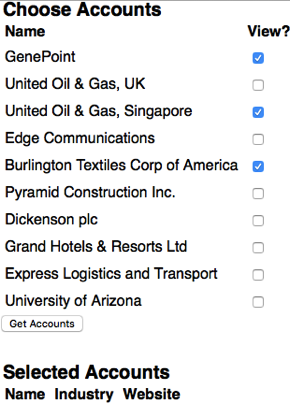
Opening the application displays the first 10 accounts retrieved from the database, which I can check the associated box to select:

Screen Shot 2015 12 12 at 16 55 05

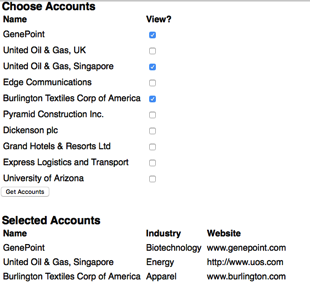
and clicking the Get Accounts button retrieves details of those accounts and displays them:

Screen Shot 2015 12 12 at 16 56 07

Related Posts


Saturday, 28 November 2015

Context is Everything

Context is Everything

Context title

You Are in a Maze of Twisty Passages, All Alike

When building applications around Lightning components on the Salesforce platform, there comes a time when you need to know where you are - in Salesforce1 or the Lightning Experience for example. Winter 16 upped the ante by allowing Lightning components to be embedded in Visualforce pages. I was expecting there to be a mechanism to get at this information via the Lightning component framework, but unfortunately that turned out not to be the case, so I had to spend some time investigating.

Desperately Seeking Context

My problem was how to figure out from inside a Lightning component whether I was executing in:

  • Salesforce1
  • Lightning Experience (LightingX)
  • Visualforce inside Salesforce1/LightningX
  • Visualforce in Salesforce Classic

Lightning Detector

Looking through the docs, there are a couple of events that are only available to components executing in Salesforce1/LightingX:

  • force:showToast
    This displays a message in a popup (or really a popdown, as it appears under the header at the top of the view)
  • force:navigateToURL
    This allows navigation to a URL from a lightning component

The docs state that it these methods are only available in Salesforce1, but as far as I’ve been able to tell, LightningX is pretty much Salesforce1 for the desktop. 

In my JavaScript controller or helper, I can attempt to instantiate the event and based on the success or failure, deduce whether I am in the Lightning context: 

isLightning: function() {
    return $A.get("e.force:showToast");
}

Mobilize

The availability of the above events tells my component if it is executing in Lightning, but not which of Salesforce1 / LightningX is the container. The only way I’ve found to reliably detect this is to use the blunt instrument that is the user agent, 

I’ve tested on an iPhone, iPad and Android phone, both for the HTML5 and installed application versions of Salesforce1, and the user agent string always contains the word ‘mobile’. However, when I am running LightningX on the desktop, this is not the case.

Note that this is by no means exhaustive testing, so if you are considering using this technique make sure to verify this behaviour on your target devices.

The controller/helper can detect mobile based on the presence or absence of mobile in the user agent as follows: 

isMobile: function() {
    var userAgent=window.navigator.userAgent.toLowerCase();
    return (-1!=userAgent.indexOf('mobile'));
}

Visualforce

I’ve found that this scenario causes the most confusion, as the assumption is that as code from a lightning component is executing, the context must somehow switch to Lightning while that is happening. A better way to think about this is in terms of the container. In Salesforce1 and LightningX, the containing application is built with Lightning components, whereas when a Lightning component is embedded in a Visualforce page, the page is the container.

The ability to detect if a Visualforce page is embedded in a Salesforce1 application has been around for a while now, and it is equally applicable to LightningX - check if the sforce and sforce.one objects are present. I can detect this in my controller/helper as follows:

hasSforceOne : function() {
    var sf;
    try {
        sf=(sforce && sforce.one);
    }
    catch (exc) {
        sf=false;
    }
     
    return sf;
}

Putting it all Together

Going back to my list of scenarios, from my lightning component I can detect each of these using the functions defined earlier  as follows:

  • Salesforce1

        isLightning() && isMobile()
     
  • Lightning Experience (LightingX)

        isLightning() && (!isMobile())
     
  • Visualforce inside Salesforce1/LightningX

        (!isLightning()) && hasSforceOne()
     
  • Visualforce in Salesforce Classic

        (!isLightning()) && (!hasSforceOne())

The Future

While these mechanisms are the best I’ve been able to do with the available tools, Salesforce will probably add something to the Lightning component framework that makes them redundant. When this happens, if you’ve kept the functionality in the methods I’ve shared above, you can simply update these to delegate to the framework rather than figuring it out for themselves. 

Related Posts


Saturday, 14 November 2015

Trailhead in the Wild

Trailhead in the Wild

Screen Shot 2015 11 14 at 16 54 32

Available, generally 

Trailhead is out of beta and generally available, so if you’ve been holding back in case it disappeared (pretty unlikely given the dev zone at DF15 was built around it) you can now jump in with both feet. It also has an updated UI, which feels a lot faster to me, even on what passes for an internet connection to my home!

Find what you need faster

Its now easier to find the right content for you - after clicking on the ‘Learn Trailhead for Free’ button, you are presented with a popup dialog where you choose between Admin, Developer or Business User:

Screen Shot 2015 11 14 at 16 51 51

of course the correct approach to Trailhead is to take everything, so this is really more a case of deciding the order in which you want to cover things!

Trailhead has also been incorporated into the search functionality, so if, for example, you search for ‘Lightning’ you’ll get details of the 30 trails with Lightning content - perfect if you are looking to learn about a specific feature of Salesforce.

Look mother, I’m dancing!

Its now even easier to seek and get the attention you deserve for your Trailhead accomplishments.

After passing a step you get some nicely styled flattery and the option to share this milestone with your social media followers.

Screen Shot 2015 11 13 at 21 18 17

Gain a badge and the ante is upped considerably - not only can you ram this down the throat of the badge-poor on social media:

Screen Shot 2015 11 13 at 21 25 57

but you can also post this to your LinkedIn profile and thus receive further connection requests and messages from recruiters desperate for Salesforce candidates:

Screen Shot 2015 11 13 at 21 27 10

Here’s my latest badge on my LinkedIn profile (Look, there’s my Technical Architect cert, how did that get in there? Oh well, best leave it in for now!).

Screen Shot 2015 11 13 at 21 28 46

At the moment it looks like you can only add new badges to LinkedIn, something that LinkedIn are probably okay with, given that they’d be looking at the flood of over 250,000 badges that have been earned to date!

All I want for Christmas

So what does the future hold for Trailhead? Even if I knew, one of the many NDAs that I’ve signed over the years would no doubt preclude me from talking about it. What’s the first rule of the future of Trailhead?

Given how successful and high profile Trailhead has been to date, I think it's safe to assume we’ll continue to see the content expanded and the experience improved. Here’s a few things that I’d really like to see, and be assured that I have given no thought to how expensive or difficult they might be to achieve:

  • Private trails
    I’d imagine that pretty much every Salesforce customer and partner would find this useful - the ability to create trails around your own custom processes and applications, along with exercises, verification and badges would be a great benefit when on-boarding new staff.
  • Groups of users
    Obviously I’d use this to pit my colleagues against each other to see who could upskill on a particular area the fastest. I think I’d have a lot of fun with this.
  • API Access to Trailhead Profiles
    I’d use this to build a leaderboard for my company, to shame the badge-poor give new hires something to aim for. Then I’d probably use it for evil, so oauth would be a good authorisation mechanism as users could easily revoke my access.
  • Fantasy Trailhead
    Team Managers would pick teams of community users and get points as they gained Trailhead badges. Maybe they would lose points if their team didn’t gain badges quickly enough. Gamification squared if you will. It would also open up Fantasy Fantasy Trailhead, where you would pick teams of Team Managers, and so on, for ever.

Still free, as in beer

Shutup

Nothing down and nothing a month.

Saving the best until last

When you open the Trailhead home page and scroll down, you’ll see my face over the Developer Trails link, and I think we can all agree it doesn’t get any better than that.

Related Posts


Sunday, 1 November 2015

Reading QR Codes in Salesforce1 Revisited

Reading QR Codes in Salesforce1 Revisited

Overview

Back in 2014 I wrote a blot post around reading QR codes in the Salesforce1 application to automatically navigate to a record. At the time, Salesforce1 did not have a custom URL scheme to allow it to be easily opened from an external application. That all changed at the beginning of 2015 with the launch of the Salesforce1 Mobile URL Schemes.

With a custom URL scheme, there’s no longer any need to process a picture of the QR code in the Salesforce1 application. This improves the user experience for a couple of reasons:

  • The original process of take a picture, see if it looks good enough and then try to process it can be time consuming. 
  • Even with what appears to be a good picture, I’ve always found the processing to be quite slow and rather hit and miss.

A dedicated QR scanner application is much less picky about the picture quality and typically processes the code in under a second, so this seems to be the obvious way to go.

Scanners and Custom URL Schemes - Will They Ever Get Along?

Unfortunately, many scanner applications don’t handle custom URL schemes and when they see a URL that doesn’t start with http/https, throw an error.  One way to work around this is to use a URL shortener - TinyURL, for example will convert a URL with a custom scheme to one with an http scheme. This isn’t a great solution though, as I’d need to integrate with the URL shortener when generating my QR code and it introduces an additional HTTP request to the shortening service. When you are working in mobile world, the last thing that you want is to introduce additional requests!

Luckily, some scanner applications do support custom URL schemes - I used Scan when preparing this post.

Generating a QR Code

There are a few ways to generate a QR code. In the past I’ve used the Google Infographics service, but that has been deprecated for over three and a half years now so is highly likely to stop working. The most popular replacement for this is GoQR.me, which works in much the same way, generating a QR code via an HTML image element. 

The URL that the code represents needs to follow the Salesforce1 custom URL scheme to navigate to a record’s view page:

salesforce1://sObject/<id>/view

I’ve created a simple Visualforce page to generate the QR code for an Account record.

<apex:page standardController="Account">
  <apex:pageBlock title="QR Code">
    <p style="padding-bottom: 10px">
       Scan the code below on your mobile device to open the account record in Salesforce1
    </p>
    <apex:image
          value="https://api.qrserver.com/v1/create-qr-code/?size=150x150&data={!URLENCODE('salesforce1://sObject/' + Account.Id + '/view')}" />
  </apex:pageBlock>
</apex:page>

 Navigating to this page with the ID of an existing account renders the following page:

Screen Shot 2015 11 01 at 08 08 22

Scanning the Code

Scanning this with a QR code scanner application that supports custom URL schemes navigates to the record view, as shown the video below. Note that I need to be logged into the organisation that the record belongs to in order to view it.

This video shows how much better using a dedicated scanner app is versus taking a picture and processing it - as long as I’m pointing the camera in the direction of the QR code, the app barely has time to start up before it has locked onto the code and is processing it.

Related Posts